CapBudget: በጀት
የወጪ መከታተያ እና የቤተሰብ በጀት በስልክዎ።


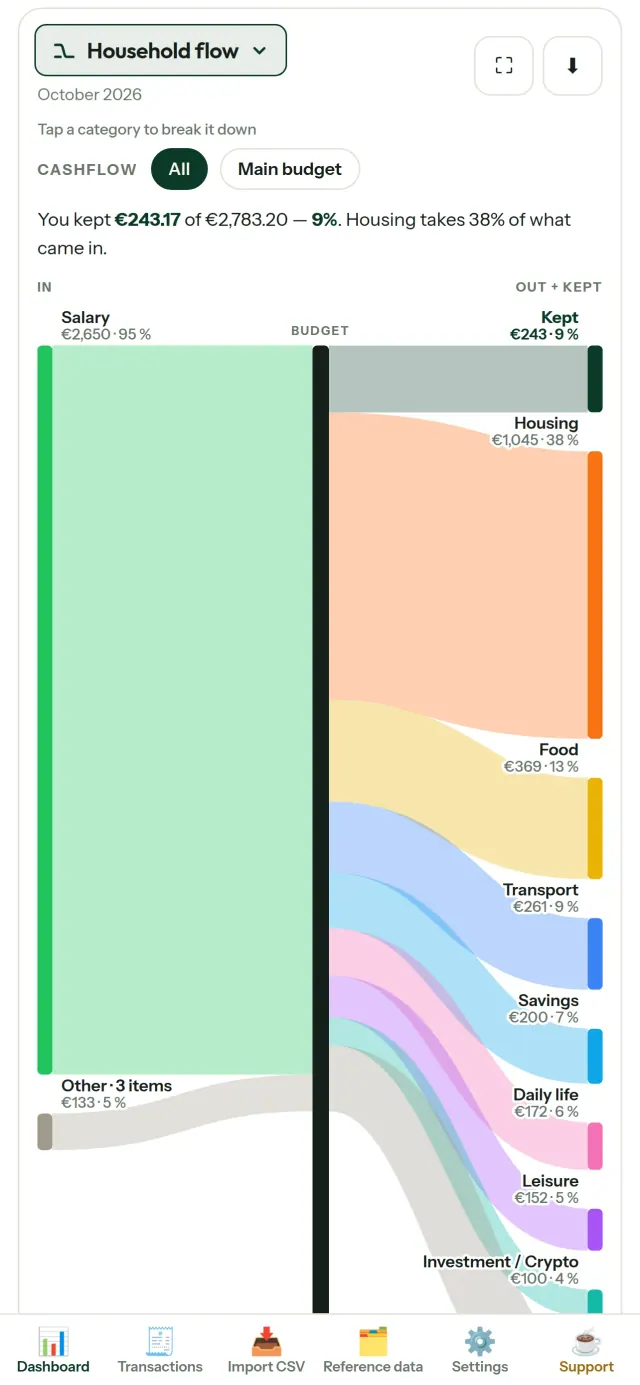
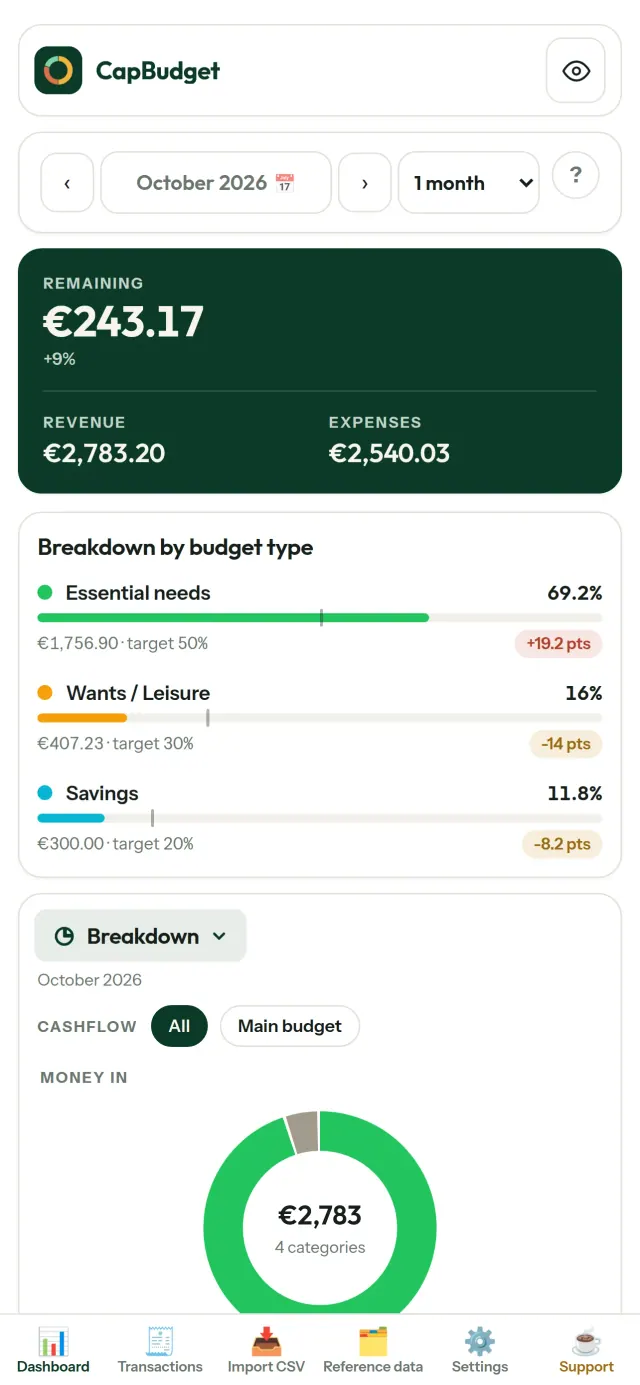
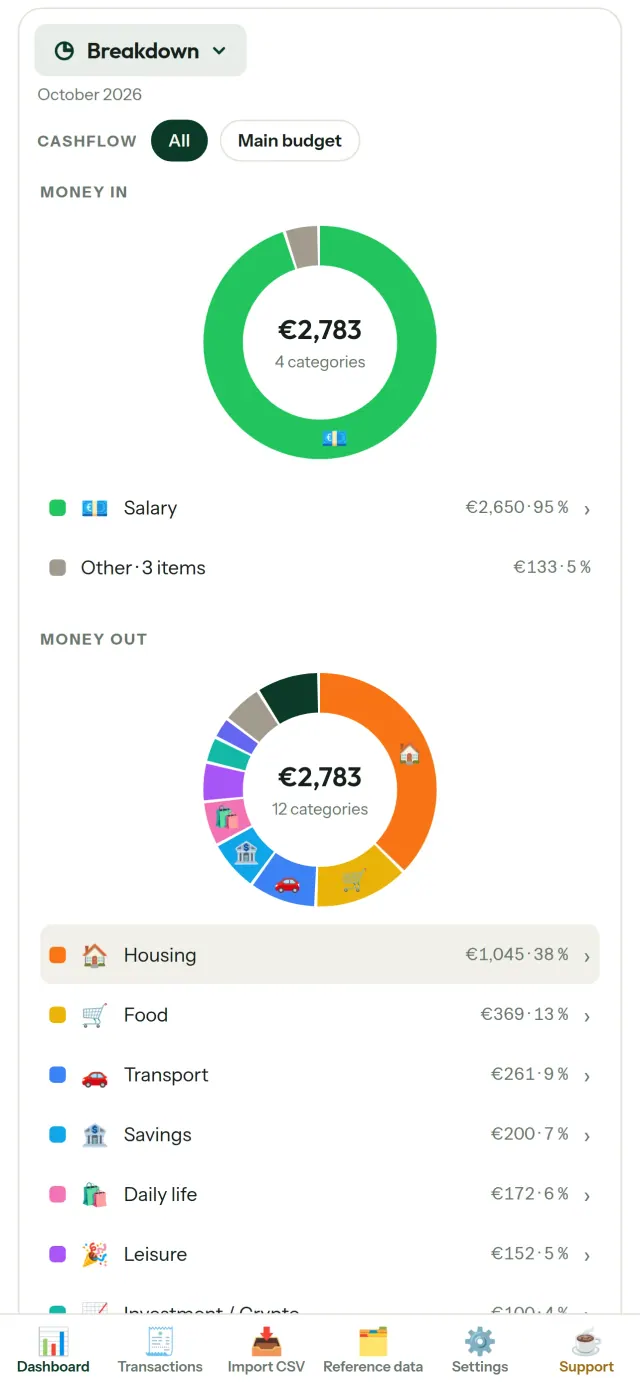
CapBudget የበጀት እቅድ አውጪ እና የወጪ መከታተያ ለቤተሰብ በጀትዎ ነው። ሁሉም ነገር በመሣሪያዎ ላይ ይቆያል፤ መለያ፣ ምዝገባ፣ የደመና መለያ፣ ማስታወቂያ ወይም ክትትል የለም። ሙሉ በሙሉ ከመስመር ውጭ ይሠራል። የቤተሰብ በጀት ቀላል ይሆናል፤ አዘገጃጀት እና በመመደብ ሁሉንም ያደራጃል።
CapBudget የሚያደርገው
የባንክ ሰነዶችዎን ያስገቡ
ከማንኛውም ባንክ CSV ፋይል ያስገቡ። አምዶችን አንድ ጊዜ ያዘጋጁ፣ ቅድመ እይታ ይመልከቱ፣ የተደጋገሙ መረጃዎችን ያስወግዱ እና ቀኖችን ያረጋግጡ።
ህጎች ምደባውን ያድርጉ
ቀላል ህጎችን ይፍጠሩ። CapBudget ግብይቶችዎን ይመድባል፣ በኋላም ህጎቹን በቀድሞ ግብይቶች ላይ እንደገና ማስኬድ ይችላሉ።
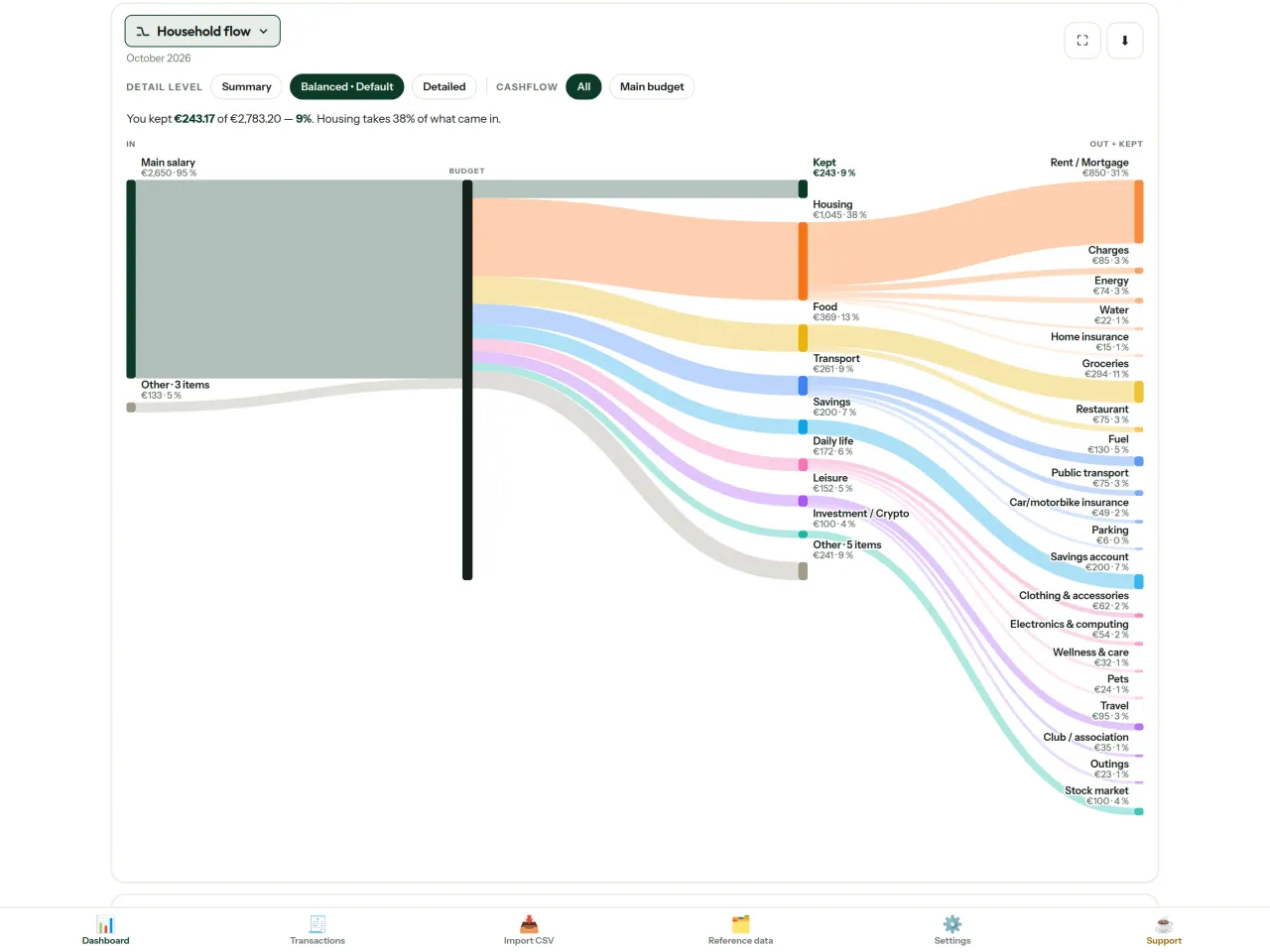
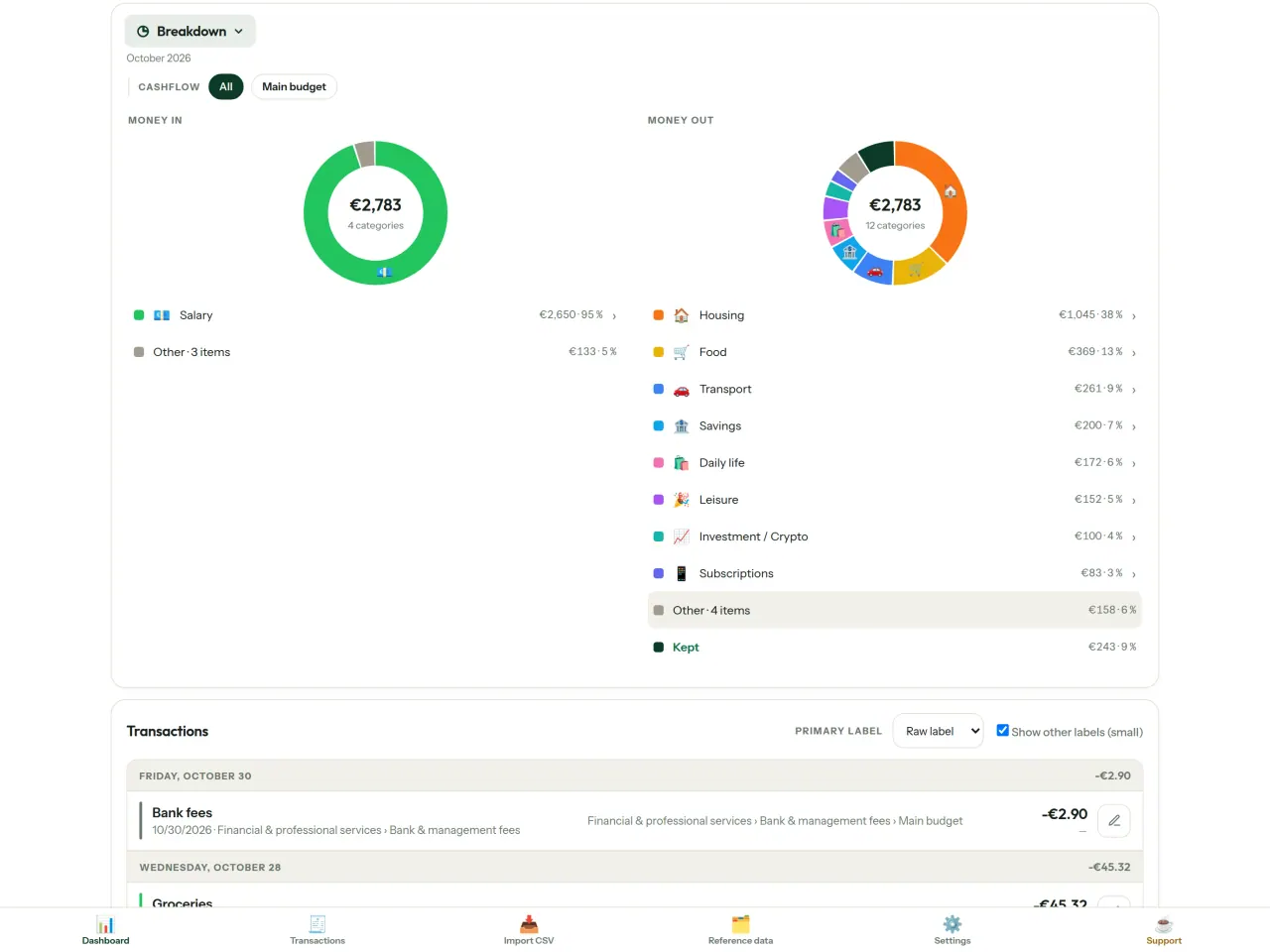
ገንዘብዎ የት እንደሚሄድ ይመልከቱ
በወር ክልል፣ በገንዘብ ፍሰት ወይም በምድብ ያጣሩ፣ ገበታን እንደ ምስል ያስቀምጡ።
- የቤተሰብ ፍሰት ከገቢ ወደ ምድቦች እና ወደ ቀሪው
- የገቢና የወጪ ዝርዝር በምድብ
- ትልቁን ወጪ መጀመሪያ የሚያሳይ ተከታታይ ምስል
- በየቀኑ የሚቀረው መጠን
- የወር የወጪ ፍጥነት
የበጀት ግቦች
ወጪዎን ከ50/30/20 ህግ ጋር ያወዳድሩ፣ ወይም የራስዎን መቶኛ ያዘጋጁ። ግብና እውነታን ይከታተሉ።
ወርዎን ያብጁ
የበጀት ወር በማንኛውም ቀን ሊጀምር ይችላል። ምድቦችን፣ ንዑስ ምድቦችን እና የገንዘብ ፍሰቶችን ያበጁ።
አማራጭ ማመሳሰል በስልኮችዎ
ማመሳሰል በነባሪነት የተጠፋ ነው፡ ከቶ ካላበሩት ምንም አይለወጥም፣ CapBudget 100% በአካባቢ ቆይቷል። ከበሩ በኋላ ስልኮችዎ የሚለዋወጡት ለውጦች ወደ ፒክሲዮን አስተላላፊ አገልጋይ ይላካሉ። ሁሉም መረጃ ከመላኩ በፊት በስልኮት ውስጥ ይመሰጥናል፤ ቁልፎቹ በተጣመሩ ስልኮች ብቻ ናቸው፣ ማስተላለፊያው ግን መረጃን ማንበብ አይችልም። ያስተላለፉት የቴክኒክ መረጃ እንደ መላኪያ መጠንና ጊዜዎች ብቻ ነው። ስልኮች በQR ማሰናከያ ይጣመራሉ።
መረጃዎ የእርስዎ ነው
ሁሉም ነገር በመሣሪያዎ ላይ ባለ አንድ ፋይል ውስጥ ይኖራል። ምትኬ ያስቀምጡ እና ማመሳሰልን ካላበሩ በስተቀር ምንም ነገር አይላክም።
ብሩህ እና ጨለማ ገጽታዎች አሉት።
ለማን ነው
- በባንካቸው CSV ወደ ውጭ መላኪያዎች በጀታቸውን መከተል የሚፈልጉ ቤተሰቦች።
- ወጪያቸውን ለመከታተል የባንክ መግቢያ መረጃቸውን መስጠት ወይም መለያ መፍጠር የማይፈልጉ ሰዎች።
- በውሂብ መፍሰስ የተሰላቹ እና የገንዘብ ውሂባቸውን መቆጣጠር መልሰው መውሰድ የሚፈልጉ ሰዎች፦ እዚህ ከስልኩ መቼም አይወጣም፣ ስለዚህ ከአገልጋይ የሚፈስ ምንም ነገር የለም።
- የ50/30/20 ህግን የሚከተሉ ወይም የበጀት ወራቸው ደመወዝ በሚገባበት ቀን የሚጀምር ሰዎች።
ለምን CapBudgetን ይመርጣሉ
- በመጀመሪያ አካባቢያዊ፦ መለያ የለም፣ ደመና የለም፣ ማስታወቂያ የለም፣ ክትትል የለም። ግብይቶችዎ በመሣሪያዎ ላይ በአንድ ፋይል ውስጥ ይቆያሉ።
- ሙሉ በሙሉ ያለ በይነመረብ ይሰራል፣ እና ነፃ ነው።
- የማንኛውንም ባንክ CSV ያስመጣል፣ የተባዙትን በመለየት እና ጥብቅ የቀን ፍተሻዎች። የምድብ ደንቦች በእጅ ያደረጓቸውን ማስተካከያዎች በፍጹም አይተኩም።
መተግበሪያው ገና የማያደርገው
- ገና ራስ-ሰር የባንክ ማመሳሰል የለም። ከባንክዎ የCSV ወደ ውጭ መላኪያ ያስመጣሉ።
- በራስዎ ስልኮች መካከል ማመሳሰል አማራጭ ነው (ከመጨረሻ እስከ መጨረሻ የተመሰጠረ፣ እስከ 5 ስልኮች)፤ የደመና መለያም ሆነ የድር ስሪት የለም።
የPixeon መርህ. የPixeon መተግበሪያዎች በመጀመሪያ አካባቢያዊ ናቸው፦ መለያ የለም፣ ክትትል የለም፣ እና ውሂብዎ በስልክዎ ላይ ይቆያል። አንድ መተግበሪያ መቼም ከአውታረ መረብ ጋር ከተገናኘ፣ የሚፈልጉትን ባህሪ ለማብራት ሲመርጡ ብቻ ነው፣ እና የግላዊነት ፖሊሲው ከመውጣቱ በፊት ይዘምናል።
CapBudgetን በተግባር ይመልከቱ።
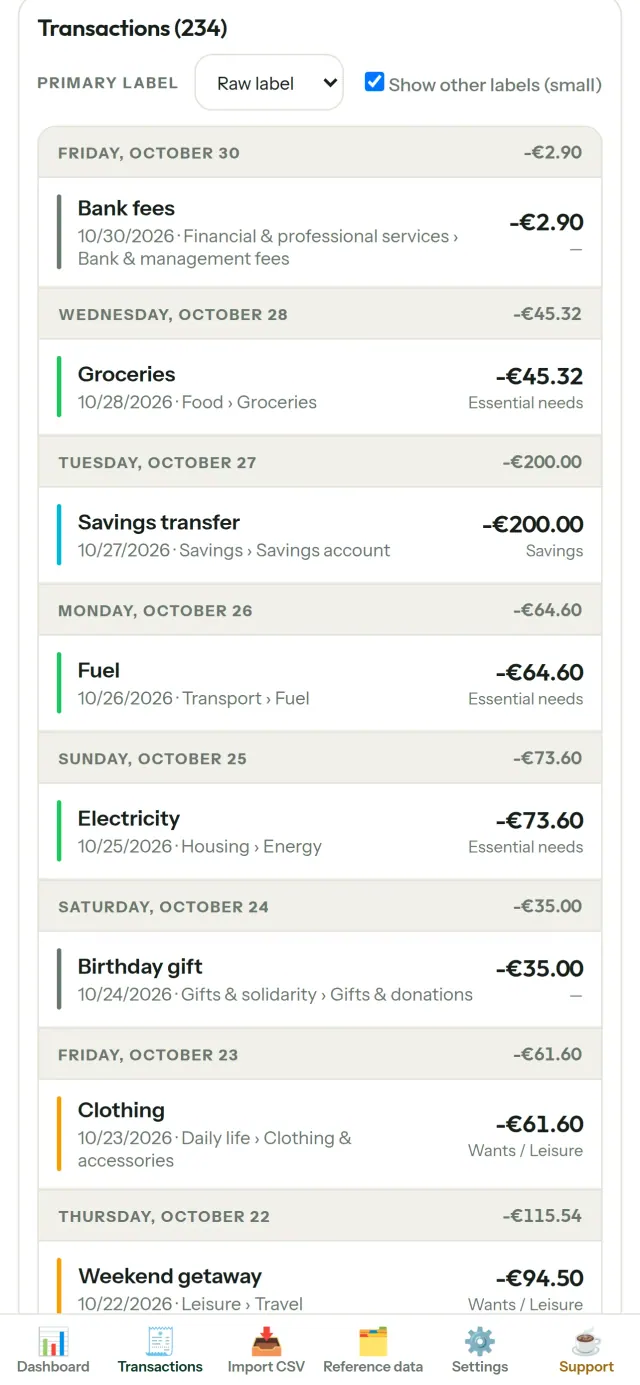
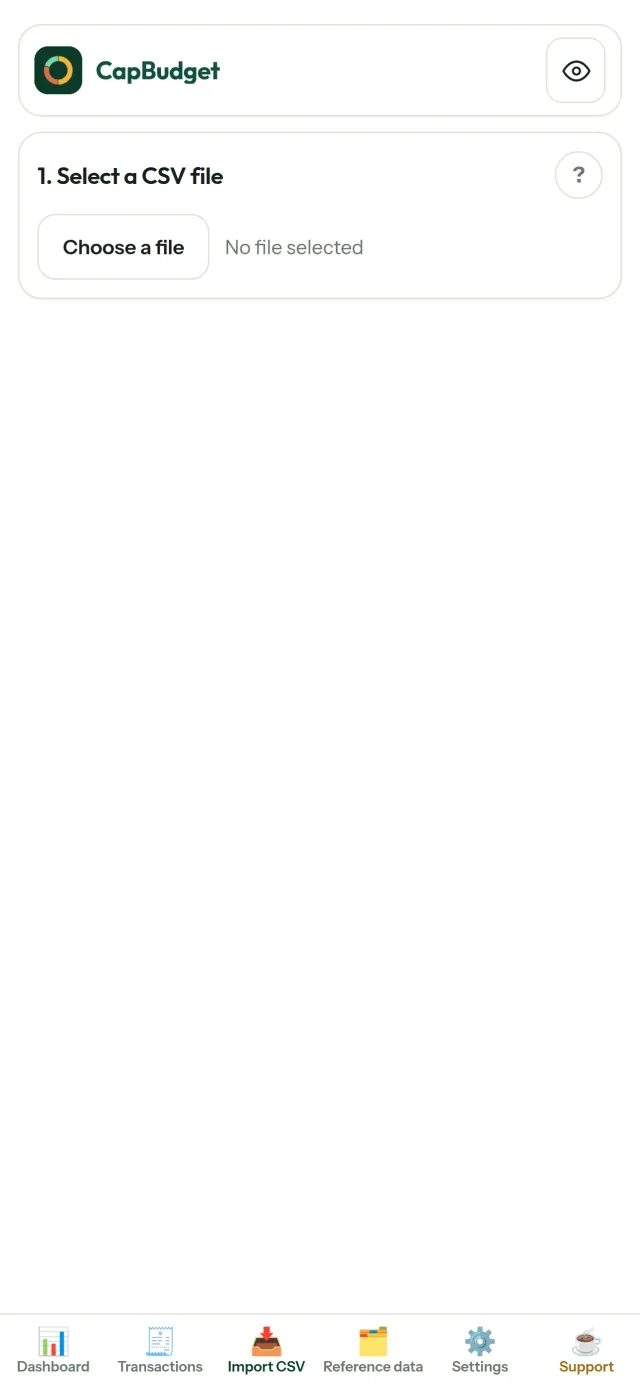
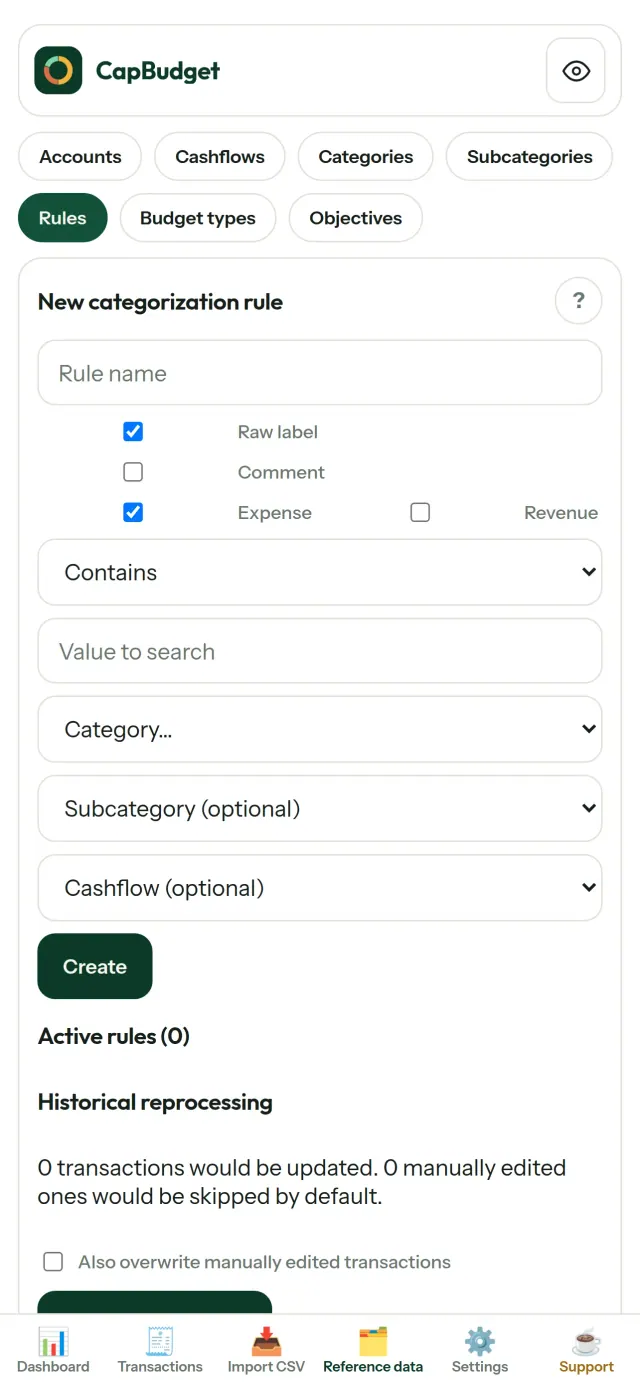
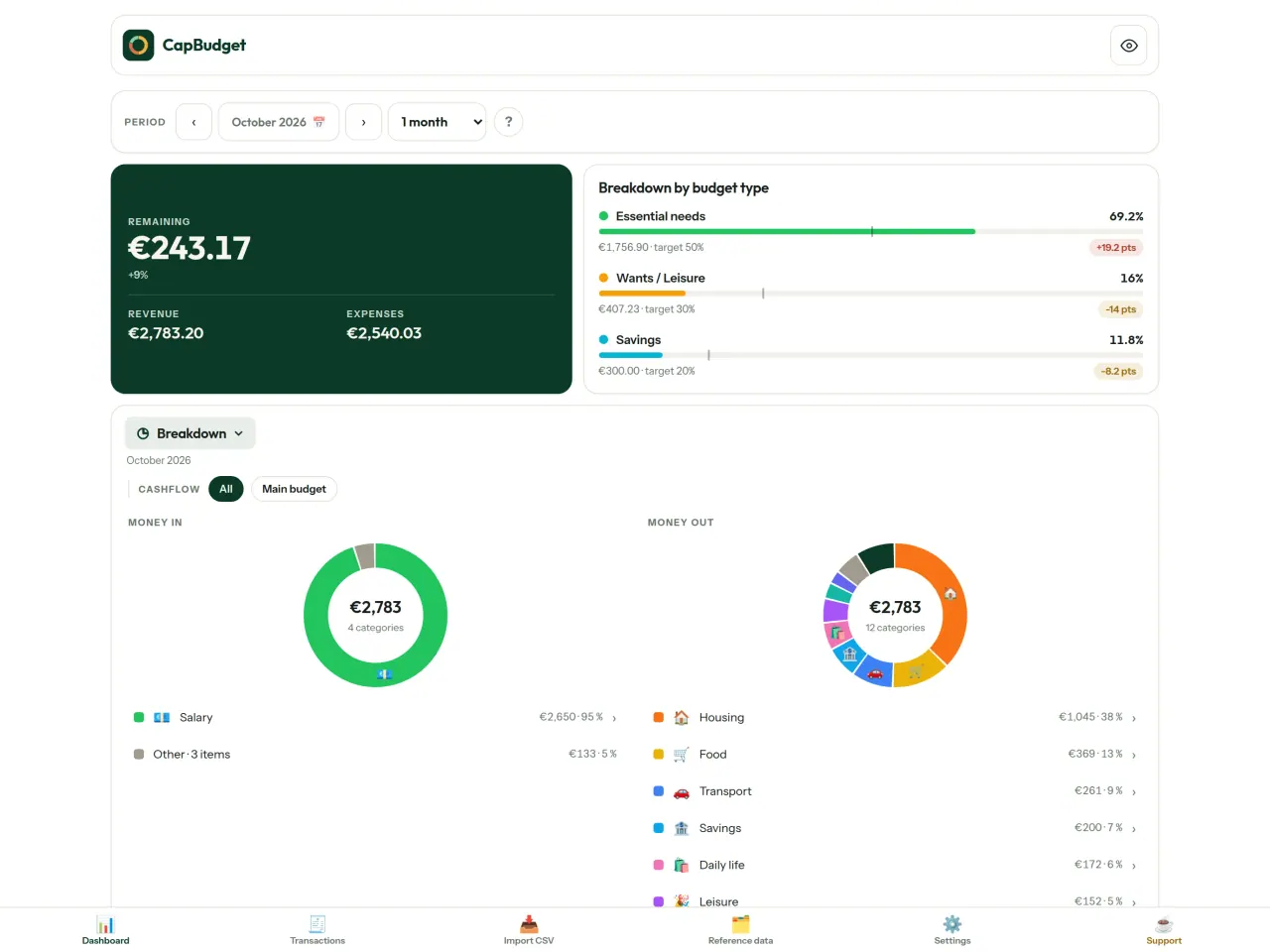
CapBudgetን ያግኙ።
በiPhone እና በAndroid ላይ ነፃ።
Privacy policy
ከታች ያለው ጽሑፍ በእንግሊዝኛ ነው። የእንግሊዝኛው ስሪት የበላይ ነው።
Last updated: 2026-11-03
CapBudget is a local-first budgeting app. The short version: nothing leaves your device unless you turn on sync between your own phones, and even then it is end-to-end encrypted. We collect nothing.
What data the app handles
Everything you put into CapBudget (bank transactions, account references,
categories, categorization rules, budget targets, and app settings) is
stored only in a single SQLite database on your device
(household.sqlite), in the app's own private storage. There is
no account and no login.
What we collect
Nothing. No analytics or usage tracking, no advertising or advertising identifiers, no crash or diagnostics reporting, no third-party SDKs that phone home. Without sync the app makes no network calls to any Pixeon service and functions fully offline.
Sync between your phones (optional)
Sync is off by default. If you link two or more phones in Settings > Sync, changes travel through a relay server run by Pixeon on Cloudflare. Everything is encrypted on your phone with a key that only your linked phones hold (it is exchanged by QR code, phone to phone, and never sent to the server). The relay stores only encrypted messages and an encrypted copy of the budget for a phone that joins; it cannot read them. It necessarily sees technical metadata: random channel and device identifiers, message sizes and times, and IP addresses (used for rate limiting, not logged). Removing a phone changes the key; stopping sync on every phone deletes the channel, and inactive channels are purged. No account, name, e-mail or phone number is involved.
CSV imports
When you import a bank CSV export, the file is parsed on your device. It is not uploaded anywhere and is not retained by the app unless you choose “keep” during import.
Backups
You can export a backup from Settings. The backup is a file you control. CapBudget does not upload it and has no access to wherever you save it.
Permissions
The app requests no location, contacts, microphone, or other sensitive permissions. The camera is used only if you scan a sync QR code; the image is processed on the phone and never stored or sent.
Optional tips
CapBudget is free. If you wish, you can leave the developer an optional tip; a tip never unlocks anything. In the iOS and Android apps this uses the store’s in-app purchase (Apple or Google Play): the payment is processed entirely by the store under its own terms and privacy policy, and CapBudget never sees your payment details, your account or your purchase history, and receives no personal information. The Android app declares the Google Play billing permission for this. In a web browser a button opens an external donation page in your browser; that page is operated by a third party under its own privacy policy, and nothing from the app is sent to it.
Bank-account references
An account number/IBAN from your CSV is stored to group transactions by account, kept only on your device. In the UI only the last 4 characters are shown.
Contact form on this website
If you write to us through this site, we use your message and the email address you optionally give only to reply. Bot protection is provided by Cloudflare and email delivery by Resend.
Language choice on this website
When you choose a language, or when this site opens a page in your browser's language, it stores
one small functional cookie (pxl, a language code, one year) so that your choice is
remembered. If this site suggests a page in your browser's language and you close that suggestion,
your browser also keeps a local note (pxl-banner-off, in local storage, 30 days) so the
suggestion does not come back. Neither identifies anyone, neither is used for tracking or advertising,
and neither is shared. You can delete them in your browser at any time.
Website statistics
This website uses Cloudflare Web Analytics to count visits (pages viewed, country, browser type, loading speed). It sets no cookie, does not use local storage, does not fingerprint your device, does not follow you across sites and does not build a profile of you. Search engines (for example Google Search Console) give us aggregated search statistics, without any data about individual visitors. Our own web server also counts the pages it serves: for each page it keeps the page address, the site or social network that sent you (only its name, or the campaign tag written in the link), the country, the type of device and whether the request came from a robot. It keeps no IP address, no identifier and no cookie, and these counts are anonymous. We use no advertising or other analytics service. None of this concerns the app itself, which collects nothing.
Delete your data
CapBudget keeps your data on your phone only. To delete it, open Settings and use Delete all my data (it erases the database and every preference, and the app starts again as on first launch), or uninstall the app. If you used sync, open Settings > Sync and choose Stop syncing on this phone on every linked phone: when the last linked phone stops, the encrypted channel and the encrypted copy of the budget are deleted from the relay. Delete all my data also leaves sync first. If a phone was offline, or the app was uninstalled without stopping sync, the channel is deleted automatically after 90 days without activity. For any request, write to the support e-mail below.
Children
CapBudget is a general-purpose finance tool and is not directed at children.
Changes
An updated policy will be published at this URL with a new date above.
Contact
Questions about privacy: capbudget-contact@pixeon.net
ድጋፍ
የመጨረሻ ዝማኔ: 2026-10-08
CapBudget በጀትዎን በመሳሪያዎ ላይ ብቻ የሚያቆይ ትንሽ ነጻ መተግበሪያ ነው፤ መለያ፣ ምዝገባ ወይም አገልጋይ የለም። ለተደጋጋሚ ጥያቄዎች መልሶች ከታች አሉ።
በጥቂት ቀናት ውስጥ ለመመለስ እንሞክራለን። ለመርዳት የመሳሪያዎን ሞዴል፣ የስርዓቱን ስሪት እና ያደርጉትን ነገር ይንገሩን። እባክዎ እውነተኛ የባንክ መረጃ ወይም የመለያ ቁጥሮች አይላኩ።
ውሂቤ የት ነው የሚቀመጠው?
በመሳሪያዎ ላይ ብቻ፣ በመተግበሪያው የግል ማስቀመጫ ውስጥ ነው። CapBudget መለያም ሆነ አገልጋይ የለውም፣ ስለዚህ እኛን ጨምሮ ማንም ውሂብዎን ማየት ወይም መመለስ አይችልም። ዝርዝሮችን በየግል መረጃ ፖሊሲ ውስጥ ይመልከቱ።
ውሂቤን እንዴት ምትኬ አደርጋለሁ ወይም ወደ አዲስ ስልክ እወስዳለሁ?
- Settings → Backup & restore → Download a backup ይክፈቱ።
.sqliteፋይል ያገኛሉ፤ በፋይሎች፣ በደመና ወይም በኮምፒውተርዎ ያስቀምጡት። - በአዲሱ መሳሪያ CapBudgetን ይጫኑ፣ Settings → Backup & restore ይክፈቱ፣ ፋይሉን ይምረጡ እና Restore from a backup ይጫኑ።
መመለስ በመተግበሪያው ውስጥ ያለውን ሁሉ ይተካል።
CapBudgetን በሁለት ስልኮች መጠቀም እችላለሁ (ማመሳሰል)?
አዎ፣ አማራጭ ነው። በመጀመሪያው ስልክ ቅንብሮችን ይክፈቱ → ማዳረግን ይምረጡ እና ስልክን እንጋብዝን ይንኩ። በሁለተኛው ስልክ ባጀት ይቀላቀሉን ይንኩ እና የQR ኮዱን ይቃኙ። ሁለቱም ስልኮች ባለ4 አሃዝ ኮድ ያሳያሉ፤ ከተመሳሰሉ አዲሱን ስልክ እንዲገባ ይፍቀዱ። ከዚያ ለውጦችዎ በስልኮችዎ መካከል ይመሳሰላሉ (እስከ 5)። ሁሉም ነገር በስልኮቹ ላይ ይመሰጠራል፤ የማስተላለፊያ አገልጋዩ ሊያነበው የማይችለውን ውሂብ ብቻ ያስተላልፋል። የQR ኮዱ ከ5 ደቂቃዎች በኋላ ያበቃል። ስልክ ለማስወገድ ቅንብሮች → ማዳረግን ይክፈቱ እና ከስልኩ አጠገብ አስወግድን ይንኩ፤ ከዚያ የምስጠራ ቁልፉ ይቀየራል። ዝርዝሮችን በየግላዊነት መመሪያ ውስጥ ያገኛሉ።
መተግበሪያውን ሰርዤዋለሁ ወይም ስልኬን አጥቻለሁ፣ ውሂቤን መመለስ እችላለሁ?
ምትኬ ካላወጡ አይቻልም፤ ውሂቡ በመሳሪያው ላይ ብቻ ነው ያለው። ምትኬን በመደበኛነት ያውርዱ።
የባንኬን ግብይቶች እንዴት አስመጣለሁ?
ከባንክዎ ድር ጣቢያ CSV ፋይል ያውርዱ፣ Import CSV ታብን ይክፈቱ፣ ፋይሉን ይምረጡ፣ አምዶቹን አንድ ጊዜ ያመሳስሉ፣ ቅድመ እይታውን ይፈትሹ እና ያረጋግጡ። እስከሚያረጋግጡ ድረስ ምንም አይመጣም።
ግብይቶች በራስ ሊመደቡ ይችላሉ?
አዎ። በReference data → Rules ውስጥ እንደ "label contains RENT → Housing / Rent" ያሉ ደንቦችን ይፍጠሩ። በቀደሙ ግብይቶች ላይም በማንኛውም ጊዜ መተግበር ይችላሉ፤ በእጅ ያስተካከሏቸው ግብይቶች በግልጽ ካልመረጡ አይተኩም።
ቋንቋውን፣ ገጽታውን ወይም የበጀት ወሩን መጀመሪያ ቀን እንዴት እቀይራለሁ?
የቋንቋ አዝራሩ በላይኛው አሞሌ ላይ ነው። ገጽታው እና የበጀት ወር መጀመሪያ ቀን በSettings ውስጥ ናቸው። CapBudget በእንግሊዝኛ፣ ፈረንሳይኛ፣ ጀርመንኛ፣ ስፔንኛ፣ ፖርቹጋልኛ እና ጣሊያንኛ ይገኛል።
የምሳሌ ውሂብን እንዴት አስወግዳለሁ?
Settings → Sample data → Remove sample data። የምሳሌ ግብይቶች ብቻ ይወገዳሉ፣ የራስዎ መረጃ ፈጽሞ አይወገድም።
EXIF መመልከቻ እና የፎቶ ሜታዳታ ማጽጃ: ቦታ፣ ቀን፣ ካሜራ። በስልክዎ ላይ።
ከPixeon ደግሞVaultMarkEncrypted document vault. Watermark documents, remove metadata before sharing.
ከPixeon ደግሞLittle RelayBreastfeeding, sleep and starting solids tracker. No account, works offline.
ከPixeon ደግሞMenuloopPlan the week's meals, build your grocery list and keep recipes with photos.