CapBudget: பட்ஜெட்
பட்ஜெட், செலவு டிராக்கர், குடும்ப பட்ஜெட் உங்கள் போனில், கணக்கு இல்லாமல்.


CapBudget என்பது பட்ஜெட் பிளானர் மற்றும் செலவு டிராக்கர் ஆப். உங்கள் குடும்ப பட்ஜெட் மற்றும் ஆஃப்லைன் பட்ஜெட் தேவைகளுக்கு ஏற்றது. அனைத்தும் உங்கள் சாதனத்திலேயே இருக்கும்: கணக்கு இல்லை, பதிவு இல்லை, கிளவுட் கணக்கு இல்லை, விளம்பரங்கள் இல்லை, கண்காணிப்பு இல்லை. இந்த ஆப் முழுமையாக ஆஃப்லைன் இயங்கும்.
CapBudget என்ன செய்கிறது
வங்கி அறிக்கைகளை இறக்குமதி செய்யுங்கள்
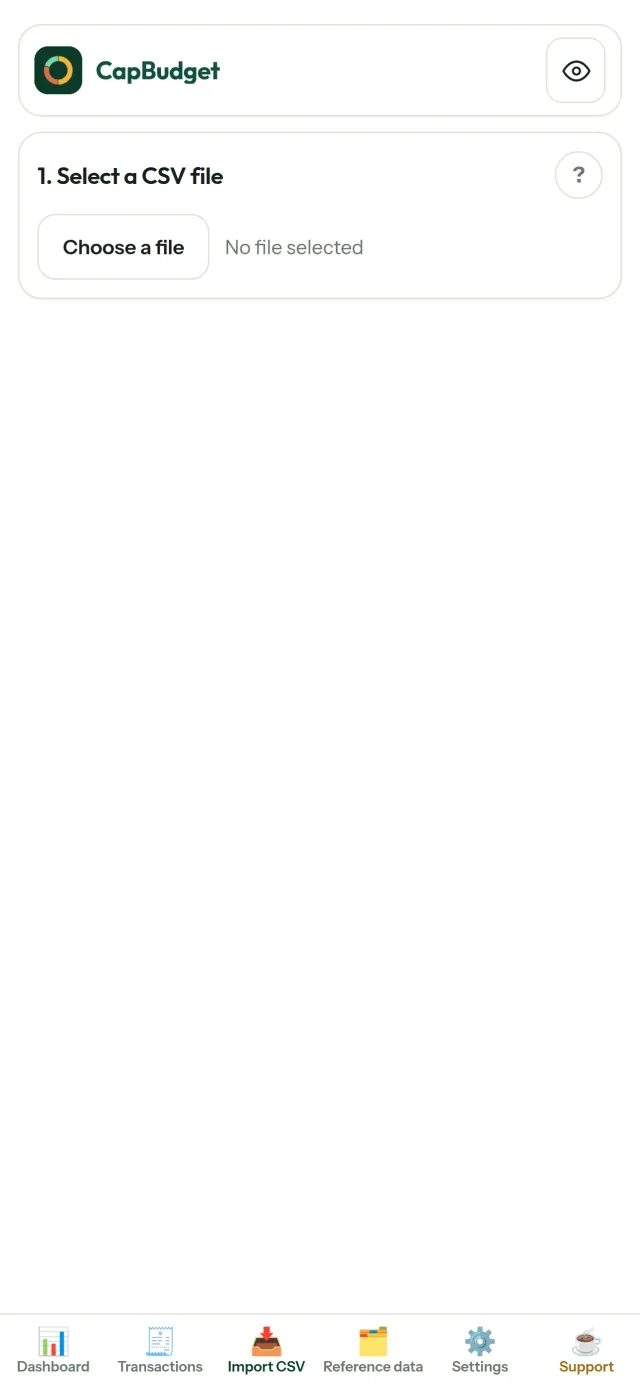
எந்த வங்கியின் CSV கோப்பையும் சேர்க்கவும். நெடுவரிசைகளை ஒருமுறை இணைத்து, இறக்குமதி ஆகப்போவதை முன்னோட்டம் பார்த்து (நகல் கண்டறிதல் மற்றும் கடுமையான தேதி சோதனையுடன்) உறுதிப்படுத்தவும். எதுவும் அமைதியாக ஊகிக்கப்படாது.
விதிகள் வகைப்படுத்தட்டும்
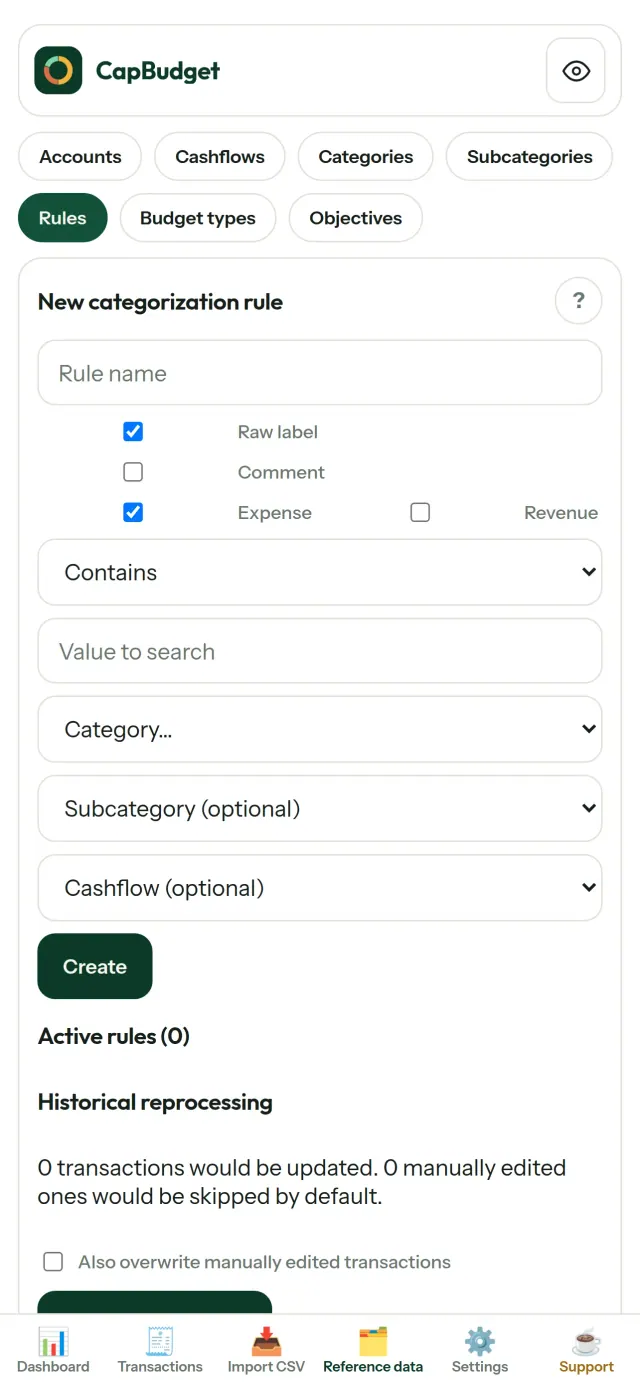
எளிய விதிகளை உருவாக்குங்கள் (“வாடகை உள்ளது → வீடு / வாடகை”), CapBudget உங்களுக்காக பரிவர்த்தனைகளை வகைப்படுத்தும். பழைய பரிவர்த்தனைகளிலும் எப்போது வேண்டுமானாலும் மீண்டும் பயன்படுத்தலாம், உங்கள் கையால் செய்த திருத்தங்கள் ஒருபோதும் மாற்றப்படாது.
உங்கள் பணம் எங்கே போகிறது எனப் பாருங்கள்
மாத வரம்பு, பணப்பாய்வு அல்லது வகை மூலம் வடிகட்டி, எந்த விளக்கப்படத்தையும் படமாக ஏற்றுமதி செய்யுங்கள்.
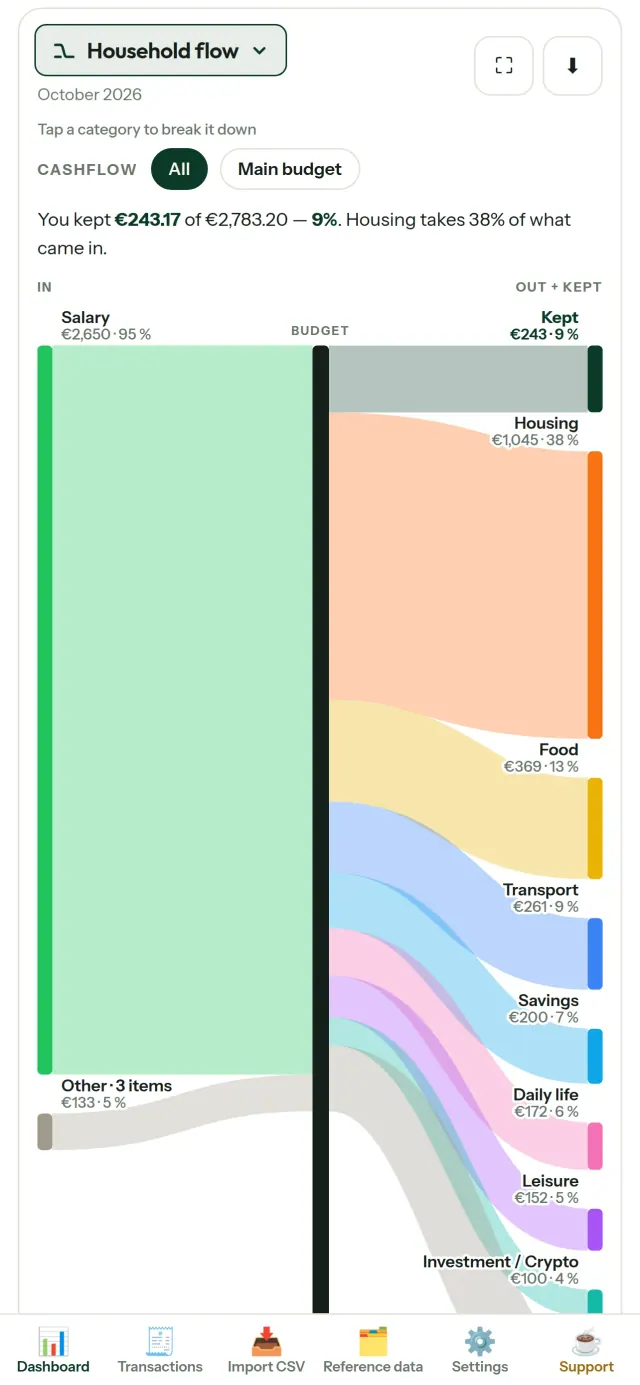
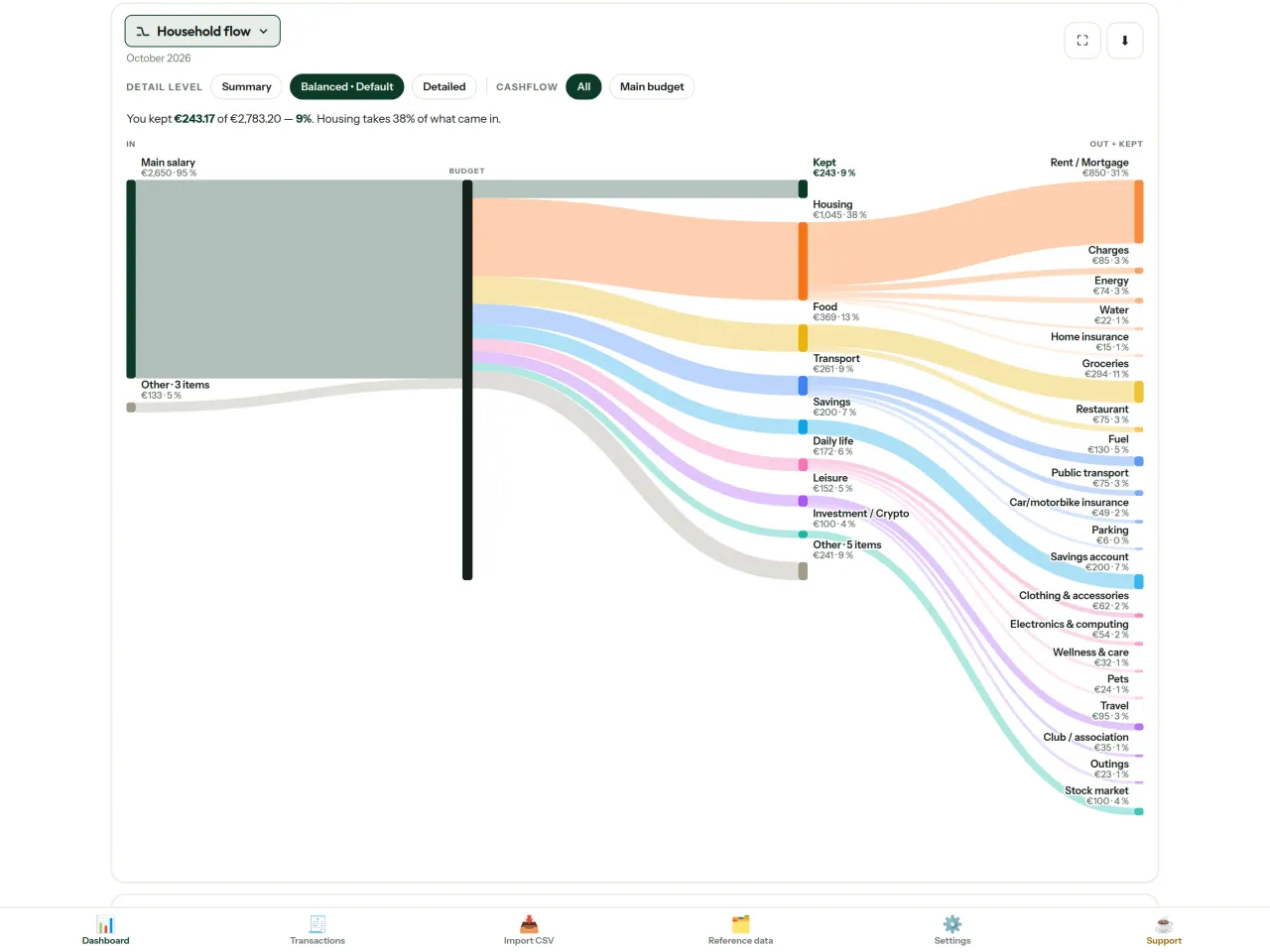
- குடும்பப் பணப்பாய்வு: வருமானத்திலிருந்து வகைகள் மற்றும் மீதம் வரையிலான சாங்கி வரைபடம்
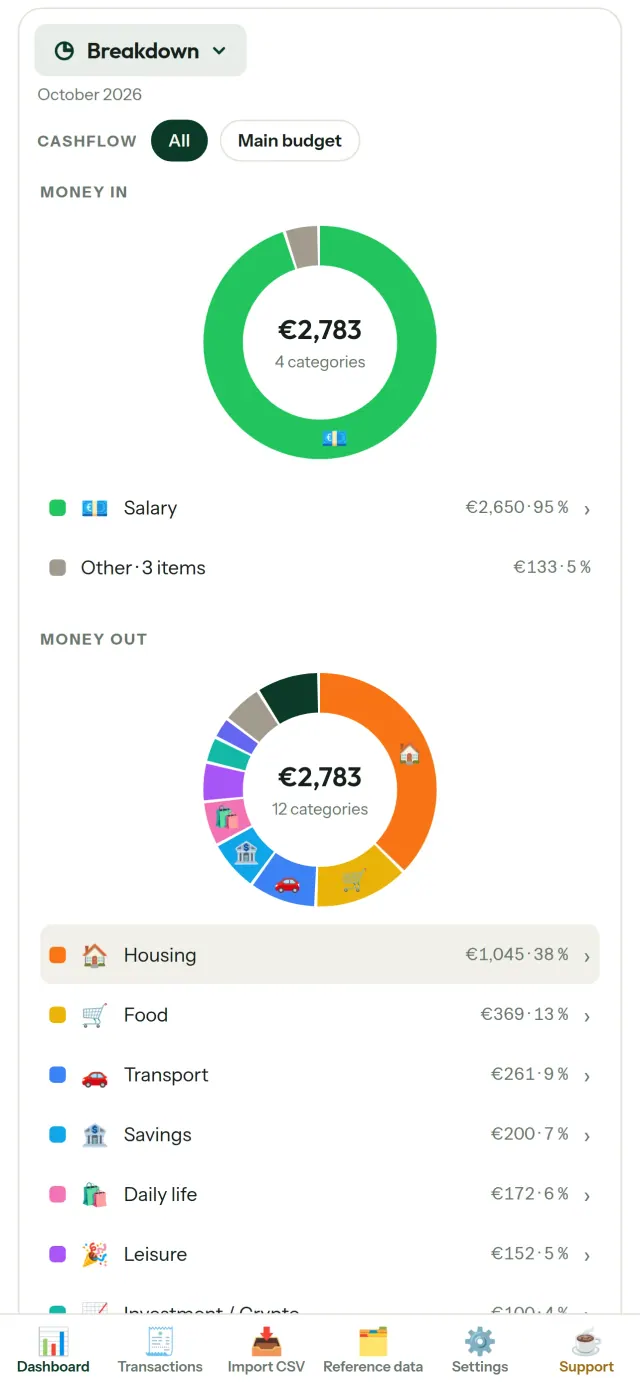
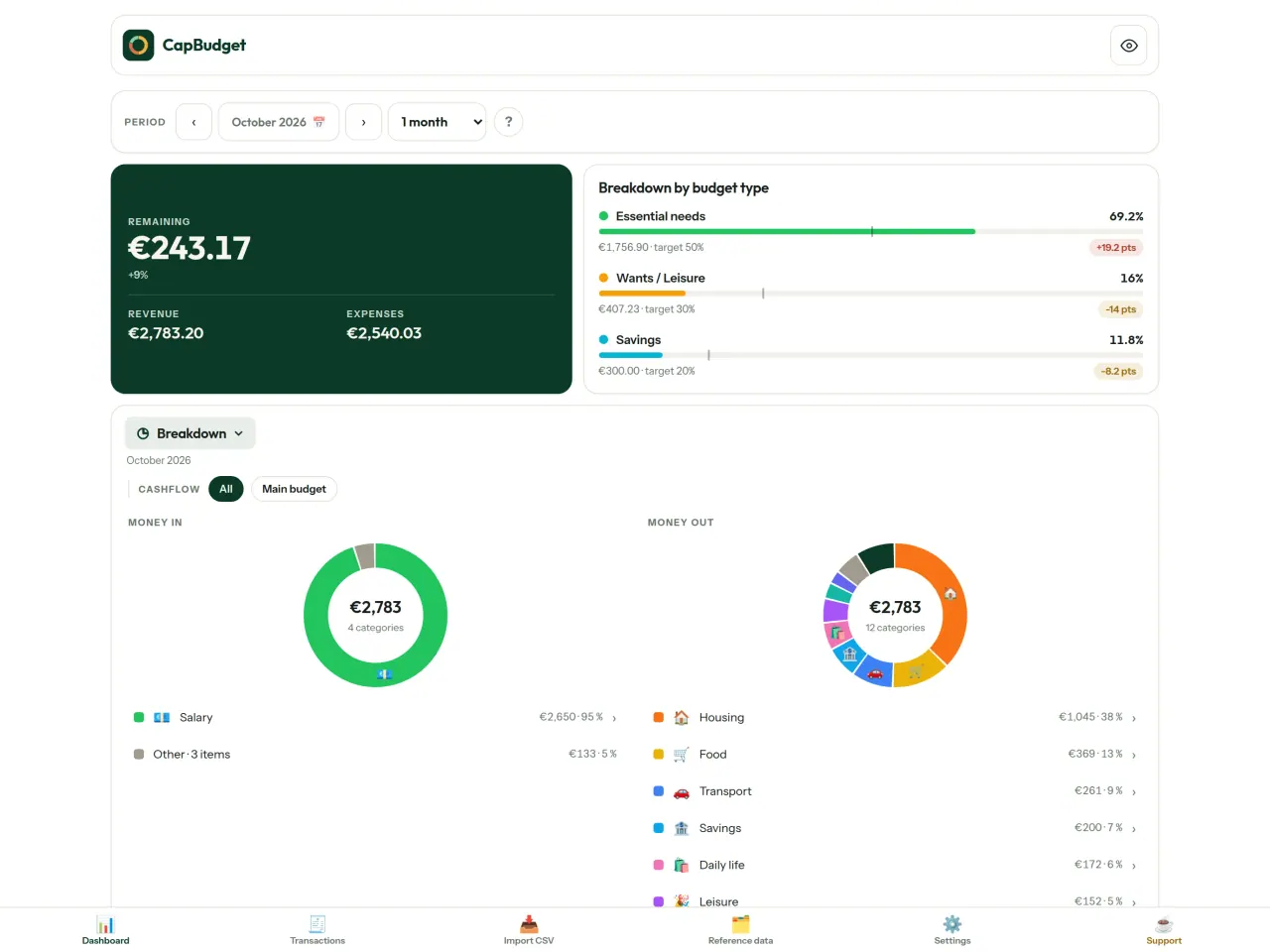
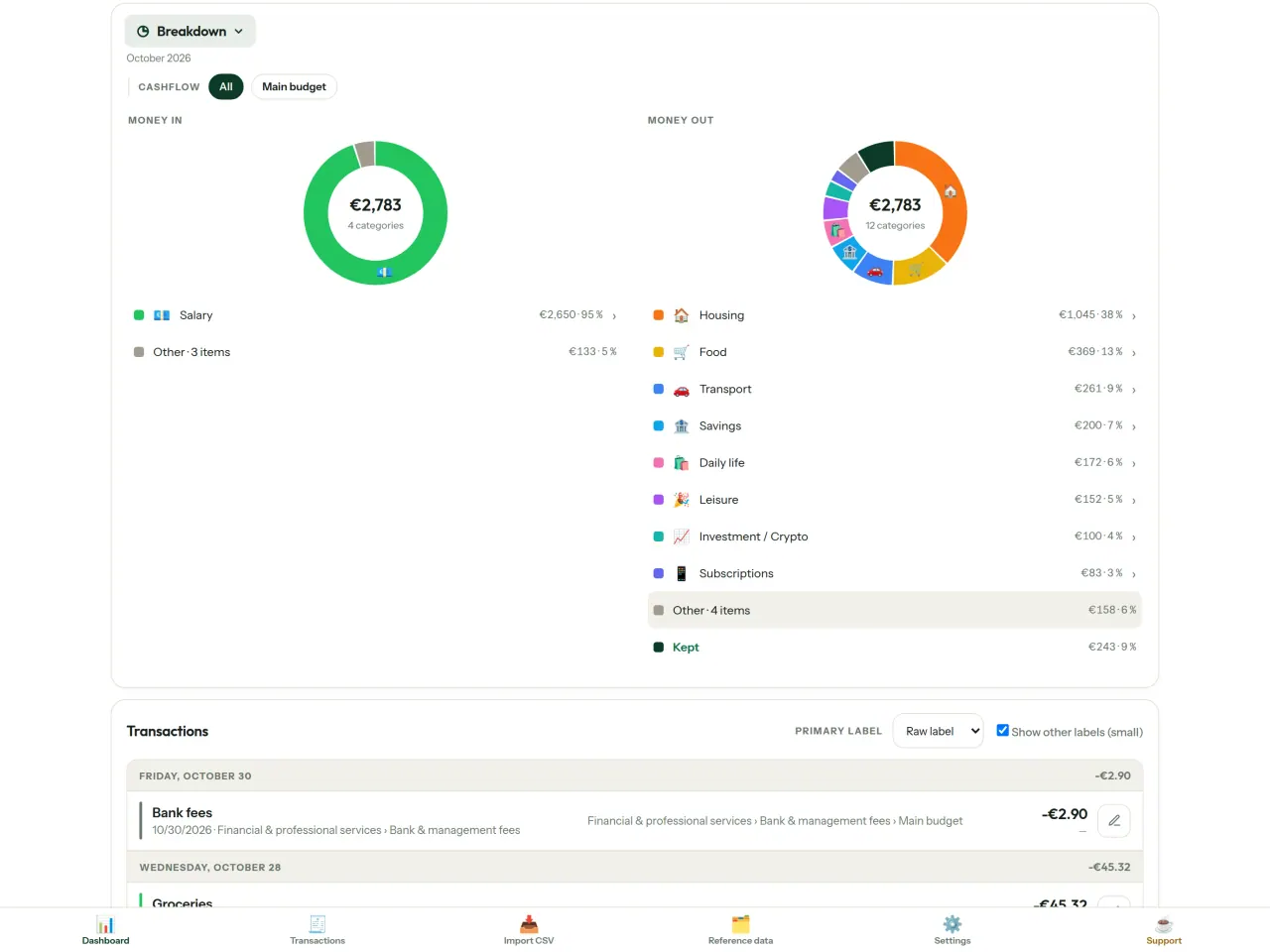
- பிரிவு: வகை வாரியாக வருமானம் மற்றும் செலவு, விவரங்களுக்குத் தட்டவும்
- பணம் எங்கே போகிறது: செலவு அருவி, பெரியது முதலில்
- தீரும் மாதம்: மீதம் எவ்வளவு, நாளுக்கு நாள்
- உங்கள் வேகம்: ஒவ்வொரு மாதமும் சீரான செலவுடன் ஒப்பீடு
பட்ஜெட் இலக்குகள்
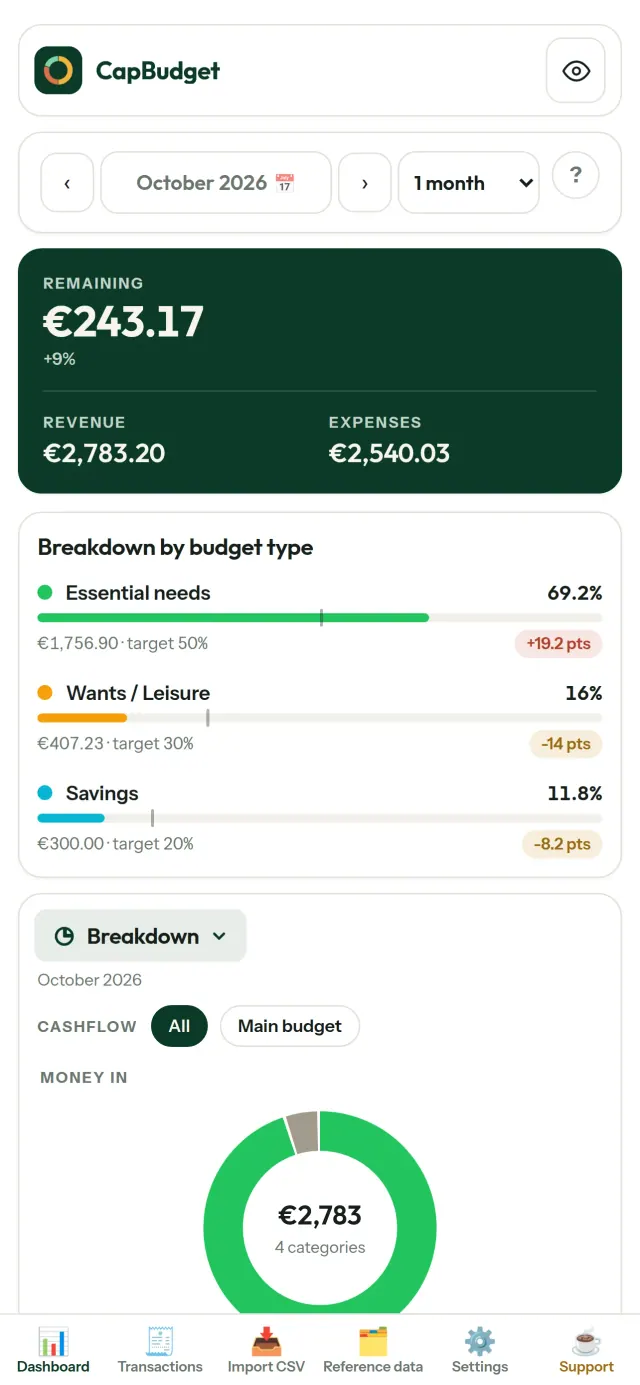
உங்கள் மாதாந்திர செலவை 50/30/20 விதியுடன் (தேவைகள், விருப்பங்கள், சேமிப்பு) ஒப்பிடுங்கள் அல்லது சொந்த சதவீதங்களை அமைத்து இலக்கையும் நிஜத்தையும் பாருங்கள்.
உங்கள் மாதம், உங்கள் வழியில்
சம்பளம் வரும் நாளுடன் பொருந்த பட்ஜெட் மாதம் எந்த நாளிலும் தொடங்கலாம். வகைகள், துணை வகைகள் மற்றும் பணப்பாய்வுகளை உங்களுக்கேற்ப மாற்றுங்கள்.
உங்கள் தரவு உங்களுடையதாகவே இருக்கும்
அனைத்தும் உங்கள் சாதனத்திலுள்ள ஒரே கோப்பில் உள்ளது. எப்போது வேண்டுமானாலும் காப்புப்பிரதியை ஏற்றுமதி செய்து விரும்பும் இடத்தில் வைக்கலாம். ஒத்திசைவை இயக்கினால் மட்டுமே பதிவேற்றம் நடக்கும்.
உங்கள் போன்களுக்கிடையில் விருப்ப ஒத்திசைவு
ஒத்திசைவு இயல்பாக முடக்கப்பட்டுள்ளது: ஒருபோதும் இயக்காவிட்டால் எதுவும் மாறாது, CapBudget 100% உள்ளூரிலேயே இருக்கும். இயக்கினால், உங்கள் போன்கள் Pixeon இயக்கும் ரிலே சேவையகம் வழியாக மாற்றங்களைப் பரிமாறும். அனுப்பும் முன் அனைத்தும் போனிலேயே குறியாக்கப்படும்; திறவுகோல்கள் இணைக்கப்பட்ட போன்களிடம் மட்டும் இருப்பதால் ரிலே உங்கள் தரவைப் படிக்க முடியாது. அது செய்தி அளவு, நேரம் போன்ற தொழில்நுட்பத் தகவல்களை மட்டுமே காணும். QR ஸ்கேன் செய்து போன்களை இணைக்கவும்.
ஒளி மற்றும் இருண்ட தீம்களுடன்.
இது யாருக்காக
- வங்கியின் CSV ஏற்றுமதியிலிருந்து பட்ஜெட்டைக் கண்காணிக்க விரும்பும் குடும்பங்கள்.
- செலவுகளைக் கண்காணிக்க வங்கி உள்நுழைவு விவரங்களைக் கொடுக்கவோ கணக்கு உருவாக்கவோ விரும்பாதவர்கள்.
- தரவு கசிவுகளால் சோர்வடைந்து தங்கள் நிதித் தரவின் கட்டுப்பாட்டை மீட்க விரும்புபவர்கள்: இங்கே அது தொலைபேசியை விட்டு ஒருபோதும் வெளியேறாது, எனவே சர்வரிலிருந்து கசிய எதுவும் இல்லை.
- 50/30/20 விதியைப் பின்பற்றுபவர்கள் அல்லது சம்பளம் வரும் நாளில் பட்ஜெட் மாதம் தொடங்குபவர்கள்.
CapBudget ஏன் தேர்வு செய்ய வேண்டும்
- முதலில் உள்ளூர்: கணக்கு இல்லை, கிளவுட் இல்லை, விளம்பரங்கள் இல்லை, கண்காணிப்பு இல்லை. உங்கள் பரிவர்த்தனைகள் உங்கள் சாதனத்தில் ஒரே கோப்பில் இருக்கும்.
- முழுமையாக ஆஃப்லைனில் இயங்கும், இலவசம்.
- எந்த வங்கியின் CSV-யையும் இறக்குமதி செய்யும், நகல் கண்டறிதல் மற்றும் கடுமையான தேதி சரிபார்ப்புடன். வகைப்படுத்தல் விதிகள் உங்கள் கைமுறை திருத்தங்களை ஒருபோதும் மாற்றியெழுதாது.
செயலி இன்னும் செய்யாதவை
- வங்கியுடன் தானியங்கி ஒத்திசைவு இன்னும் இல்லை. உங்கள் வங்கியின் CSV ஏற்றுமதியை நீங்கள் இறக்குமதி செய்கிறீர்கள்.
- உங்கள் சொந்தத் தொலைபேசிகளுக்கு இடையிலான ஒத்திசைவு விருப்பத்திற்குரியது (முனை முதல் முனை வரை குறியாக்கம் செய்யப்பட்டது, அதிகபட்சம் 5 தொலைபேசிகள்); கிளவுட் கணக்கோ இணையப் பதிப்போ இல்லை.
Pixeon-இன் கொள்கை. Pixeon செயலிகள் முதலில் உள்ளூர் சார்ந்தவை: கணக்குகள் இல்லை, கண்காணிப்பு இல்லை, உங்கள் தரவு உங்கள் தொலைபேசியிலேயே இருக்கும். ஒரு செயலி ஒருபோதும் இணையத்தில் இணைந்தால், தேவையான அம்சத்தை நீங்களே இயக்கும்போது மட்டுமே அது நடக்கும், அதற்கு முன் தனியுரிமைக் கொள்கை புதுப்பிக்கப்படும்.
CapBudget செயல்படுவதைப் பாருங்கள்.
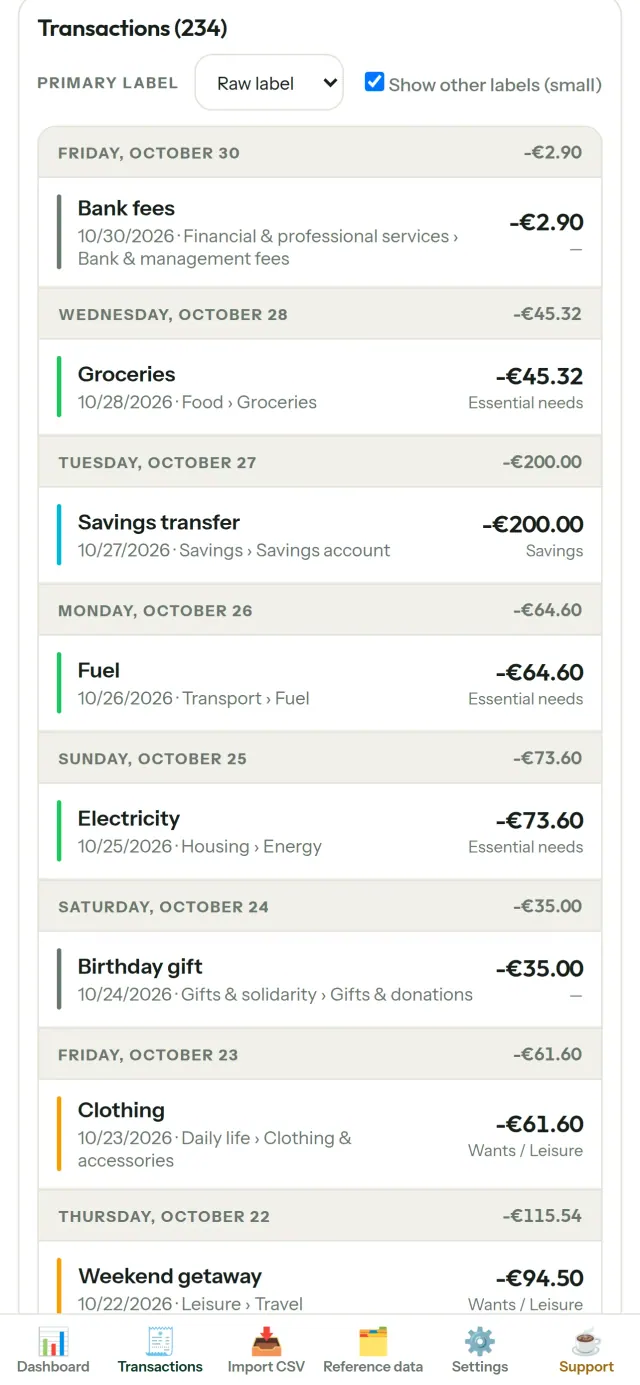
CapBudget பெறுங்கள்.
iPhone மற்றும் Android-இல் இலவசம்.
Privacy policy
கீழுள்ள உரை ஆங்கிலத்தில் உள்ளது. ஆங்கிலப் பதிப்பே இறுதியானது.
Last updated: 2026-11-03
CapBudget is a local-first budgeting app. The short version: nothing leaves your device unless you turn on sync between your own phones, and even then it is end-to-end encrypted. We collect nothing.
What data the app handles
Everything you put into CapBudget (bank transactions, account references,
categories, categorization rules, budget targets, and app settings) is
stored only in a single SQLite database on your device
(household.sqlite), in the app's own private storage. There is
no account and no login.
What we collect
Nothing. No analytics or usage tracking, no advertising or advertising identifiers, no crash or diagnostics reporting, no third-party SDKs that phone home. Without sync the app makes no network calls to any Pixeon service and functions fully offline.
Sync between your phones (optional)
Sync is off by default. If you link two or more phones in Settings > Sync, changes travel through a relay server run by Pixeon on Cloudflare. Everything is encrypted on your phone with a key that only your linked phones hold (it is exchanged by QR code, phone to phone, and never sent to the server). The relay stores only encrypted messages and an encrypted copy of the budget for a phone that joins; it cannot read them. It necessarily sees technical metadata: random channel and device identifiers, message sizes and times, and IP addresses (used for rate limiting, not logged). Removing a phone changes the key; stopping sync on every phone deletes the channel, and inactive channels are purged. No account, name, e-mail or phone number is involved.
CSV imports
When you import a bank CSV export, the file is parsed on your device. It is not uploaded anywhere and is not retained by the app unless you choose “keep” during import.
Backups
You can export a backup from Settings. The backup is a file you control. CapBudget does not upload it and has no access to wherever you save it.
Permissions
The app requests no location, contacts, microphone, or other sensitive permissions. The camera is used only if you scan a sync QR code; the image is processed on the phone and never stored or sent.
Optional tips
CapBudget is free. If you wish, you can leave the developer an optional tip; a tip never unlocks anything. In the iOS and Android apps this uses the store’s in-app purchase (Apple or Google Play): the payment is processed entirely by the store under its own terms and privacy policy, and CapBudget never sees your payment details, your account or your purchase history, and receives no personal information. The Android app declares the Google Play billing permission for this. In a web browser a button opens an external donation page in your browser; that page is operated by a third party under its own privacy policy, and nothing from the app is sent to it.
Bank-account references
An account number/IBAN from your CSV is stored to group transactions by account, kept only on your device. In the UI only the last 4 characters are shown.
Contact form on this website
If you write to us through this site, we use your message and the email address you optionally give only to reply. Bot protection is provided by Cloudflare and email delivery by Resend.
Language choice on this website
When you choose a language, or when this site opens a page in your browser's language, it stores
one small functional cookie (pxl, a language code, one year) so that your choice is
remembered. If this site suggests a page in your browser's language and you close that suggestion,
your browser also keeps a local note (pxl-banner-off, in local storage, 30 days) so the
suggestion does not come back. Neither identifies anyone, neither is used for tracking or advertising,
and neither is shared. You can delete them in your browser at any time.
Website statistics
This website uses Cloudflare Web Analytics to count visits (pages viewed, country, browser type, loading speed). It sets no cookie, does not use local storage, does not fingerprint your device, does not follow you across sites and does not build a profile of you. Search engines (for example Google Search Console) give us aggregated search statistics, without any data about individual visitors. Our own web server also counts the pages it serves: for each page it keeps the page address, the site or social network that sent you (only its name, or the campaign tag written in the link), the country, the type of device and whether the request came from a robot. It keeps no IP address, no identifier and no cookie, and these counts are anonymous. We use no advertising or other analytics service. None of this concerns the app itself, which collects nothing.
Delete your data
CapBudget keeps your data on your phone only. To delete it, open Settings and use Delete all my data (it erases the database and every preference, and the app starts again as on first launch), or uninstall the app. If you used sync, open Settings > Sync and choose Stop syncing on this phone on every linked phone: when the last linked phone stops, the encrypted channel and the encrypted copy of the budget are deleted from the relay. Delete all my data also leaves sync first. If a phone was offline, or the app was uninstalled without stopping sync, the channel is deleted automatically after 90 days without activity. For any request, write to the support e-mail below.
Children
CapBudget is a general-purpose finance tool and is not directed at children.
Changes
An updated policy will be published at this URL with a new date above.
Contact
Questions about privacy: capbudget-contact@pixeon.net
ஆதரவு
கடைசியாகப் புதுப்பிக்கப்பட்டது: 2026-10-08
CapBudget ஒரு சிறிய சுயாதீன செயலி. உங்கள் பட்ஜெட்டை உங்கள் சாதனத்தில் மட்டுமே வைத்திருக்கிறது: கணக்கு இல்லை, பதிவு செய்ய வேண்டியதில்லை, சேவையகம் இல்லை. பொதுவாகக் கேட்கப்படும் கேள்விகளுக்கான பதில்கள் கீழே உள்ளன.
சில நாட்களுக்குள் பதிலளிக்க எங்களால் முடிந்ததைச் செய்கிறோம். எங்களுக்கு உதவ, உங்கள் சாதனத்தின் மாடல், அதன் சிஸ்டம் பதிப்பு மற்றும் நீங்கள் என்ன செய்து கொண்டிருந்தீர்கள் என்பதைத் தெரிவிக்கவும். உண்மையான வங்கி தரவு அல்லது கணக்கு எண்களை அனுப்ப வேண்டாம்.
எனது தரவு எங்கே சேமிக்கப்படுகிறது?
உங்கள் சாதனத்தில், செயலியின் சொந்தத் தனிப்பட்ட சேமிப்பகத்தில் மட்டுமே. CapBudget கணக்கோ CapBudget சேவையகமோ இல்லை, எனவே எங்களையும் சேர்த்து யாராலும் உங்கள் தரவைப் பார்க்கவோ மீட்டெடுக்கவோ முடியாது. விவரங்களுக்கு தனியுரிமைக் கொள்கையைப் பார்க்கவும்.
எனது தரவை எவ்வாறு காப்புப் பிரதி எடுப்பது அல்லது புதிய தொலைபேசிக்கு மாற்றுவது?
- அமைப்புகள் → காப்புப் பிரதி மற்றும் மீட்டமை → காப்புப் பிரதியைப் பதிவிறக்கு என்பதைத் திறக்கவும். உங்களுக்கு ஒரு
.sqliteகோப்பு கிடைக்கும்: அதை நீங்கள் விரும்பும் இடத்தில் வைத்துக்கொள்ளுங்கள் (Files, கிளவுட் டிரைவ், உங்கள் கணினி). - புதிய சாதனத்தில் CapBudget-ஐ நிறுவி, அமைப்புகள் → காப்புப் பிரதி மற்றும் மீட்டமை என்பதைத் திறந்து, கோப்பைத் தேர்ந்தெடுத்து காப்புப் பிரதியிலிருந்து மீட்டமை என்பதைத் தட்டவும்.
மீட்டமைத்தல் செயலியில் தற்போது உள்ள அனைத்தையும் மாற்றிவிடும்.
இரண்டு தொலைபேசிகளில் CapBudget-ஐ பயன்படுத்தலாமா (ஒத்திசைவு)?
ஆம், இது விருப்பத்திற்குரியது. முதல் தொலைபேசியில் அமைப்புகள் → ஒத்திசைவு என்பதைத் திறந்து, தொலைபேசியை அழை என்பதைத் தட்டவும். இரண்டாவது தொலைபேசியில் பட்ஜெட்டில் சேர் என்பதைத் தட்டி QR குறியீட்டை ஸ்கேன் செய்யவும். இரண்டு தொலைபேசிகளிலும் 4 இலக்கக் குறியீடு காட்டப்படும். அவை பொருந்தினால், புதிய தொலைபேசியை அனுமதிக்கவும். அதன் பிறகு உங்கள் மாற்றங்கள் தொலைபேசிகளுக்கு இடையில் ஒத்திசைக்கப்படும் (அதிகபட்சம் 5). அனைத்தும் தொலைபேசிகளிலேயே குறியாக்கம் செய்யப்படுகின்றன: ரிலே சேவையகம் தன்னால் படிக்க முடியாத தரவை மட்டுமே கொண்டு செல்கிறது. QR குறியீடு 5 நிமிடங்களுக்குப் பிறகு காலாவதியாகும். தொலைபேசியை அகற்ற, அமைப்புகள் → ஒத்திசைவு என்பதைத் திறந்து, அதன் அருகிலுள்ள அகற்று என்பதைத் தட்டவும். அப்போது குறியாக்க விசை மாறும். விவரங்களுக்கு தனியுரிமைக் கொள்கையைப் பார்க்கவும்.
செயலியை நீக்கிவிட்டேன் அல்லது தொலைபேசியை இழந்துவிட்டேன். எனது தரவை மீட்டெடுக்க முடியுமா?
நீங்கள் காப்புப் பிரதியை ஏற்றுமதி செய்திருந்தால் மட்டுமே முடியும்: தரவு சாதனத்தில் மட்டுமே உள்ளது. வழக்கமாக காப்புப் பிரதியைப் பதிவிறக்கவும்.
எனது வங்கியின் பரிவர்த்தனைகளை எவ்வாறு இறக்குமதி செய்வது?
உங்கள் வங்கியின் இணையதளத்திலிருந்து CSV கோப்பை ஏற்றுமதி செய்யவும். பின்னர் CSV-ஐ இறக்குமதி தாவலைத் திறந்து, கோப்பைத் தேர்ந்தெடுத்து, அதன் நெடுவரிசைகளை ஒருமுறை பொருத்தி, முன்னோட்டத்தைச் சரிபார்த்து (நகல்கள் மற்றும் செல்லாத தேதிகள் குறிக்கப்படும்), உறுதிப்படுத்தவும். நீங்கள் உறுதிப்படுத்தும் வரை எதுவும் இறக்குமதி செய்யப்படாது.
பரிவர்த்தனைகளைத் தானாக வகைப்படுத்த முடியுமா?
ஆம். குறிப்புத் தரவு → விதிகள் என்பதில், "லேபிளில் RENT இருந்தால் → வீடு / வாடகை" போன்ற விதிகளை உருவாக்கவும். அவற்றை முந்தைய பரிவர்த்தனைகளுக்கு எப்போது வேண்டுமானாலும் மீண்டும் பயன்படுத்தலாம்; கையால் திருத்திய பரிவர்த்தனைகள், அவற்றை மேலெழுத நீங்கள் வெளிப்படையாகத் தேர்ந்தெடுக்காத வரை பாதுகாக்கப்படும்.
மொழி, தோற்றம் அல்லது எனது பட்ஜெட் மாதம் தொடங்கும் நாளை எவ்வாறு மாற்றுவது?
மொழி பொத்தான் மேல்பட்டியில் உள்ளது. தோற்றமும் உங்கள் பட்ஜெட் மாதம் தொடங்கும் நாளும் அமைப்புகள் பகுதியில் உள்ளன. CapBudget ஆங்கிலம், பிரெஞ்சு, ஜெர்மன், ஸ்பானிஷ், போர்த்துகீசியம் மற்றும் இத்தாலிய மொழிகளில் கிடைக்கிறது.
மாதிரி தரவை எவ்வாறு அகற்றுவது?
அமைப்புகள் → மாதிரி தரவு → மாதிரி தரவை அகற்று. மாதிரி பரிவர்த்தனைகள் மட்டுமே அகற்றப்படும், உங்கள் சொந்தப் பரிவர்த்தனைகள் ஒருபோதும் அகற்றப்படாது.
திட்டத்தை ஆதரியுங்கள்
CapBudget இலவசமாகவும் விளம்பரமின்றியும் தொடரும். இது உங்களுக்குப் பயனுள்ளதாக இருந்தால், இதன் வளர்ச்சியை ஆதரிக்கலாம் (விருப்பத்திற்குரியது):
Buy Me a CoffeeEXIF பார்வை, மெட்டாடேட்டா நீக்கம்: இடம், தேதி, கேமரா. உங்கள் போனில்.
Pixeon-இடமிருந்து மேலும்VaultMarkEncrypted document vault. Watermark documents, remove metadata before sharing.
Pixeon-இடமிருந்து மேலும்Little RelayBreastfeeding, sleep and starting solids tracker. No account, works offline.
Pixeon-இடமிருந்து மேலும்MenuloopPlan the week's meals, build your grocery list and keep recipes with photos.