CapBudget: ബജറ്റ്
ബജറ്റ് ട്രാക്കർ, ചെലവ് ട്രാക്കർ, കുടുംബ ബജറ്റ്. ഫോണിൽ, അക്കൗണ്ട് വേണ്ട.


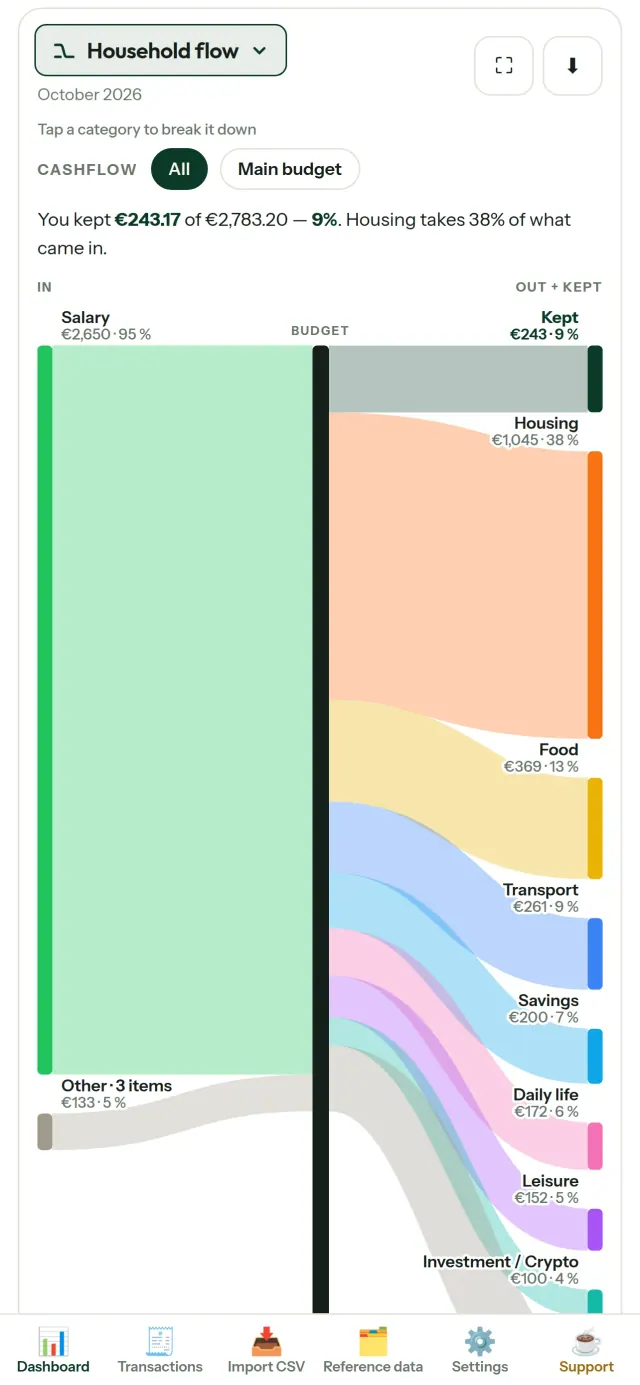
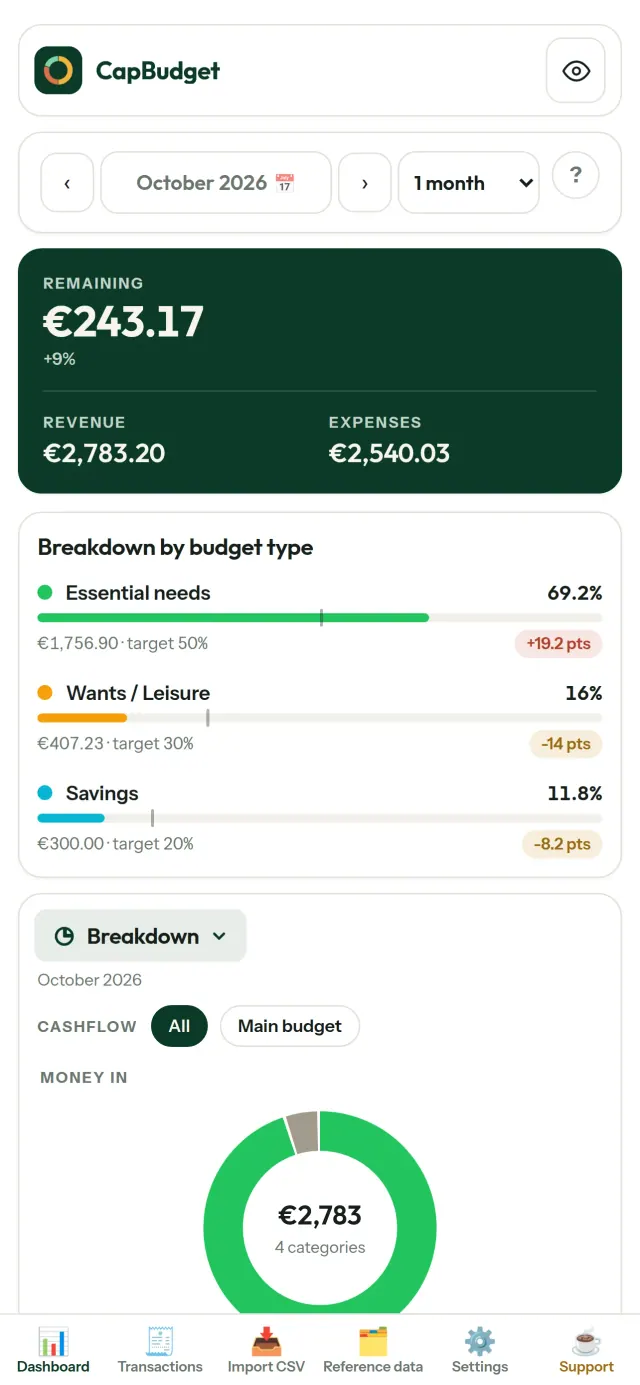
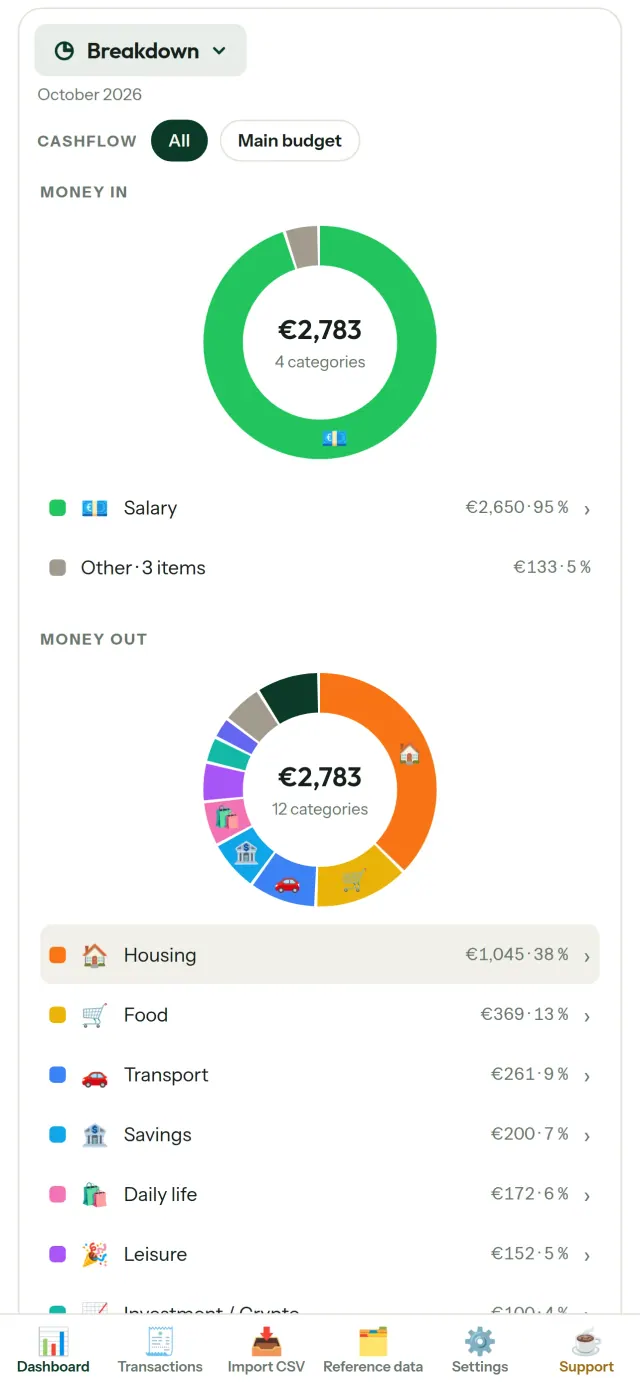
CapBudget ഒരു ബജറ്റ് ട്രാക്കർ, ചെലവ് ട്രാക്കർ, ബജറ്റ് പ്ലാനർ എന്നിവയാണ്. കുടുംബ ബജറ്റ് ലളിതമായി കൈകാര്യം ചെയ്യാം. എല്ലാം നിങ്ങളുടെ ഉപകരണത്തിൽ തന്നെ: അക്കൗണ്ട് ഇല്ല, രജിസ്ട്രേഷൻ ഇല്ല, ക്ലൗഡ് ഇല്ല, പരസ്യങ്ങളില്ല, ട്രാക്കിംഗ് ഇല്ല. പൂർണ്ണമായും ഓഫ്ലൈൻ പ്രവർത്തിക്കുന്നു.
CapBudget എന്തു ചെയ്യുന്നു
ബാങ്ക് സ്റ്റേറ്റ്മെന്റുകൾ ഇറക്കുമതി ചെയ്യുക
ഏത് ബാങ്കിന്റെയും CSV ഫയൽ ചേർക്കുക. നിരകൾ ഒരിക്കൽ ബന്ധിപ്പിക്കുക, എന്താണ് ഇറക്കുമതി ചെയ്യുന്നതെന്ന് പ്രിവ്യൂ കാണുക (ഇരട്ടിപ്പ് കണ്ടെത്തലും കർശനമായ തീയതി പരിശോധനയും സഹിതം), തുടർന്ന് സ്ഥിരീകരിക്കുക. ഒന്നും നിശ്ശബ്ദമായി ഊഹിക്കില്ല.
നിയമങ്ങൾ തരംതിരിക്കട്ടെ
ലളിതമായ നിയമങ്ങൾ സൃഷ്ടിക്കുക (“വാടക അടങ്ങിയാൽ → വീട് / വാടക”), CapBudget നിങ്ങൾക്കായി ഇടപാടുകൾ വർഗ്ഗീകരിക്കും. പഴയ ഇടപാടുകളിലും എപ്പോൾ വേണമെങ്കിലും വീണ്ടും പ്രയോഗിക്കാം, നിങ്ങളുടെ കൈകൊണ്ടുള്ള തിരുത്തലുകൾ ഒരിക്കലും മാറ്റിയെഴുതപ്പെടില്ല.
നിങ്ങളുടെ പണം എവിടെ പോകുന്നു എന്ന് കാണുക
മാസ പരിധി, പണമൊഴുക്ക് അല്ലെങ്കിൽ വിഭാഗം അനുസരിച്ച് ഫിൽട്ടർ ചെയ്യുക, ഏത് ചാർട്ടും ചിത്രമായി എക്സ്പോർട്ട് ചെയ്യുക.
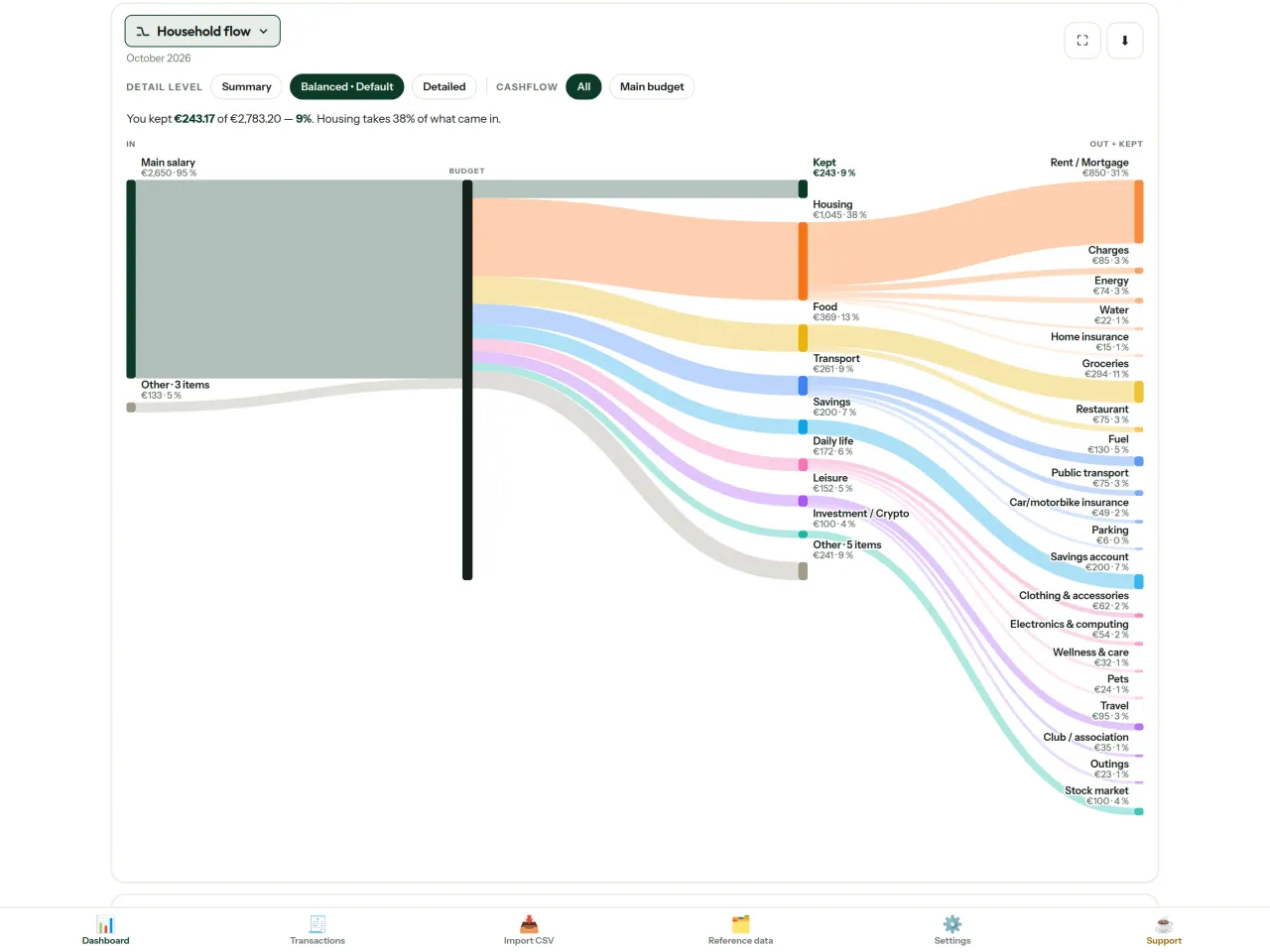
- കുടുംബ പണമൊഴുക്ക്: വരുമാനത്തിൽ നിന്ന് വിഭാഗങ്ങളിലേക്കും ബാക്കിയിലേക്കുമുള്ള സാങ്കി ഡയഗ്രം
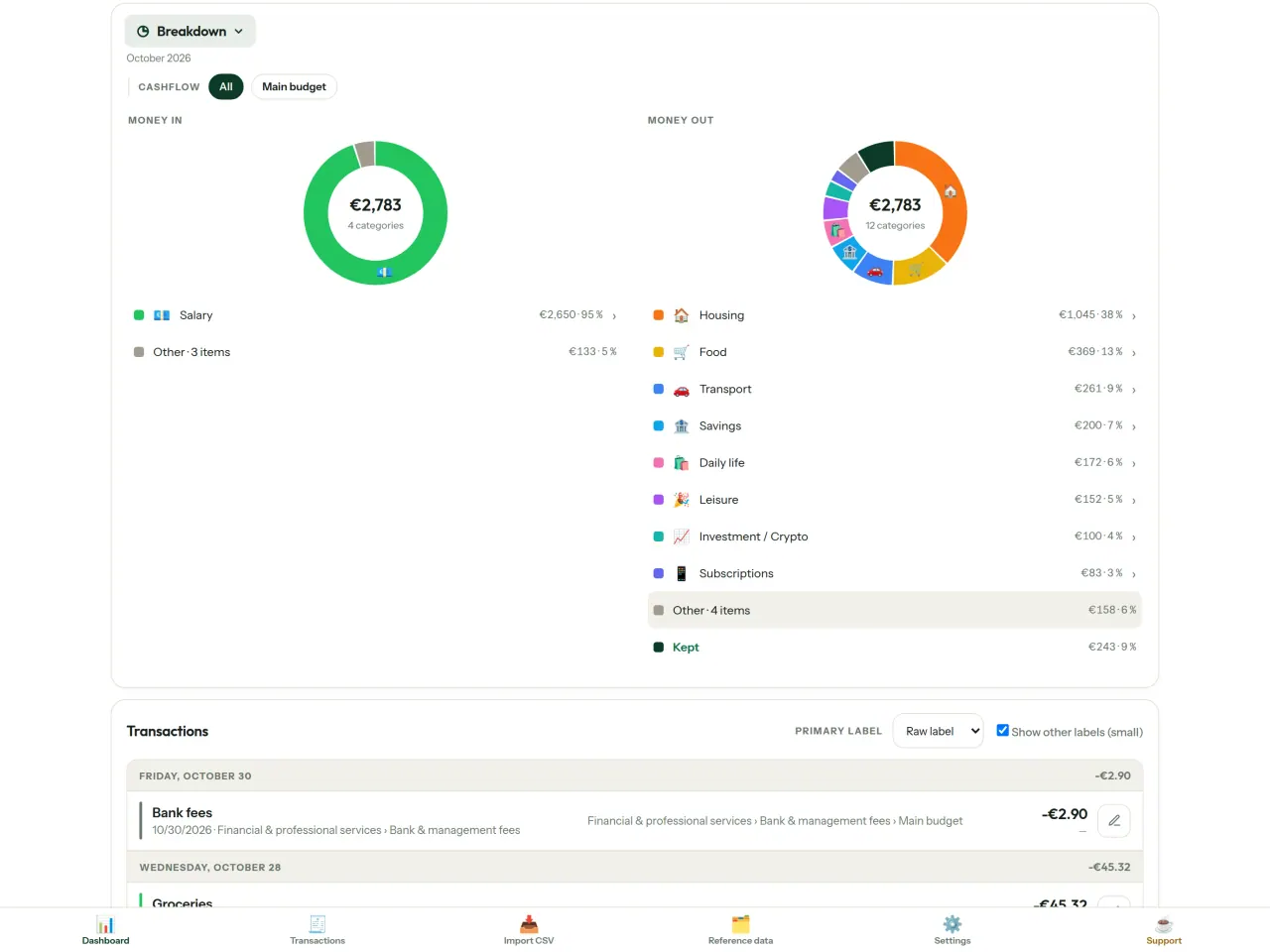
- വിഭജനം: വിഭാഗം അനുസരിച്ച് വരുമാനവും ചെലവും, വിശദാംശങ്ങൾക്ക് ടാപ്പ് ചെയ്യുക
- പണം എവിടെ പോകുന്നു: ചെലവിന്റെ വെള്ളച്ചാട്ടം, ഏറ്റവും വലുത് ആദ്യം
- തീരുന്ന മാസം: ബാക്കി എത്ര, ദിവസം തോറും
- നിങ്ങളുടെ വേഗത: ഓരോ മാസവും സ്ഥിരമായ ചെലവുമായി താരതമ്യം
ലക്ഷ്യങ്ങൾ
നിങ്ങളുടെ പ്രതിമാസ ചെലവിനെ 50/30/20 നിയമവുമായി (ആവശ്യങ്ങൾ, ആഗ്രഹങ്ങൾ, സമ്പാദ്യം) താരതമ്യം ചെയ്യുക, അല്ലെങ്കിൽ സ്വന്തം ശതമാനം നിശ്ചയിച്ച് ലക്ഷ്യവും യാഥാർത്ഥ്യവും കാണുക.
നിങ്ങളുടെ മാസം, നിങ്ങളുടെ രീതിയിൽ
ശമ്പളം വരുന്ന ദിവസത്തിനൊപ്പം പൊരുത്തപ്പെടാൻ മാസം ഏത് ദിവസവും തുടങ്ങാം. വിഭാഗങ്ങൾ, ഉപവിഭാഗങ്ങൾ, പണമൊഴുക്കുകൾ എന്നിവ ഇഷ്ടാനുസരണം മാറ്റാം.
നിങ്ങളുടെ ഫോണുകൾക്കിടയിൽ ഐച്ഛിക സമന്വയം
സമന്വയം പ്രാരംഭാവസ്ഥയിൽ ഓഫ് ആണ്: നിങ്ങൾ ഒരിക്കലും ഓൺ ചെയ്തില്ലെങ്കിൽ, ഒന്നും മാറില്ല, CapBudget 100% പ്രാദേശികമായി തുടരും. ഓൺ ചെയ്താൽ, നിങ്ങളുടെ ഫോണുകൾ Pixeon നടത്തുന്ന റിലേ സർവർ വഴി മാറ്റങ്ങൾ കൈമാറുന്നു. അയയ്ക്കുന്നതിന് മുമ്പ് എല്ലാം നിങ്ങളുടെ ഫോണിൽ എൻക്രിപ്റ്റ് ചെയ്യപ്പെടുന്നു, ജോടിയാക്കിയ ഫോണുകൾക്കു മാത്രമാണ് കീകൾ ഉള്ളത്, അതിനാൽ റിലേയ്ക്ക് ഡാറ്റ വായിക്കാനാവില്ല. സന്ദേശ വലിപ്പം, സമയം തുടങ്ങിയ സാങ്കേതിക വിവരങ്ങൾ മാത്രമാണ് അത് കാണുന്നത്. QR സ്കാൻ ചെയ്താണ് ഫോണുകൾ ജോടിയാക്കുന്നത്.
നിങ്ങളുടെ ഡാറ്റ നിങ്ങളുടേതായി തുടരും
എല്ലാം നിങ്ങളുടെ ഉപകരണത്തിലെ ഒരൊറ്റ ഫയലിലാണ്. എപ്പോൾ വേണമെങ്കിലും ബാക്കപ്പ് എക്സ്പോർട്ട് ചെയ്ത് ഇഷ്ടമുള്ളിടത്ത് സൂക്ഷിക്കാം. സമന്വയം ഓണാക്കിയില്ലെങ്കിൽ ഒന്നും അപ്ലോഡ് ചെയ്യപ്പെടില്ല.
ലൈറ്റ്, ഡാർക്ക് തീമുകളോടെ.
ഇത് ആർക്കുവേണ്ടി
- ബാങ്കിന്റെ CSV എക്സ്പോർട്ടുകളിൽ നിന്ന് ബജറ്റ് പിന്തുടരാൻ ആഗ്രഹിക്കുന്ന കുടുംബങ്ങൾ.
- ചെലവുകൾ നിരീക്ഷിക്കാൻ ബാങ്ക് ലോഗിൻ വിവരങ്ങൾ നൽകാനോ അക്കൗണ്ട് ഉണ്ടാക്കാനോ ആഗ്രഹിക്കാത്തവർ.
- ഡാറ്റ ചോർച്ചയിൽ മടുത്ത്, സാമ്പത്തിക ഡാറ്റയുടെ നിയന്ത്രണം തിരികെ നേടാൻ ആഗ്രഹിക്കുന്നവർ: ഇവിടെ അത് ഒരിക്കലും ഫോണിന് പുറത്തുപോകുന്നില്ല, അതിനാൽ സെർവറിൽ നിന്ന് ചോരാൻ ഒന്നുമില്ല.
- 50/30/20 നിയമം പിന്തുടരുന്നവർ, അല്ലെങ്കിൽ ശമ്പളം വരുന്ന ദിവസം ബജറ്റ് മാസം തുടങ്ങുന്നവർ.
എന്തുകൊണ്ട് CapBudget തിരഞ്ഞെടുക്കണം
- ആദ്യം പ്രാദേശികം: അക്കൗണ്ടില്ല, ക്ലൗഡില്ല, പരസ്യങ്ങളില്ല, ട്രാക്കിംഗില്ല. നിങ്ങളുടെ ഇടപാടുകൾ ഉപകരണത്തിലെ ഒരൊറ്റ ഫയലിൽ നിലനിൽക്കുന്നു.
- പൂർണ്ണമായും ഓഫ്ലൈനായി പ്രവർത്തിക്കുന്നു, സൗജന്യവുമാണ്.
- ഏത് ബാങ്കിന്റെയും CSV ഇറക്കുമതി ചെയ്യുന്നു, ഡ്യൂപ്ലിക്കേറ്റ് കണ്ടെത്തലും കർശനമായ തീയതി പരിശോധനയും സഹിതം. വർഗ്ഗീകരണ നിയമങ്ങൾ നിങ്ങളുടെ കൈകൊണ്ടുള്ള തിരുത്തലുകൾ ഒരിക്കലും മാറ്റിയെഴുതില്ല.
ആപ്പ് ഇതുവരെ ചെയ്യാത്തത്
- ബാങ്കുമായി സ്വയമേവയുള്ള സമന്വയം ഇതുവരെയില്ല. നിങ്ങളുടെ ബാങ്കിൽ നിന്നുള്ള CSV എക്സ്പോർട്ട് നിങ്ങൾ ഇറക്കുമതി ചെയ്യുന്നു.
- നിങ്ങളുടെ സ്വന്തം ഫോണുകൾ തമ്മിലുള്ള സമന്വയം ഐച്ഛികമാണ് (എൻഡ്-ടു-എൻഡ് എൻക്രിപ്റ്റ് ചെയ്തത്, പരമാവധി 5 ഫോണുകൾ); ക്ലൗഡ് അക്കൗണ്ടും വെബ് പതിപ്പും ഇല്ല.
Pixeon-ന്റെ തത്വം. Pixeon ആപ്പുകൾ ആദ്യം പ്രാദേശികമാണ്: അക്കൗണ്ടില്ല, ട്രാക്കിംഗില്ല, നിങ്ങളുടെ ഡാറ്റ നിങ്ങളുടെ ഫോണിൽ തന്നെ നിലനിൽക്കുന്നു. ഏതെങ്കിലും ആപ്പ് നെറ്റ്വർക്കുമായി ബന്ധപ്പെടുന്നുണ്ടെങ്കിൽ, ആവശ്യമായ സവിശേഷത നിങ്ങൾ തന്നെ ഓണാക്കാൻ തിരഞ്ഞെടുക്കുമ്പോൾ മാത്രമാണത്, സ്വകാര്യതാ നയം റിലീസിന് മുമ്പ് പുതുക്കുന്നു.
CapBudget പ്രവർത്തിക്കുന്നത് കാണുക.
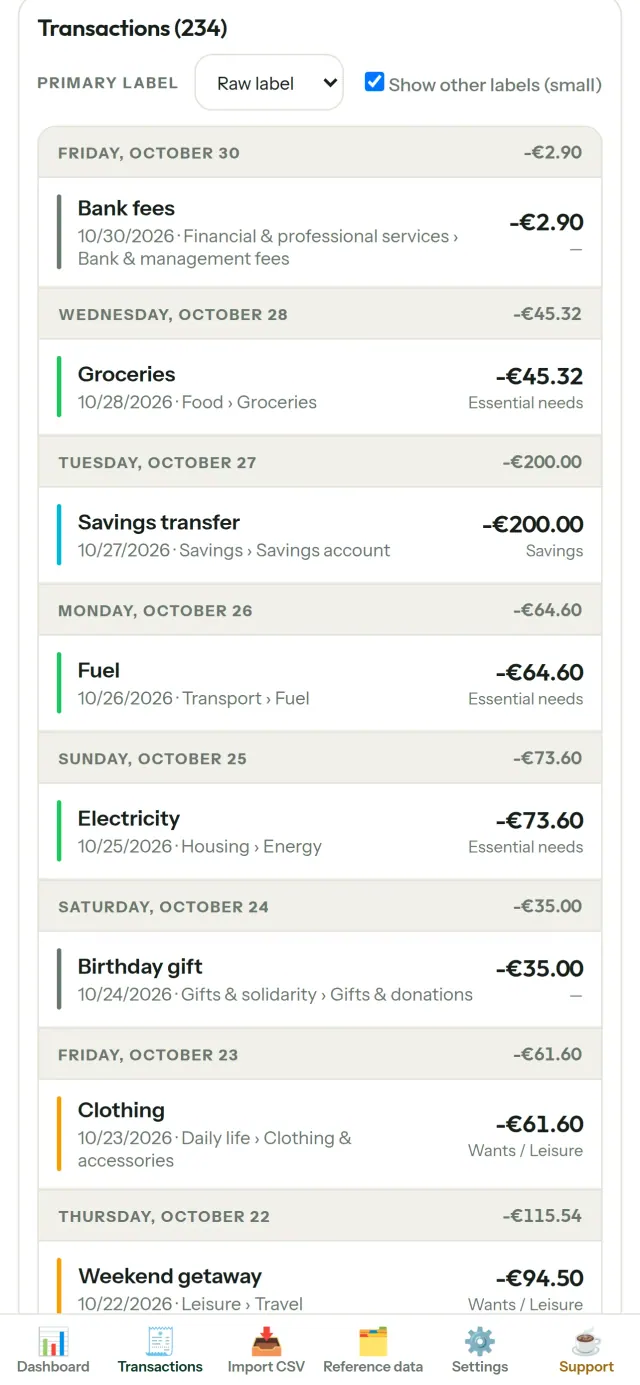
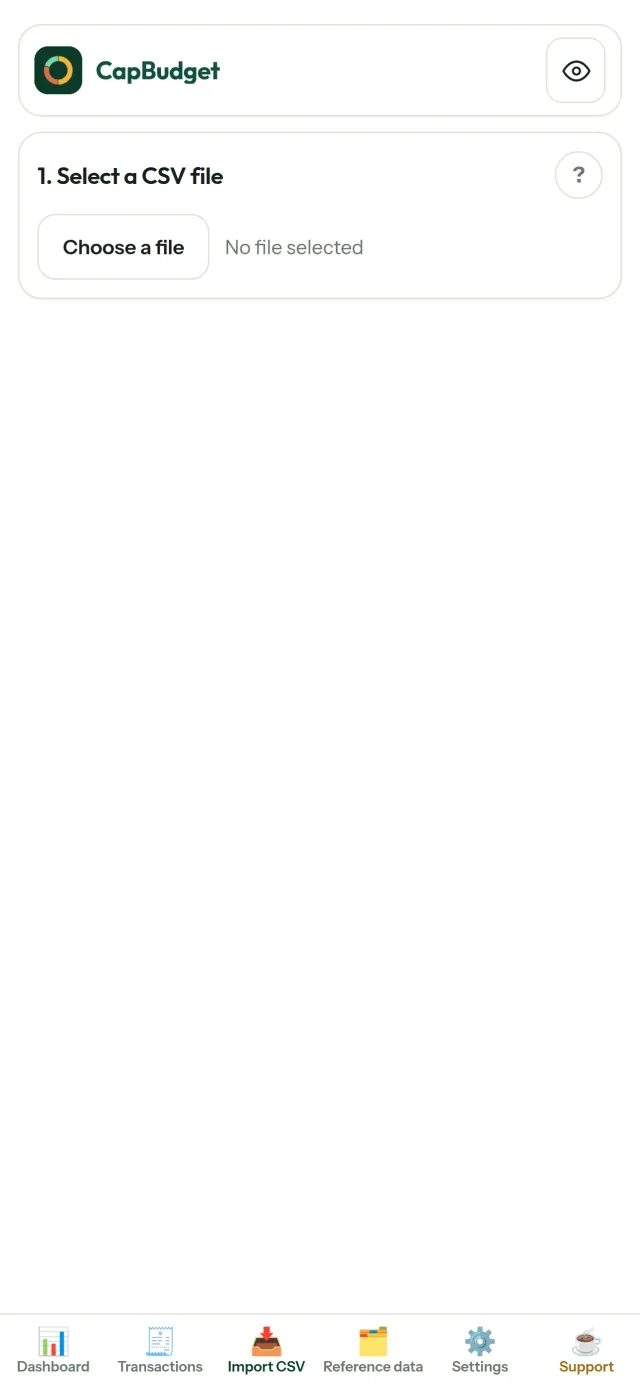
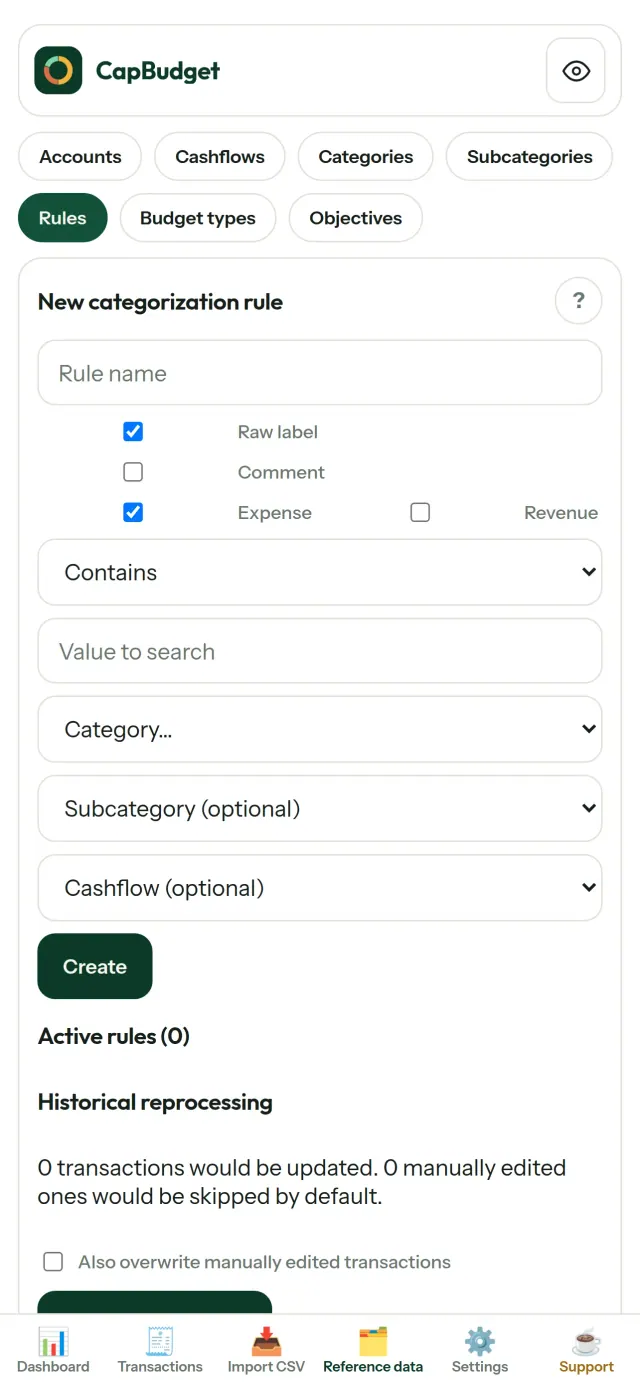
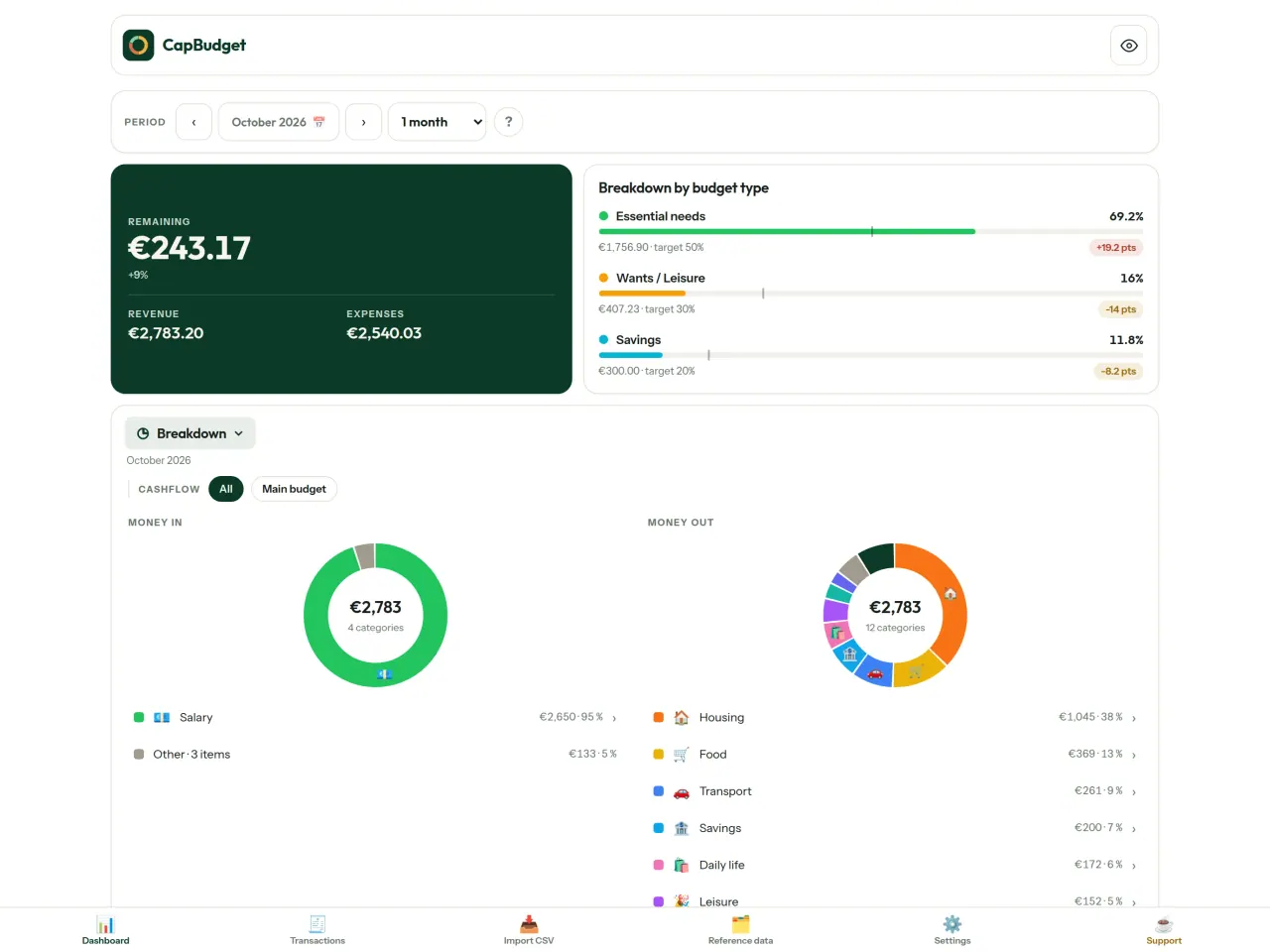
CapBudget നേടുക.
iPhone, Android എന്നിവയിൽ സൗജന്യം.
Privacy policy
താഴെയുള്ള വാചകം ഇംഗ്ലീഷിലാണ്. ഇംഗ്ലീഷ് പതിപ്പാണ് ആധികാരികം.
Last updated: 2026-11-03
CapBudget is a local-first budgeting app. The short version: nothing leaves your device unless you turn on sync between your own phones, and even then it is end-to-end encrypted. We collect nothing.
What data the app handles
Everything you put into CapBudget (bank transactions, account references,
categories, categorization rules, budget targets, and app settings) is
stored only in a single SQLite database on your device
(household.sqlite), in the app's own private storage. There is
no account and no login.
What we collect
Nothing. No analytics or usage tracking, no advertising or advertising identifiers, no crash or diagnostics reporting, no third-party SDKs that phone home. Without sync the app makes no network calls to any Pixeon service and functions fully offline.
Sync between your phones (optional)
Sync is off by default. If you link two or more phones in Settings > Sync, changes travel through a relay server run by Pixeon on Cloudflare. Everything is encrypted on your phone with a key that only your linked phones hold (it is exchanged by QR code, phone to phone, and never sent to the server). The relay stores only encrypted messages and an encrypted copy of the budget for a phone that joins; it cannot read them. It necessarily sees technical metadata: random channel and device identifiers, message sizes and times, and IP addresses (used for rate limiting, not logged). Removing a phone changes the key; stopping sync on every phone deletes the channel, and inactive channels are purged. No account, name, e-mail or phone number is involved.
CSV imports
When you import a bank CSV export, the file is parsed on your device. It is not uploaded anywhere and is not retained by the app unless you choose “keep” during import.
Backups
You can export a backup from Settings. The backup is a file you control. CapBudget does not upload it and has no access to wherever you save it.
Permissions
The app requests no location, contacts, microphone, or other sensitive permissions. The camera is used only if you scan a sync QR code; the image is processed on the phone and never stored or sent.
Optional tips
CapBudget is free. If you wish, you can leave the developer an optional tip; a tip never unlocks anything. In the iOS and Android apps this uses the store’s in-app purchase (Apple or Google Play): the payment is processed entirely by the store under its own terms and privacy policy, and CapBudget never sees your payment details, your account or your purchase history, and receives no personal information. The Android app declares the Google Play billing permission for this. In a web browser a button opens an external donation page in your browser; that page is operated by a third party under its own privacy policy, and nothing from the app is sent to it.
Bank-account references
An account number/IBAN from your CSV is stored to group transactions by account, kept only on your device. In the UI only the last 4 characters are shown.
Contact form on this website
If you write to us through this site, we use your message and the email address you optionally give only to reply. Bot protection is provided by Cloudflare and email delivery by Resend.
Language choice on this website
When you choose a language, or when this site opens a page in your browser's language, it stores
one small functional cookie (pxl, a language code, one year) so that your choice is
remembered. If this site suggests a page in your browser's language and you close that suggestion,
your browser also keeps a local note (pxl-banner-off, in local storage, 30 days) so the
suggestion does not come back. Neither identifies anyone, neither is used for tracking or advertising,
and neither is shared. You can delete them in your browser at any time.
Website statistics
This website uses Cloudflare Web Analytics to count visits (pages viewed, country, browser type, loading speed). It sets no cookie, does not use local storage, does not fingerprint your device, does not follow you across sites and does not build a profile of you. Search engines (for example Google Search Console) give us aggregated search statistics, without any data about individual visitors. Our own web server also counts the pages it serves: for each page it keeps the page address, the site or social network that sent you (only its name, or the campaign tag written in the link), the country, the type of device and whether the request came from a robot. It keeps no IP address, no identifier and no cookie, and these counts are anonymous. We use no advertising or other analytics service. None of this concerns the app itself, which collects nothing.
Delete your data
CapBudget keeps your data on your phone only. To delete it, open Settings and use Delete all my data (it erases the database and every preference, and the app starts again as on first launch), or uninstall the app. If you used sync, open Settings > Sync and choose Stop syncing on this phone on every linked phone: when the last linked phone stops, the encrypted channel and the encrypted copy of the budget are deleted from the relay. Delete all my data also leaves sync first. If a phone was offline, or the app was uninstalled without stopping sync, the channel is deleted automatically after 90 days without activity. For any request, write to the support e-mail below.
Children
CapBudget is a general-purpose finance tool and is not directed at children.
Changes
An updated policy will be published at this URL with a new date above.
Contact
Questions about privacy: capbudget-contact@pixeon.net
പിന്തുണ
അവസാനം പുതുക്കിയത്: 2026-10-08
CapBudget ഒരു ചെറിയ സ്വതന്ത്ര ആപ്പാണ്. നിങ്ങളുടെ ബജറ്റ് നിങ്ങളുടെ ഉപകരണത്തിൽ മാത്രം സൂക്ഷിക്കുന്നു: അക്കൗണ്ടില്ല, സൈൻ-അപ്പില്ല, സെർവറില്ല. സാധാരണയായി ചോദിക്കുന്ന ചോദ്യങ്ങൾക്കുള്ള ഉത്തരങ്ങൾ താഴെ നൽകുന്നു.
കുറച്ച് ദിവസങ്ങൾക്കുള്ളിൽ മറുപടി നൽകാൻ ഞങ്ങൾ പരമാവധി ശ്രമിക്കും. ഞങ്ങളെ സഹായിക്കാൻ, നിങ്ങളുടെ ഉപകരണത്തിന്റെ മോഡൽ, സിസ്റ്റം പതിപ്പ്, നിങ്ങൾ ചെയ്യുകയായിരുന്ന കാര്യം എന്നിവ അറിയിക്കുക. യഥാർത്ഥ ബാങ്ക് വിവരങ്ങളോ അക്കൗണ്ട് നമ്പറുകളോ അയയ്ക്കരുത്.
എന്റെ ഡാറ്റ എവിടെയാണ് സൂക്ഷിക്കുന്നത്?
നിങ്ങളുടെ ഉപകരണത്തിലെ ആപ്പിന്റെ സ്വന്തം സ്വകാര്യ സംഭരണിയിൽ മാത്രം. CapBudget അക്കൗണ്ടോ CapBudget സെർവറോ ഇല്ല, അതിനാൽ ഞങ്ങളുൾപ്പെടെ ആർക്കും നിങ്ങളുടെ ഡാറ്റ കാണാനോ വീണ്ടെടുക്കാനോ കഴിയില്ല. വിശദാംശങ്ങൾക്ക് സ്വകാര്യതാ നയം കാണുക.
എന്റെ ഡാറ്റ ബാക്കപ്പ് ചെയ്യുകയോ പുതിയ ഫോണിലേക്ക് മാറ്റുകയോ ചെയ്യുന്നത് എങ്ങനെ?
- Settings → Backup & restore → Download a backup തുറക്കുക. നിങ്ങൾക്ക് ഒരു
.sqliteഫയൽ ലഭിക്കും: ഇഷ്ടമുള്ളിടത്ത് സൂക്ഷിക്കുക (Files, ക്ലൗഡ് ഡ്രൈവ്, നിങ്ങളുടെ കമ്പ്യൂട്ടർ). - പുതിയ ഉപകരണത്തിൽ CapBudget ഇൻസ്റ്റാൾ ചെയ്യുക, Settings → Backup & restore തുറക്കുക, ഫയൽ തിരഞ്ഞെടുത്ത് Restore from a backup ടാപ്പ് ചെയ്യുക.
റീസ്റ്റോർ ചെയ്യുന്നത് ആപ്പിലുള്ള നിലവിലെ എല്ലാം മാറ്റിസ്ഥാപിക്കും.
എനിക്ക് CapBudget രണ്ട് ഫോണുകളിൽ ഉപയോഗിക്കാനാകുമോ (സമന്വയം)?
അതെ, ഇത് ഐച്ഛികമാണ്. ആദ്യ ഫോണിൽ ക്രമീകരണങ്ങൾ തുറന്ന് → സമന്വയം തിരഞ്ഞെടുത്ത് ഒരു ഫോൺ ക്ഷണിക്കുക അമർത്തുക. രണ്ടാമത്തെ ഫോണിൽ ബജറ്റിൽ ചേരുക അമർത്തി QR കോഡ് സ്കാൻ ചെയ്യുക. രണ്ട് ഫോണുകളിലും 4 അക്ക കോഡ് കാണിക്കും: അവ പൊരുത്തപ്പെടുന്നെങ്കിൽ, പുതിയ ഫോൺ അനുവദിക്കുക. തുടർന്ന് നിങ്ങളുടെ മാറ്റങ്ങൾ ഫോണുകൾക്കിടയിൽ സമന്വയിപ്പിക്കപ്പെടും (പരമാവധി 5 എണ്ണം). എല്ലാം ഫോണുകളിൽ എൻക്രിപ്റ്റ് ചെയ്യപ്പെടുന്നു: റിലേ സെർവർ വായിക്കാനാകാത്ത ഡാറ്റ മാത്രമാണ് കൈമാറുന്നത്. QR കോഡ് 5 മിനിറ്റിന് ശേഷം കാലഹരണപ്പെടും. ഒരു ഫോൺ നീക്കം ചെയ്യാൻ, ക്രമീകരണങ്ങൾ → സമന്വയം തുറന്ന് അതിന് അടുത്തുള്ള നീക്കം ചെയ്യുക അമർത്തുക; തുടർന്ന് എൻക്രിപ്ഷൻ കീ മാറും. വിശദാംശങ്ങൾ സ്വകാര്യതാ നയത്തിൽ കാണാം.
ഞാൻ ആപ്പ് നീക്കം ചെയ്യുകയോ ഫോൺ നഷ്ടപ്പെടുകയോ ചെയ്തു: എന്റെ ഡാറ്റ വീണ്ടെടുക്കാനാകുമോ?
നിങ്ങൾ ബാക്കപ്പ് എക്സ്പോർട്ട് ചെയ്തിട്ടുണ്ടെങ്കിൽ മാത്രം: ഡാറ്റ ഉപകരണത്തിൽ മാത്രമാണ് ഉള്ളത്. പതിവായി ബാക്കപ്പ് ഡൗൺലോഡ് ചെയ്യുക.
എന്റെ ബാങ്കിന്റെ ഇടപാടുകൾ എങ്ങനെ ഇറക്കുമതി ചെയ്യാം?
നിങ്ങളുടെ ബാങ്കിന്റെ വെബ്സൈറ്റിൽ നിന്ന് ഒരു CSV ഫയൽ എക്സ്പോർട്ട് ചെയ്യുക, തുടർന്ന് Import CSV ടാബ് തുറന്ന് ഫയൽ തിരഞ്ഞെടുക്കുക, കോളങ്ങൾ ഒരിക്കൽ മാപ്പ് ചെയ്യുക, പ്രിവ്യൂ പരിശോധിക്കുക (തനിപ്പകർപ്പുകളും അസാധുവായ തീയതികളും അടയാളപ്പെടുത്തും), ശേഷം സ്ഥിരീകരിക്കുക. നിങ്ങൾ സ്ഥിരീകരിക്കുന്നതുവരെ ഒന്നും ഇറക്കുമതി ചെയ്യില്ല.
ഇടപാടുകളെ സ്വയമേവ വിഭാഗീകരിക്കാനാകുമോ?
അതെ. Reference data → Rules എന്നതിൽ, "label contains RENT → Housing / Rent" പോലുള്ള നിയമങ്ങൾ സൃഷ്ടിക്കുക. അവ പഴയ ഇടപാടുകൾക്ക് എപ്പോൾ വേണമെങ്കിലും വീണ്ടും പ്രയോഗിക്കാം; കൈകൊണ്ട് തിരുത്തിയ ഇടപാടുകൾ മാറ്റിയെഴുതാൻ നിങ്ങൾ വ്യക്തമായി തിരഞ്ഞെടുക്കുന്നതുവരെ സംരക്ഷിക്കപ്പെടും.
ഭാഷ, തീം, അല്ലെങ്കിൽ എന്റെ ബജറ്റ് മാസം ആരംഭിക്കുന്ന ദിവസം എങ്ങനെ മാറ്റാം?
ഭാഷാ ബട്ടൺ മുകളിലെ ബാറിലാണ്. തീമും ബജറ്റ് മാസം ആരംഭിക്കുന്ന ദിവസവും Settings ൽ കാണാം. CapBudget ഇംഗ്ലീഷ്, ഫ്രഞ്ച്, ജർമ്മൻ, സ്പാനിഷ്, പോർച്ചുഗീസ്, ഇറ്റാലിയൻ ഭാഷകളിൽ ലഭ്യമാണ്.
സാമ്പിൾ ഡാറ്റ എങ്ങനെ നീക്കം ചെയ്യാം?
Settings → Sample data → Remove sample data. നിങ്ങളുടെ സ്വന്തം ഇടപാടുകളൊന്നും നീക്കം ചെയ്യില്ല, സാമ്പിൾ ഇടപാടുകൾ മാത്രം നീക്കം ചെയ്യും.
പദ്ധതിയെ പിന്തുണയ്ക്കുക
CapBudget സൗജന്യവും പരസ്യരഹിതവുമായി തുടരും. ഇത് നിങ്ങൾക്ക് ഉപകാരപ്പെട്ടാൽ, ഇതിന്റെ വികസനത്തെ പിന്തുണയ്ക്കാം (ഓപ്ഷണൽ):
Buy Me a CoffeeEXIF വ്യൂവർ, ഫോട്ടോ മെറ്റാഡാറ്റ നീക്കം: സ്ഥലം, തീയതി, ക്യാമറ. നിങ്ങളുടെ ഫോണിൽ.
Pixeon-ൽ നിന്ന് കൂടുതൽVaultMarkEncrypted document vault. Watermark documents, remove metadata before sharing.
Pixeon-ൽ നിന്ന് കൂടുതൽLittle RelayBreastfeeding, sleep and starting solids tracker. No account, works offline.
Pixeon-ൽ നിന്ന് കൂടുതൽMenuloopPlan the week's meals, build your grocery list and keep recipes with photos.