CapBudget งบประมาณ
ใช้ แอพบันทึกรายจ่าย จัดการเงินในบ้านและ วางแผนงบประมาณ ได้สะดวก
 เร็ว ๆ นี้บนGoogle Play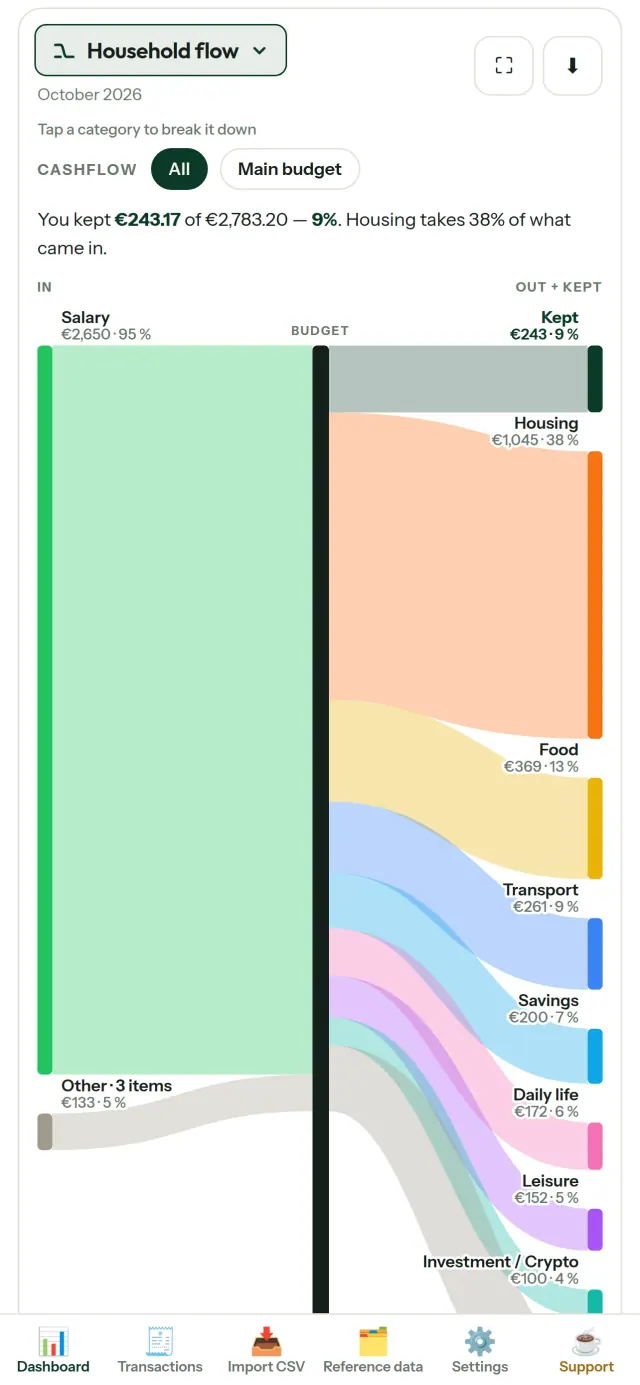
CapBudget ช่วยจัดการ งบประมาณ ในบ้าน เป็น แอพบันทึกรายจ่าย สำหรับครอบครัว พร้อมเครื่องมือ วางแผนงบประมาณ ที่เก็บข้อมูลไว้บนอุปกรณ์ของคุณ ไม่ต้องสมัครบัญชี ไม่ใช้คลาวด์ ไม่มีโฆษณาหรือการติดตาม และใช้งานได้แม้ไม่มีอินเทอร์เน็ต
สิ่งที่ CapBudget ทำได้
นำเข้าไฟล์จากธนาคาร
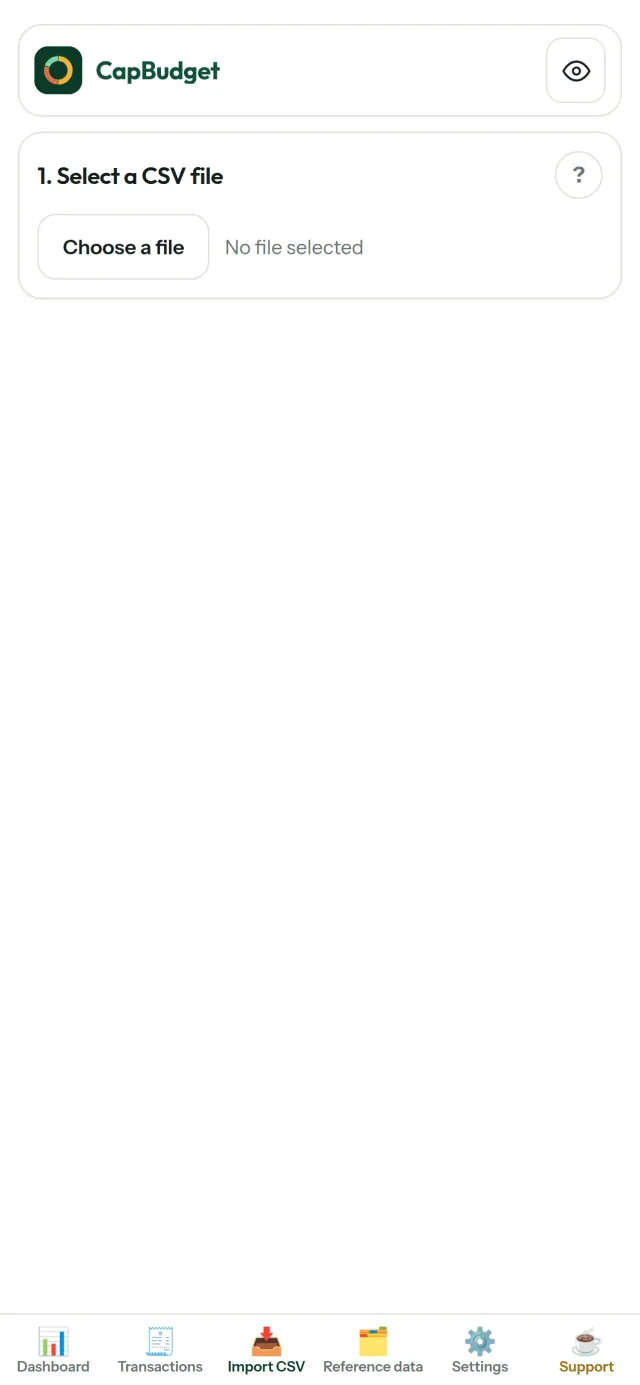
นำเข้าไฟล์ CSV ที่ดาวน์โหลดจากธนาคาร จับคู่คอลัมน์เพียงครั้งเดียว แล้วตรวจสอบรายการก่อนยืนยัน ระบบช่วยตรวจหารายการซ้ำและรูปแบบวันที่ที่ไม่ถูกต้อง โดยไม่เดาข้อมูลแทนคุณ
ตั้งกฎให้ช่วยจัดหมวดหมู่
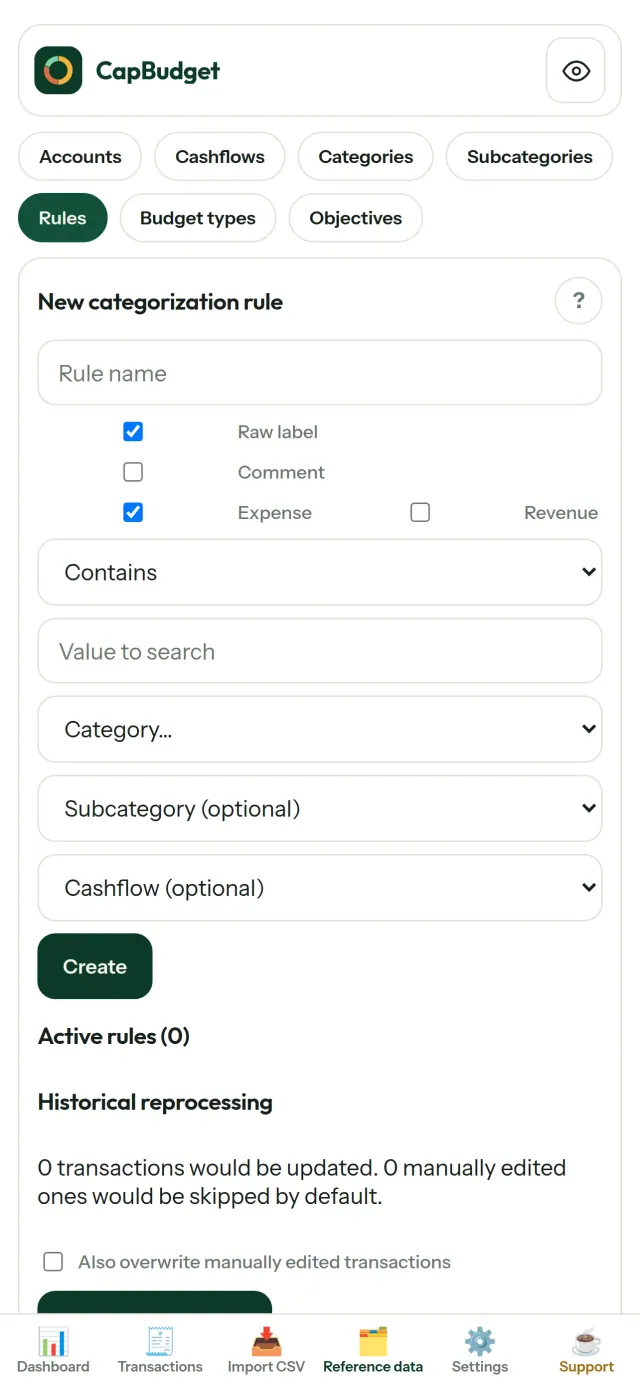
สร้างกฎง่าย ๆ เช่น “มีคำว่า RENT → ที่อยู่อาศัย / ค่าเช่า” แล้วให้ CapBudget จัดหมวดหมู่รายการให้ เรียกใช้กฎกับรายการย้อนหลังได้ทุกเมื่อ โดยการแก้ไขที่คุณทำเองจะไม่ถูกเขียนทับ
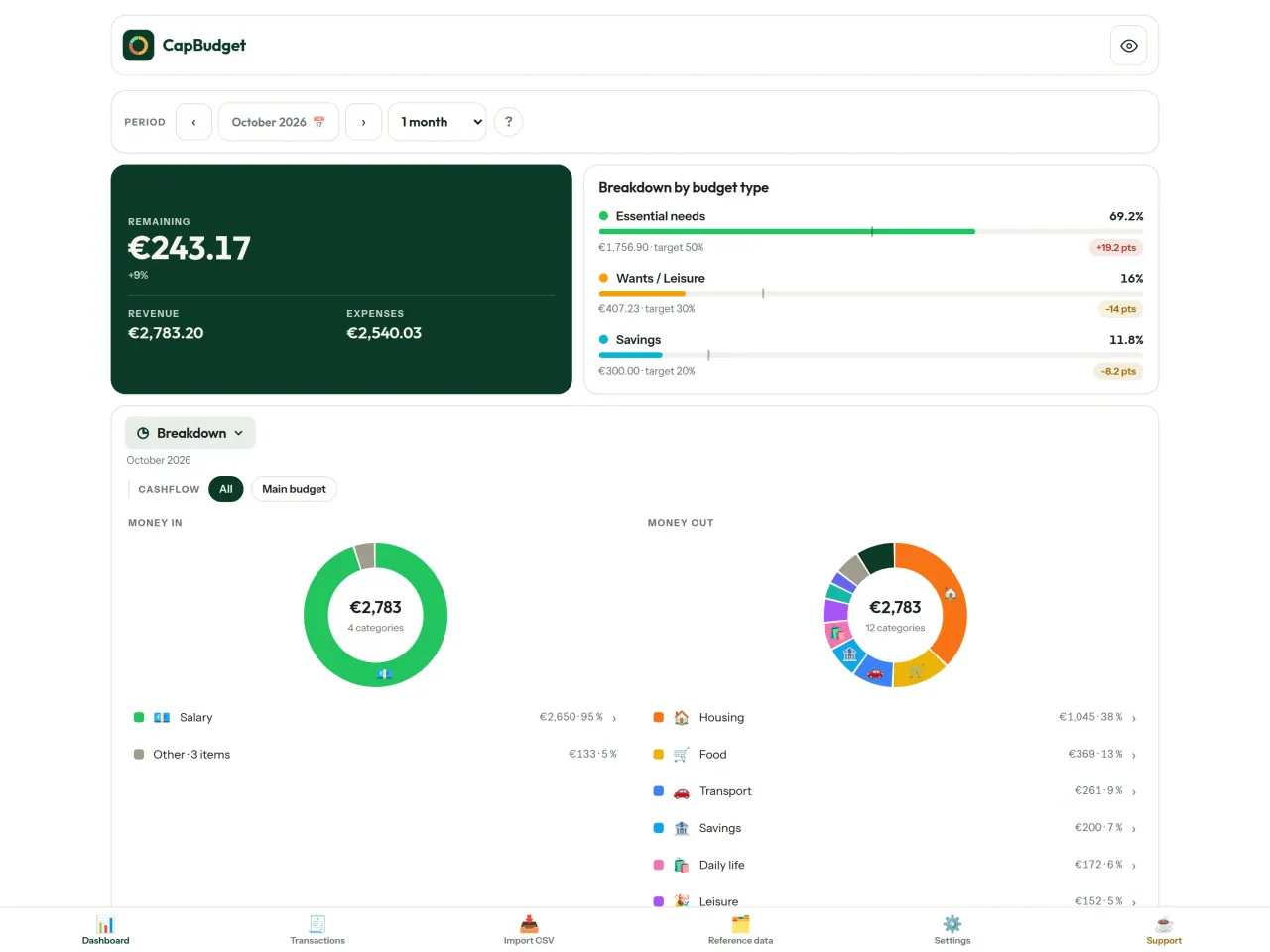
ดูว่าเงินของคุณไปที่ไหน
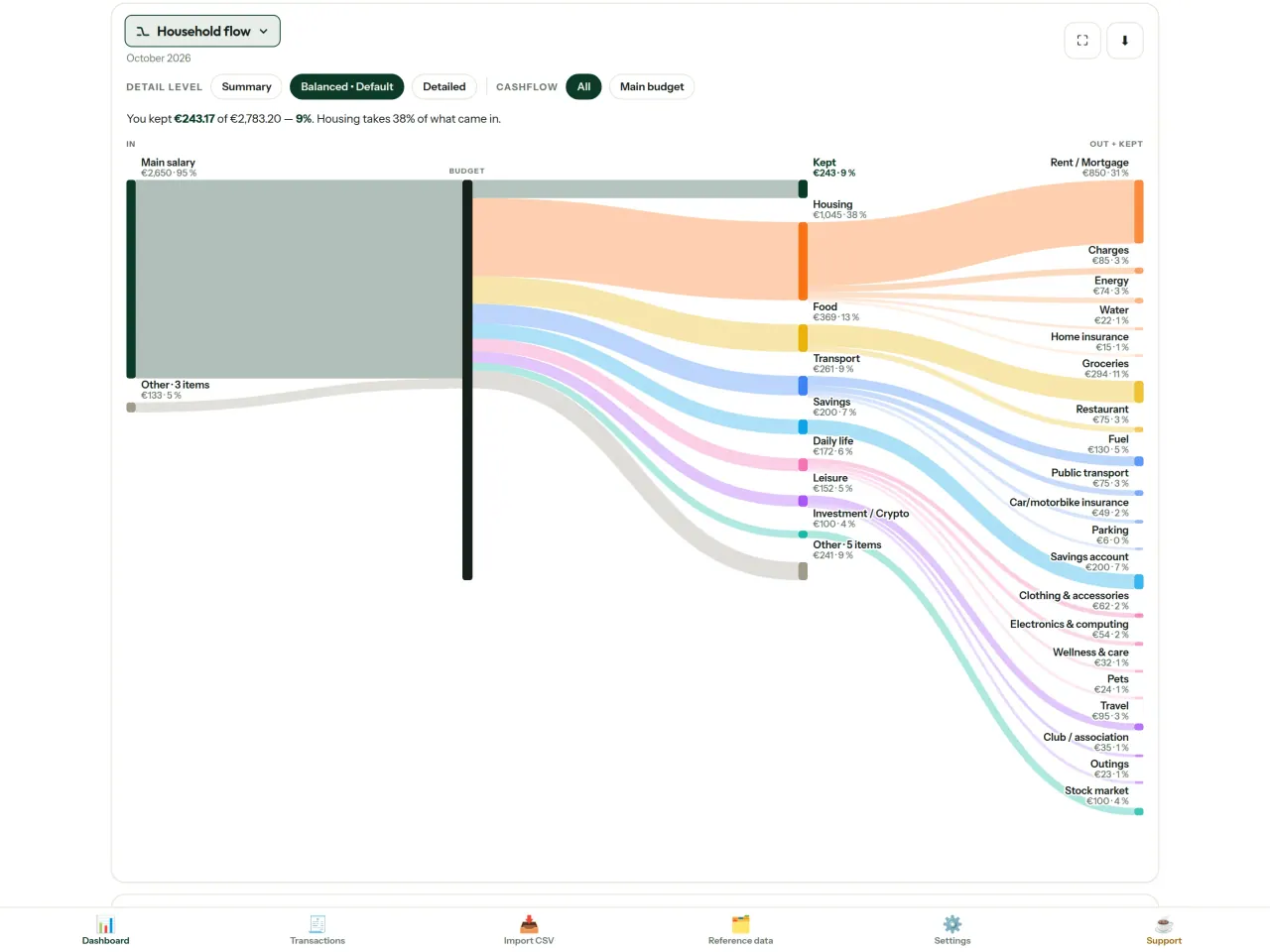
กรองตามช่วงเดือน กระแสเงินสด หรือหมวดหมู่ และส่งออกกราฟเป็นรูปภาพได้
- ภาพรวมเงินในบ้าน: แผนภาพ Sankey แสดงเส้นทางจากรายรับไปยังหมวดหมู่และยอดคงเหลือ
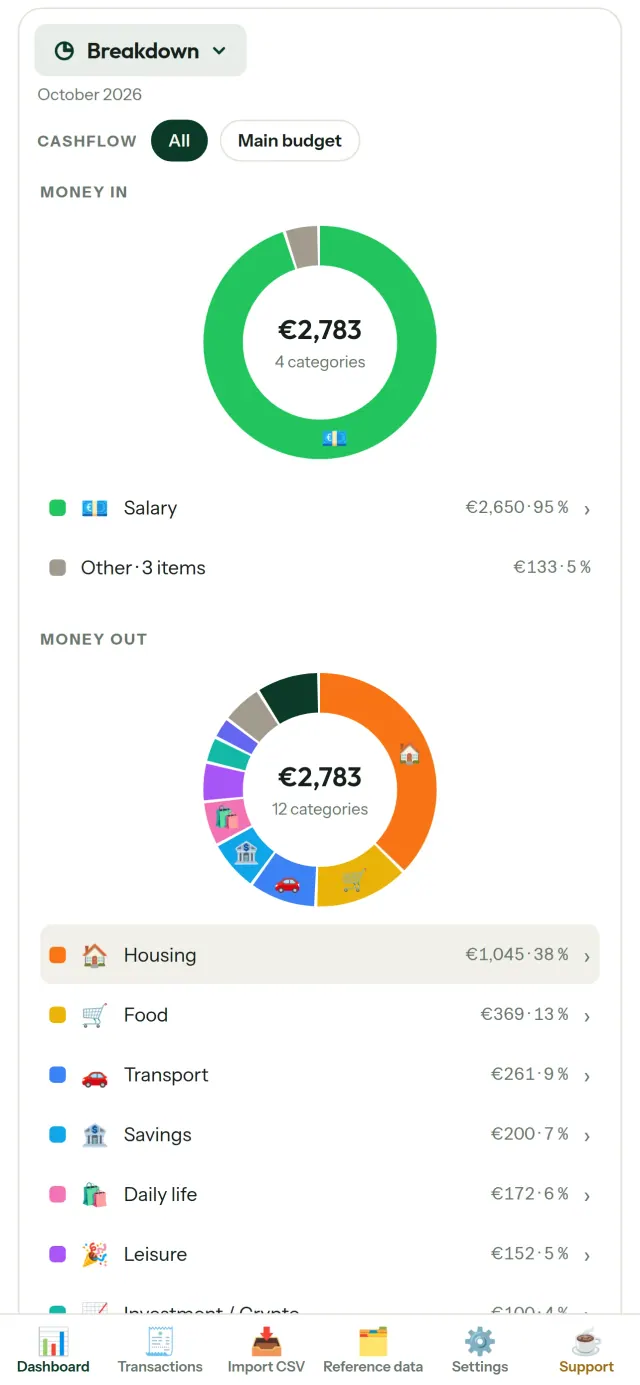
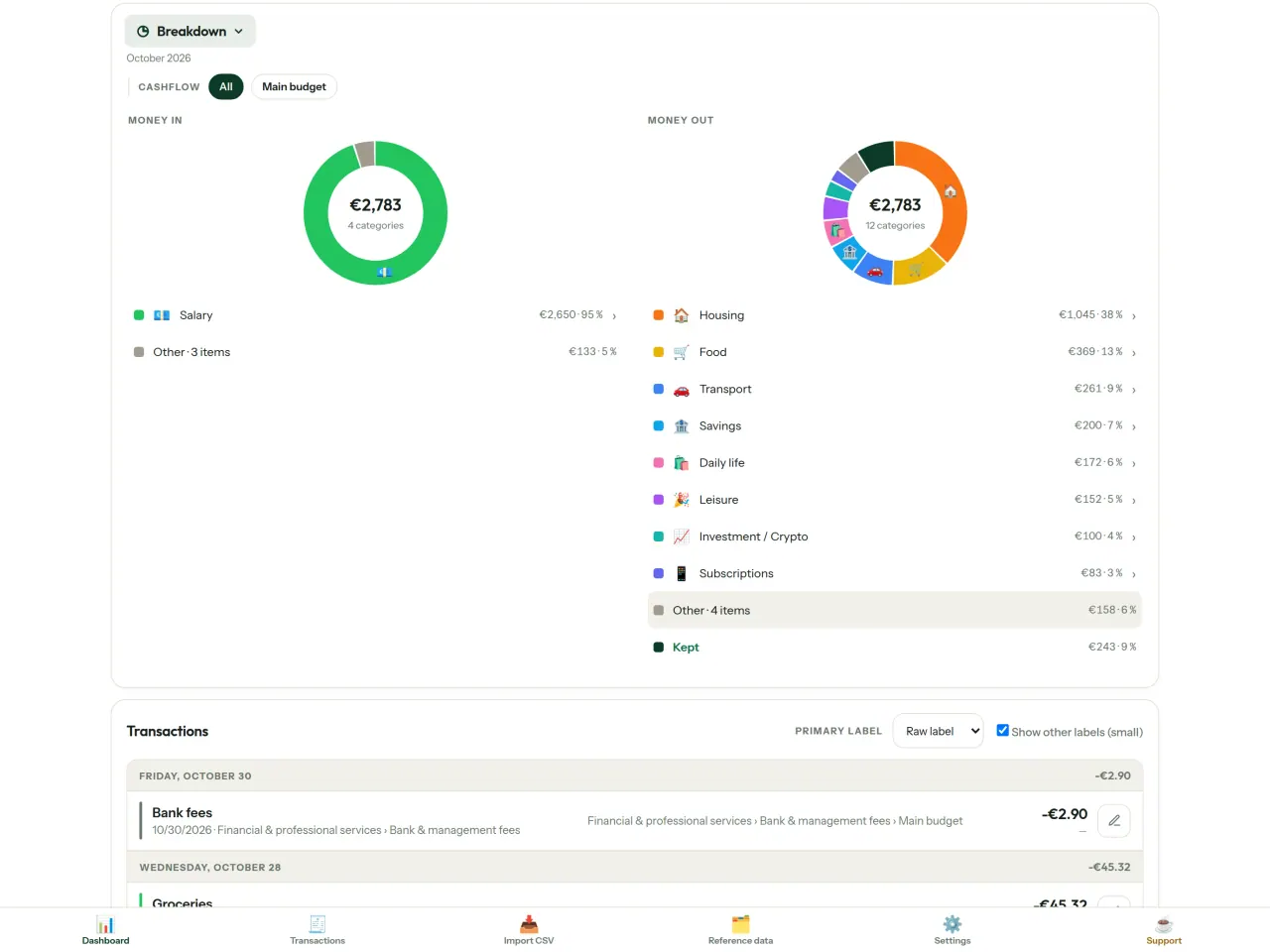
- สรุปตามหมวดหมู่: ดูรายรับและรายจ่าย แล้วแตะเพื่อดูข้อมูลเพิ่มเติม
- รายจ่ายไปที่ไหน: เรียงลำดับจากรายการที่มียอดสูงสุด
- เงินคงเหลือระหว่างเดือน: ดูยอดที่เหลือในแต่ละวัน
- จังหวะการใช้เงิน: เทียบแต่ละเดือนกับค่าใช้จ่ายเฉลี่ย
เป้าหมายงบประมาณ
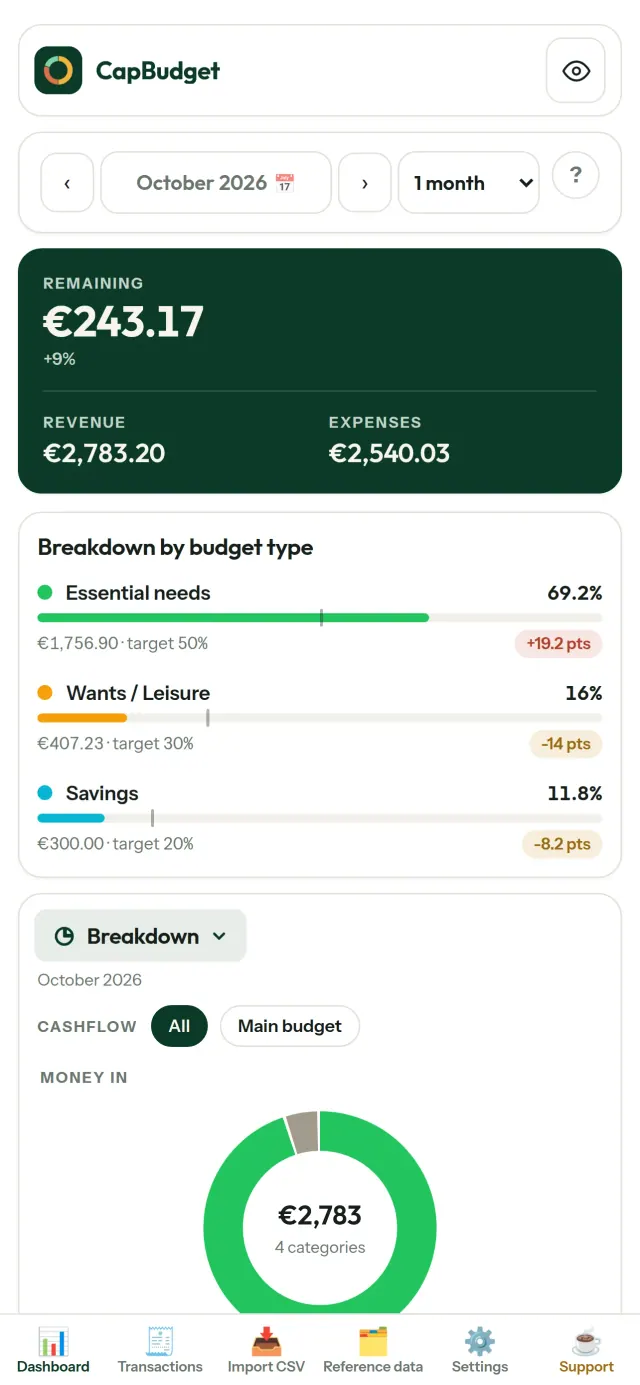
เทียบการใช้จ่ายรายเดือนกับหลัก 50/30/20 ซึ่งแบ่งเป็นสิ่งจำเป็น สิ่งที่ต้องการ และเงินออม หรือกำหนดสัดส่วนเองเพื่อดูเป้าหมายเทียบกับการใช้จ่ายจริง
จัดเดือนให้เหมาะกับคุณ
กำหนดวันเริ่มต้นเดือนของงบประมาณได้เอง ให้สอดคล้องกับวันที่เงินเดือนเข้าจริง ปรับแต่งหมวดหมู่ หมวดย่อย และกระแสเงินสดได้
ข้อมูลเป็นของคุณ
ข้อมูลทั้งหมดจัดเก็บอยู่ในไฟล์เดียวบนอุปกรณ์ ส่งออกไฟล์สำรองเมื่อไรก็ได้ และเก็บไว้ในตำแหน่งที่คุณเลือก ไม่มีการอัปโหลดข้อมูล
เลือกใช้ธีมสว่างหรือธีมมืดได้
เลือก แอพ CapBudget เพื่อ บันทึก รายรับและ รายจ่าย ได้เป็นหมวดหมู่ พร้อมดูภาพรวมเงินในบ้านได้ในที่เดียว
เหมาะสำหรับใคร
- ครอบครัวที่ต้องการติดตามงบประมาณจากไฟล์ CSV ที่ส่งออกจากธนาคาร
- ผู้ที่ไม่ต้องการให้ข้อมูลเข้าสู่ระบบธนาคารหรือสร้างบัญชีเพื่อติดตามรายจ่าย
- ผู้ที่เบื่อกับเหตุข้อมูลรั่วไหลและอยากควบคุมข้อมูลการเงินของตัวเองกลับคืนมา: ที่นี่ข้อมูลไม่เคยออกจากโทรศัพท์ จึงไม่มีอะไรให้รั่วไหลจากเซิร์ฟเวอร์
- ผู้ที่ใช้กฎ 50/30/20 หรือผู้ที่เริ่มเดือนงบประมาณในวันที่เงินเดือนเข้า
ทำไมต้องเลือก CapBudget
- เน้นในเครื่องเป็นหลัก: ไม่มีบัญชี ไม่มีคลาวด์ ไม่มีโฆษณา ไม่มีการติดตาม ธุรกรรมของคุณเก็บอยู่ในไฟล์เดียวบนอุปกรณ์ของคุณ
- ใช้งานได้โดยไม่ต้องออนไลน์ทั้งหมด และใช้ฟรี
- นำเข้าไฟล์ CSV ของธนาคารใดก็ได้ พร้อมตรวจจับรายการซ้ำและตรวจสอบวันที่อย่างเข้มงวด กฎการจัดหมวดหมู่จะไม่เขียนทับการแก้ไขที่คุณทำเอง
สิ่งที่แอปยังทำไม่ได้
- ยังไม่มีการซิงก์กับธนาคารอัตโนมัติ คุณต้องนำเข้าไฟล์ CSV ที่ส่งออกจากธนาคารของคุณ
- ยังไม่มีการซิงก์ระหว่างหลายอุปกรณ์ ใช้การส่งออกข้อมูลสำรองเพื่อย้ายข้อมูล
หลักการของ Pixeon. แอปของ Pixeon เน้นการทำงานในเครื่องเป็นหลัก ไม่มีบัญชี ไม่มีการติดตาม และข้อมูลของคุณอยู่บนโทรศัพท์ของคุณ หากแอปเชื่อมต่อกับเครือข่ายในอนาคต จะเกิดขึ้นเฉพาะเมื่อคุณเลือกเปิดใช้ฟีเจอร์ที่ต้องการเอง และเราจะอัปเดตนโยบายความเป็นส่วนตัวก่อนปล่อยฟีเจอร์นั้น
ดู CapBudget ในการใช้งานจริง
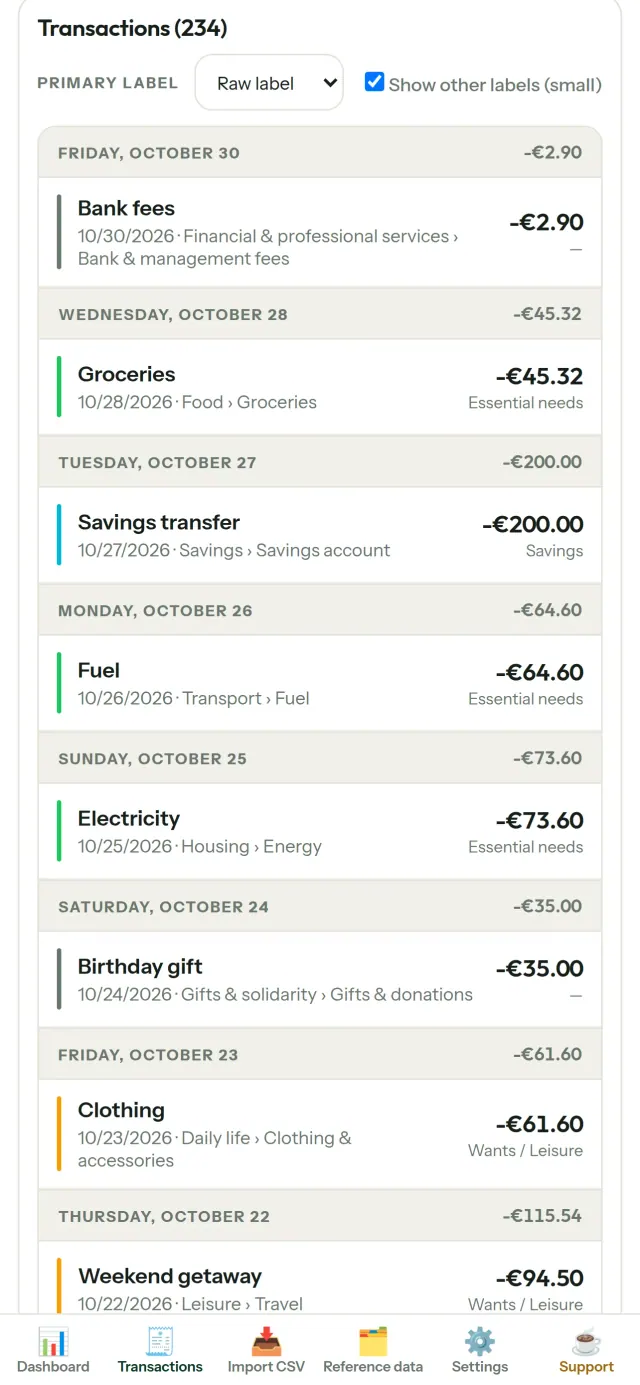
รับ CapBudget
ใช้ฟรีบน iPhone, Android เร็ว ๆ นี้
เร็ว ๆ นี้บนGoogle PlaySupport the project
ข้อความด้านล่างเป็นภาษาอังกฤษ ฉบับภาษาอังกฤษสำคัญกว่า
CapBudget is a budgeting app that I develop and maintain on my own, in my spare time alongside my day job. It is a local-first project: your data stays on your device.
No account, no ads, and no tracking.
If you find the app useful, the occasional coffee helps keep me motivated to keep releasing improvements. Buy me a coffee, and thank you for your support, whatever form it takes.
Privacy policy
ข้อความด้านล่างเป็นภาษาอังกฤษ ฉบับภาษาอังกฤษสำคัญกว่า
Last updated: 2026-10-06
CapBudget is a local-first budgeting app. The short version: nothing leaves your device, and we collect nothing.
What data the app handles
Everything you put into CapBudget (bank transactions, account references,
categories, categorization rules, budget targets, and app settings) is
stored only in a single SQLite database on your device
(household.sqlite), in the app's own private storage. There is
no account, no login, and no CapBudget server.
What we collect
Nothing. No analytics or usage tracking, no advertising or advertising identifiers, no crash or diagnostics reporting, no third-party SDKs that phone home, no network calls to any CapBudget-operated service (there is none). The app functions fully offline.
CSV imports
When you import a bank CSV export, the file is parsed on your device. It is not uploaded anywhere and is not retained by the app unless you choose “keep” during import.
Backups
You can export a backup from Settings. The backup is a file you control. CapBudget does not upload it and has no access to wherever you save it.
Permissions
The app requests no location, contacts, camera, microphone, or other sensitive permissions, only its own private storage.
Optional tips
CapBudget is free. If you wish, you can leave the developer an optional tip; a tip never unlocks anything. On iOS this uses Apple’s in-app purchase: the payment is processed entirely by Apple, and CapBudget never sees your payment details, your Apple ID or your purchase history, and receives no personal information. On Android and in a web browser a button opens an external donation page in your browser; that page is operated by a third party (Buy Me a Coffee) under its own privacy policy, and nothing from the app is sent to it.
Bank-account references
An account number/IBAN from your CSV is stored to group transactions by account, kept only on your device. In the UI only the last 4 characters are shown.
Contact form on this website
If you write to us through this site, we use your message and the email address you optionally give only to reply. Bot protection is provided by Cloudflare and email delivery by Resend.
Language choice on this website
When you choose a language, or when this site opens a page in your browser's language, it stores
one small functional cookie (pxl, a language code, one year) so that your choice is
remembered. If this site suggests a page in your browser's language and you close that suggestion,
your browser also keeps a local note (pxl-banner-off, in local storage, 30 days) so the
suggestion does not come back. Neither identifies anyone, neither is used for tracking or advertising,
and neither is shared. You can delete them in your browser at any time.
Website statistics
This website uses Cloudflare Web Analytics to count visits (pages viewed, country, browser type, loading speed). It sets no cookie, does not use local storage, does not fingerprint your device, does not follow you across sites and does not build a profile of you. Search engines (for example Google Search Console) give us aggregated search statistics, without any data about individual visitors. We use no advertising or other analytics service. None of this concerns the app itself, which collects nothing.
Children
CapBudget is a general-purpose finance tool and is not directed at children.
Changes
An updated policy will be published at this URL with a new date above.
Contact
Questions about privacy: capbudget-contact@pixeon.net
Support
ข้อความด้านล่างเป็นภาษาอังกฤษ ฉบับภาษาอังกฤษสำคัญกว่า
Last updated: 2026-10-06
CapBudget is a small independent app that keeps your budget on your device only: no account, no sign-up, no server. Answers to the most common questions are below.
We do our best to reply within a few days. To help us, tell us your device model, its system version and what you were doing. Please do not send real bank data or account numbers.
Where is my data stored?
Only on your device, in the app's own private storage. There is no CapBudget account and no CapBudget server, so nobody, including us, can see or recover your data. Details in the privacy policy.
How do I back up my data or move to a new phone?
- Open Settings → Backup & restore →
Download a backup. You get a
.sqlitefile: keep it wherever you like (Files, a cloud drive, your computer). - On the new device, install CapBudget, open Settings → Backup & restore, choose the file and tap Restore from a backup.
A restore replaces everything currently in the app.
I deleted the app or lost my phone: can my data be recovered?
Not unless you exported a backup: the data lives only on the device. Download a backup regularly.
How do I import my bank's transactions?
Export a CSV file from your bank's website, then open the Import CSV tab, choose the file, map its columns once, check the preview (duplicates and invalid dates are flagged) and confirm. Nothing is imported until you confirm.
Can transactions be categorized automatically?
Yes. In Reference data → Rules, create rules such as "label contains RENT → Housing / Rent". You can re-apply them to past transactions at any time; transactions you edited by hand are protected unless you explicitly choose to overwrite them.
How do I change the language, the theme or the start day of my budget month?
The language button is in the top bar. The theme and the day your budget month starts are in Settings. CapBudget is available in English, French, German, Spanish, Portuguese and Italian.
How do I remove the sample data?
Settings → Sample data → Remove sample data. Only the sample transactions are removed, never your own.
EXIF viewer ดูและล้างเมทาดาทารูปภาพ: ตำแหน่ง วันที่ กล้อง
ผลิตโดย PixeonVaultMarkEncrypted document vault. Watermark documents, remove metadata before sharing.