CapBudget: බජට්
බජට් සහ වියදම් ට්රැකර්, පවුලේ බජට් ඔබේ දුරකථනයේ, ගිණුමක් නැතිව.


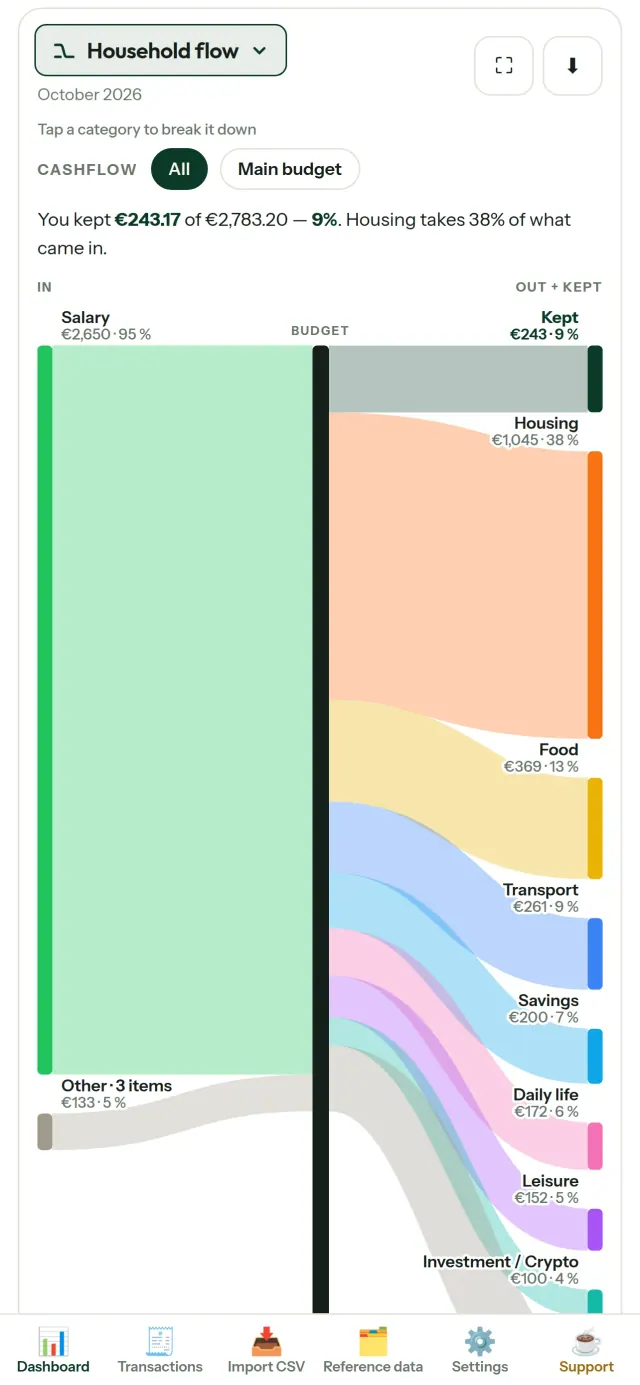
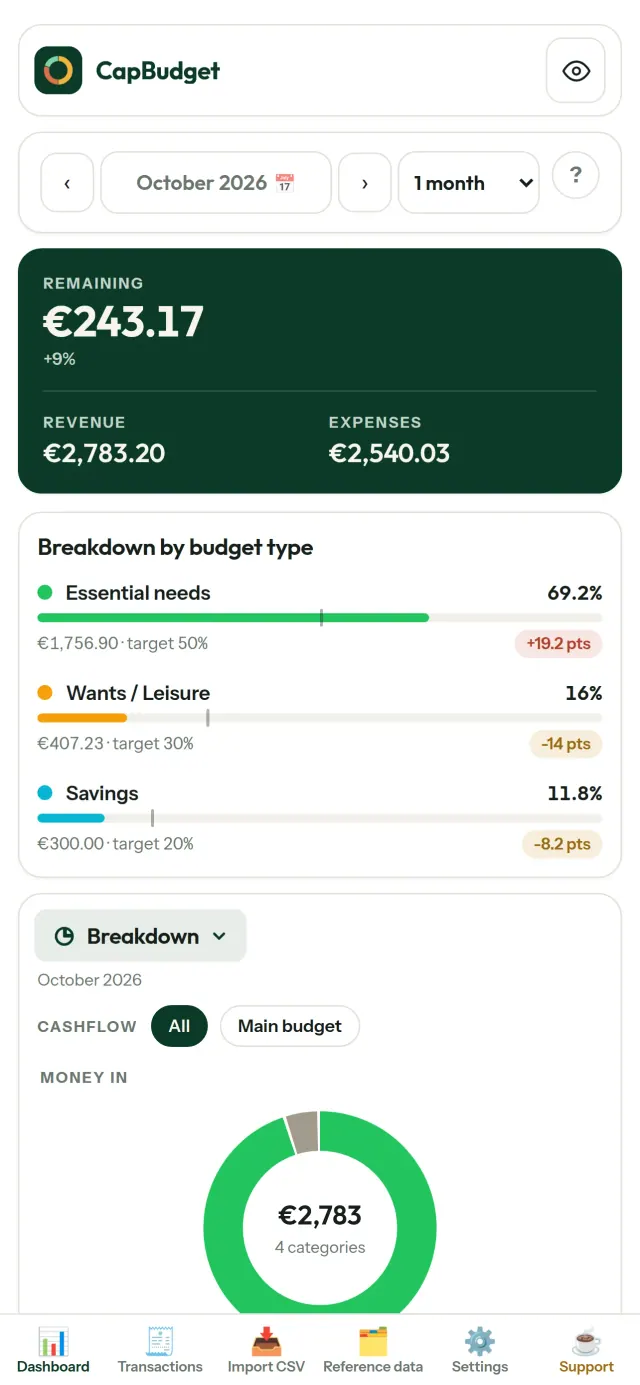
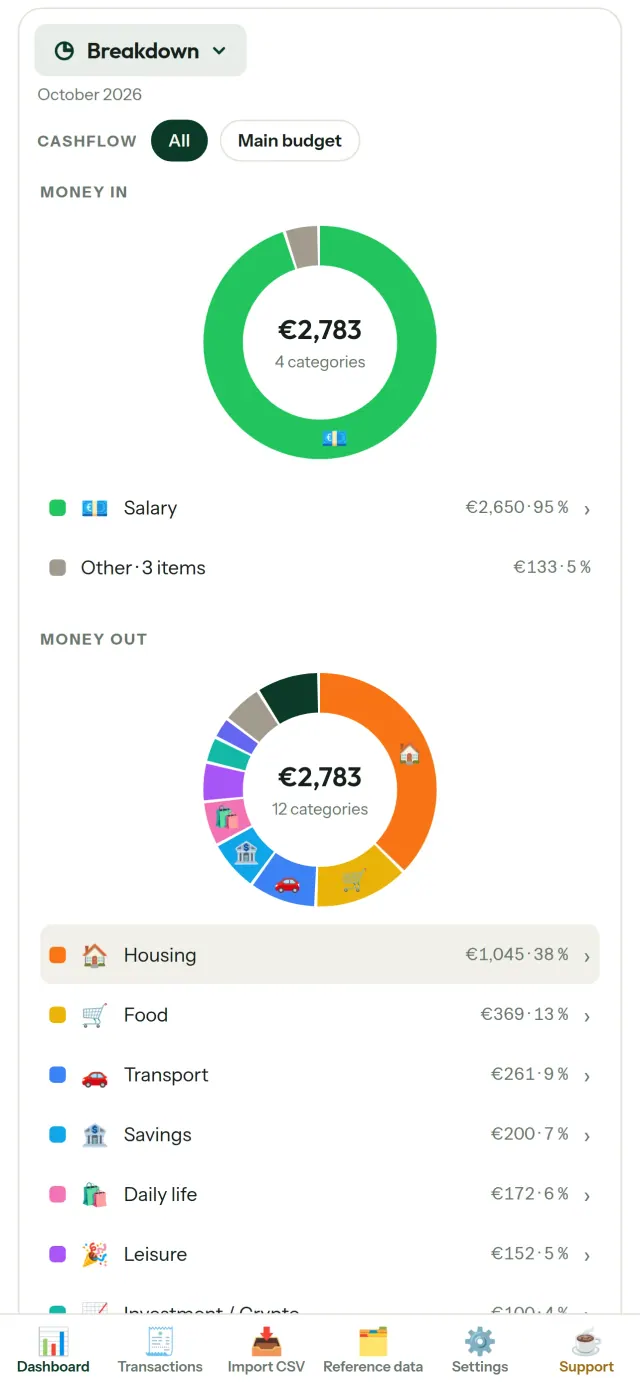
CapBudget යනු බජට් ප්ලෑනර් සහ වියදම් ට්රැකර් යෙදුමකි, ඔබේ පවුලේ බජට් සඳහා. සියල්ල ඔබේ උපාංගයේම පවතී: ගිණුමක් නැත, ලියාපදිංචියක් නැත, වලාකුළු ගිණුමක් නැත, දැන්වීම් නැත, ලුහුබැඳීම් නැත. යෙදුම අන්තර්ජාලයෙන් තොරව සම්පූර්ණයෙන් ක්රියා කරයි.
CapBudget කරන්නේ කුමක්ද
බැංකු ප්රකාශන ආනයනය කරන්න
ඕනෑම බැංකුවක CSV ගොනුවක් එක් කරන්න. තීරු එක් වරක් සම්බන්ධ කර, ආනයනය වන දේ පෙරදසුන් කර (අනුපිටපත් හඳුනාගැනීම සහ දැඩි දින පරීක්ෂාව සමඟ) තහවුරු කරන්න. කිසිවක් නිහඬව අනුමාන නොකෙරේ.
නීති මගින් වර්ග කරවන්න
සරල නීති සාදන්න (“කුලිය අඩංගු නම් → නිවාස / කුලිය”) එවිට CapBudget ඔබ වෙනුවෙන් ගනුදෙනු වර්ග කරයි. පැරණි ගනුදෙනුවලට ඕනෑම වේලාවක නැවත යොදන්න, ඔබේ අතින් කළ නිවැරදි කිරීම් කිසිදා උඩින් ලියැවෙන්නේ නැත.
ඔබේ මුදල් යන්නේ කොතැනටදැයි බලන්න
මාස පරාසය, මුදල් ගලනය හෝ ප්රවර්ගය අනුව පෙරන්න, ඕනෑම ප්රස්තාරයක් රූපයක් ලෙස නිර්යාත කරන්න.
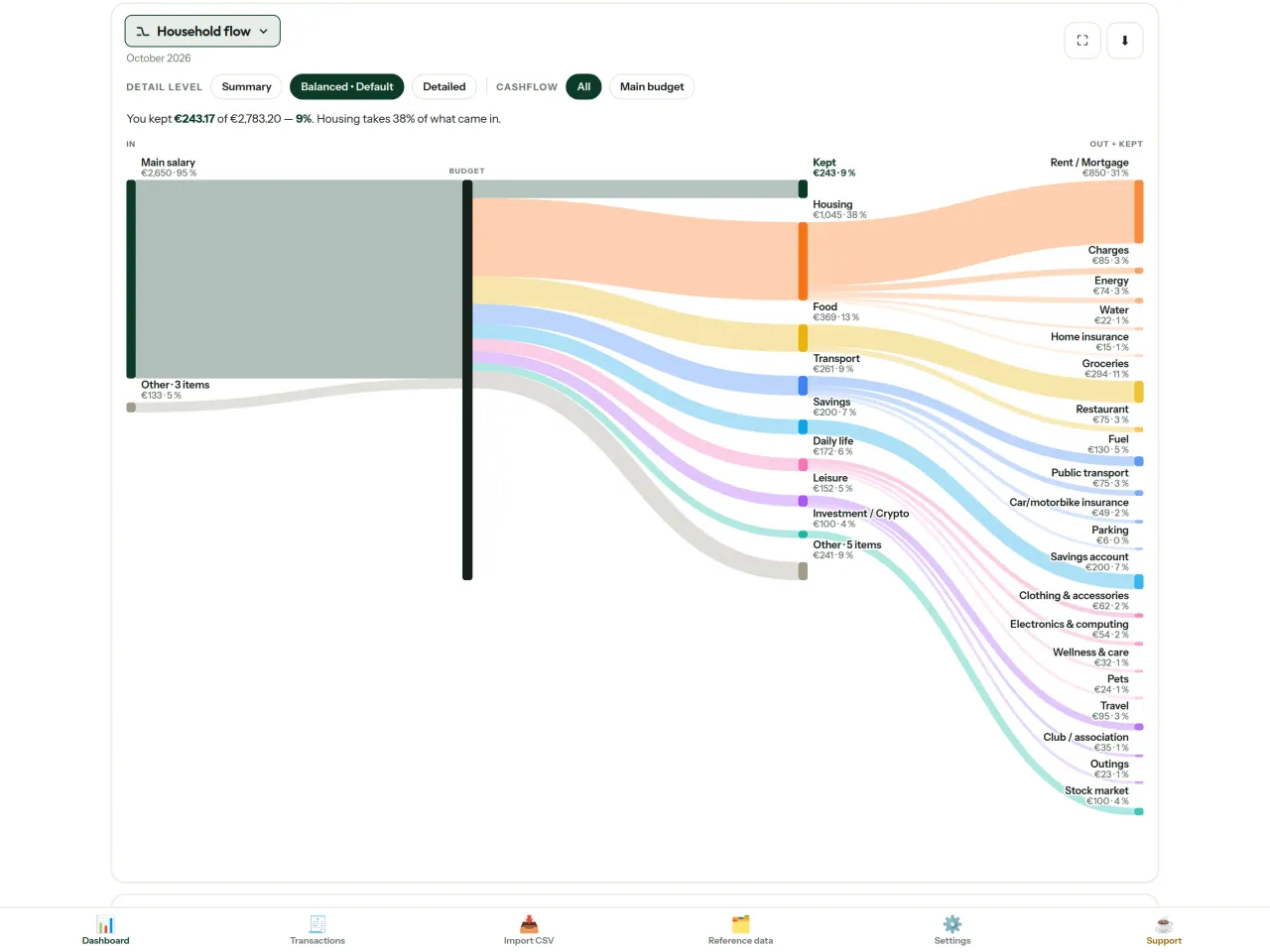
- පවුලේ ගලනය: ආදායමේ සිට ප්රවර්ග සහ ඉතිරිය දක්වා සැන්කි රූප සටහන
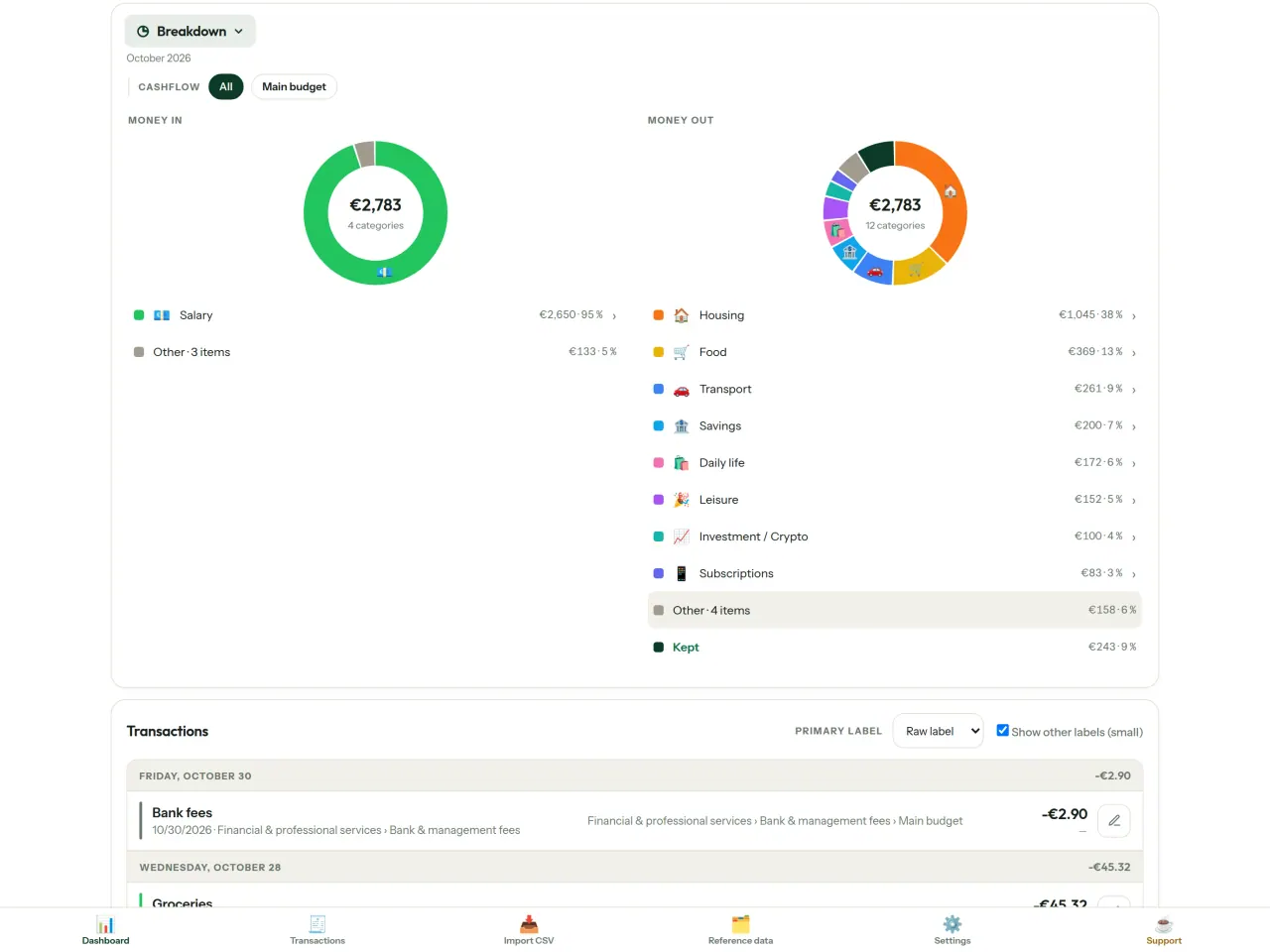
- බෙදීම: ප්රවර්ගය අනුව ආදායම සහ වියදම, විස්තර සඳහා තට්ටු කරන්න
- මුදල් යන්නේ කොතැනටද: වියදම් දිය ඇල්ල, විශාලම මුලින්
- ඉවර වන මාසය: ඉතිරිය කොපමණද, දිනෙන් දින
- ඔබේ වේගය: සෑම මාසයක්ම ස්ථාවර වියදමක් සමඟ සසඳයි
බජට් ඉලක්ක
ඔබේ මාසික වියදම 50/30/20 රීතිය (අවශ්යතා, ආශාවන්, ඉතුරුම්) සමඟ සසඳන්න, නැතහොත් ඔබේම ප්රතිශත සකසා ඉලක්කය සහ යථාර්ථය බලන්න.
ඔබේ මාසය, ඔබේ ආකාරයට
පඩිය ලැබෙන දිනයට ගැළපෙන පරිදි බජට් මාසය ඕනෑම දිනකින් ආරම්භ විය හැක. ප්රවර්ග, උප ප්රවර්ග සහ මුදල් ගලනය ඔබට ගැළපෙන සේ වෙනස් කරන්න.
දුරකථන අතර විකල්ප සමමුහුර්තය
සමමුහුර්තය පෙරනිමියෙන් අක්රියයි: එය කිසිදා සක්රිය නොකළොත් කිසිවක් වෙනස් නොවන අතර CapBudget 100% උපාංගයේම පවතී. සක්රිය කළ විට දුරකථන Pixeon පවත්වාගෙන යන relay සේවාදායකයක් හරහා වෙනස්කම් හුවමාරු කරයි. යැවීමට පෙර සියල්ල දුරකථනයේ ගුප්තකේතනය වන අතර යතුරු ඇත්තේ යුගල කළ දුරකථනවල පමණි, එබැවින් relay ට ඔබේ දත්ත කියවිය නොහැක. එයට පෙනෙන්නේ පණිවිඩ ප්රමාණ සහ වේලාවන් වැනි තාක්ෂණික තොරතුරු පමණි. QR කේතයක් ස්කෑන් කිරීමෙන් දුරකථන යුගල කරන්න.
ඔබේ දත්ත ඔබේම වේ
සියල්ල ඔබේ උපාංගයේ තනි ගොනුවක ඇත. ඕනෑම වේලාවක උපස්ථයක් නිර්යාත කර කැමති තැනක තබාගන්න. සමමුහුර්තය ඇරඹුවහොත් පමණක් දත්ත උඩුගත වේ.
ලා සහ අඳුරු තේමා සමඟ.
මෙය කා සඳහාද
- බැංකුවේ CSV අපනයනයෙන් අයවැය නිරීක්ෂණය කිරීමට කැමති පවුල්.
- වියදම් නිරීක්ෂණයට බැංකු පිවිසුම් තොරතුරු දීමට හෝ ගිණුමක් සෑදීමට අකමැති අය.
- දත්ත කාන්දු වීම්වලින් වෙහෙසට පත්ව තම මූල්ය දත්ත පාලනය නැවත ලබාගැනීමට කැමති අය: මෙහි ඒවා කිසි විටෙක දුරකථනයෙන් ඉවත් නොවන බැවින් සේවාදායකයකින් කාන්දු වීමට කිසිවක් නැත.
- 50/30/20 රීතිය අනුගමනය කරන හෝ අයවැය මාසය වැටුප ලැබෙන දිනයෙන් ආරම්භ වන අය.
CapBudget තෝරාගත යුත්තේ ඇයි
- පළමුව දේශීය: ගිණුම් නැත, වලාකුළු නැත, දැන්වීම් නැත, ලුහුබැඳීම් නැත. ඔබේ ගනුදෙනු ඔබේ උපාංගයේ එක ගොනුවක පවතී.
- සම්පූර්ණයෙන්ම නොබැඳිව ක්රියා කරන අතර නොමිලේ.
- ඕනෑම බැංකුවක CSV ආනයනය කරයි, අනුපිටපත් හඳුනාගැනීම සහ දැඩි දින පරීක්ෂාව සමඟ. වර්ගීකරණ රීති ඔබේ අතින් කළ නිවැරදි කිරීම් කිසිවිටෙක නොපිරිසිදු කරයි.
යෙදුම තවම නොකරන දේ
- බැංකුව සමඟ ස්වයංක්රීය සමමුහුර්තය තවම නැත. ඔබ ඔබේ බැංකුවේ CSV අපනයනය ආනයනය කරයි.
- ඔබේ දුරකථන අතර සමමුහුර්ත කිරීම විකල්පයකි. එය අන්තයේ සිට අන්තය දක්වා සංකේතනය කර ඇති අතර දුරකථන 5ක් දක්වා සහාය දක්වයි; ක්ලවුඩ් ගිණුමක් හෝ වෙබ් අනුවාදයක් නැත.
Pixeon හි මූලධර්මය. Pixeon යෙදුම් පළමුව දේශීයයි: ගිණුම් නැත, ලුහුබැඳීම් නැත, ඔබේ දත්ත ඔබේ දුරකථනයේම පවතී. යෙදුමක් කවදා හෝ ජාලයට සම්බන්ධ වේ නම්, එය සිදුවන්නේ අවශ්ය විශේෂාංගය ඔබම සක්රිය කළ විට පමණක් වන අතර, එයට පෙර රහස්යතා ප්රතිපත්තිය යාවත්කාලීන කෙරේ.
CapBudget ක්රියාත්මක වන ආකාරය බලන්න.
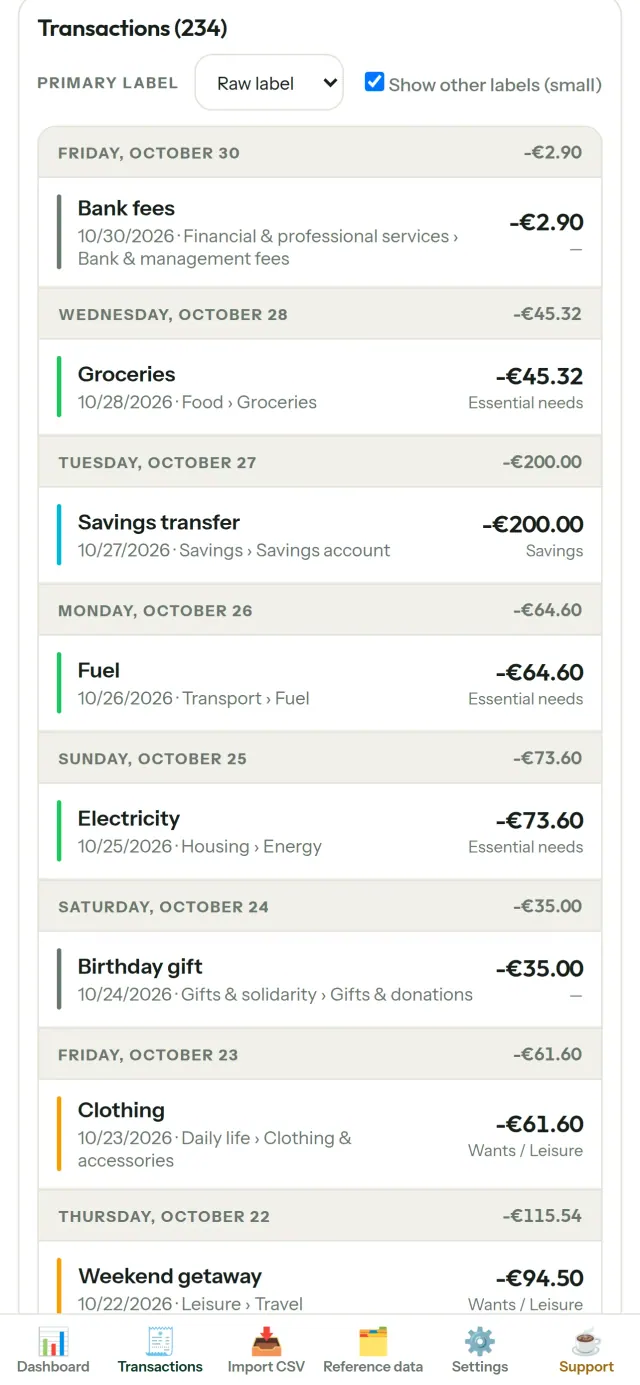
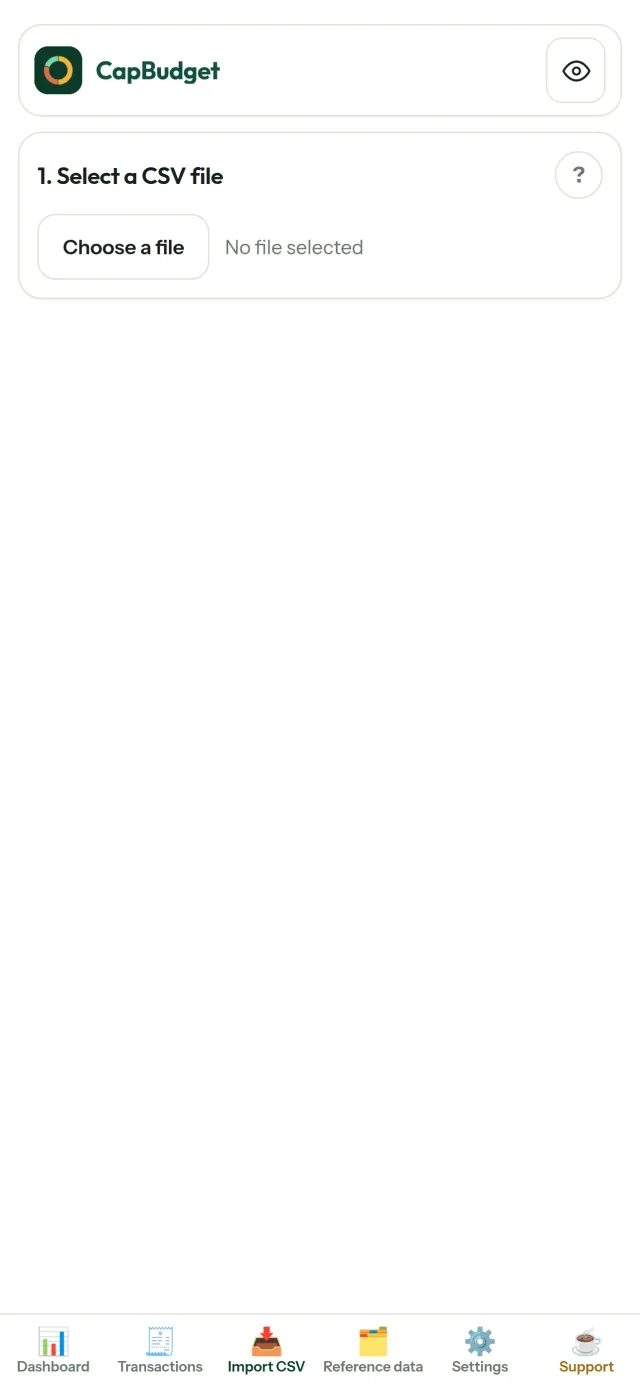
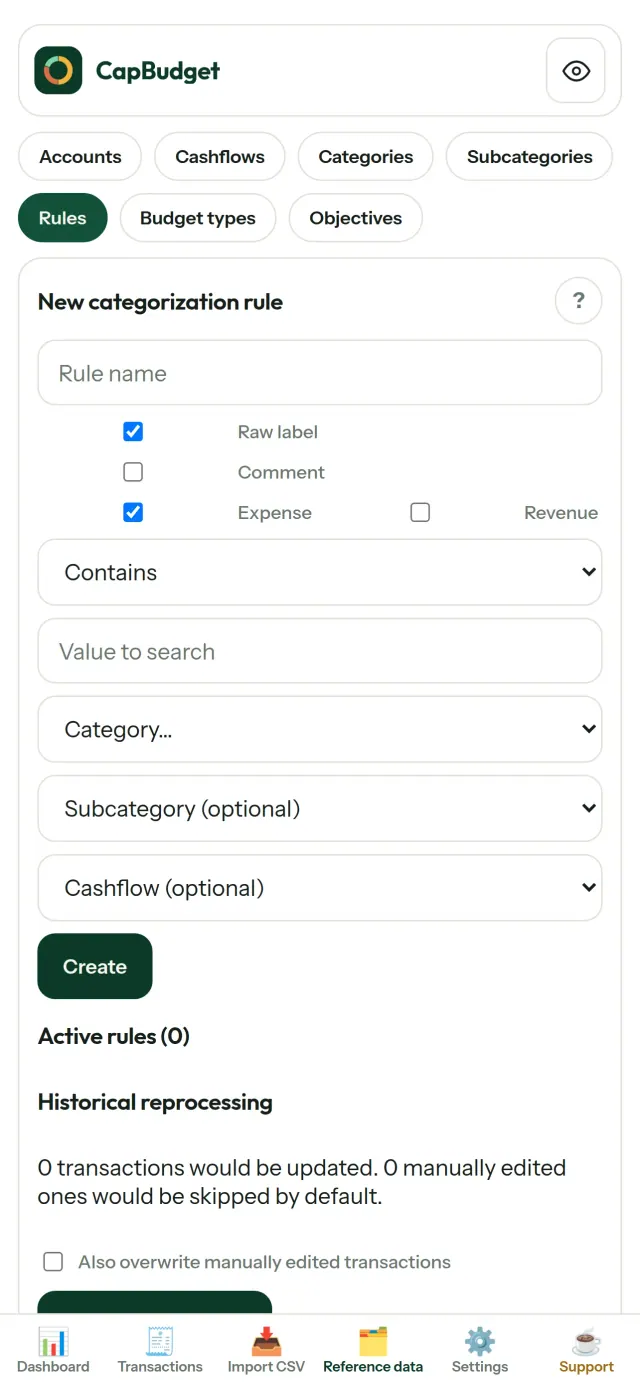
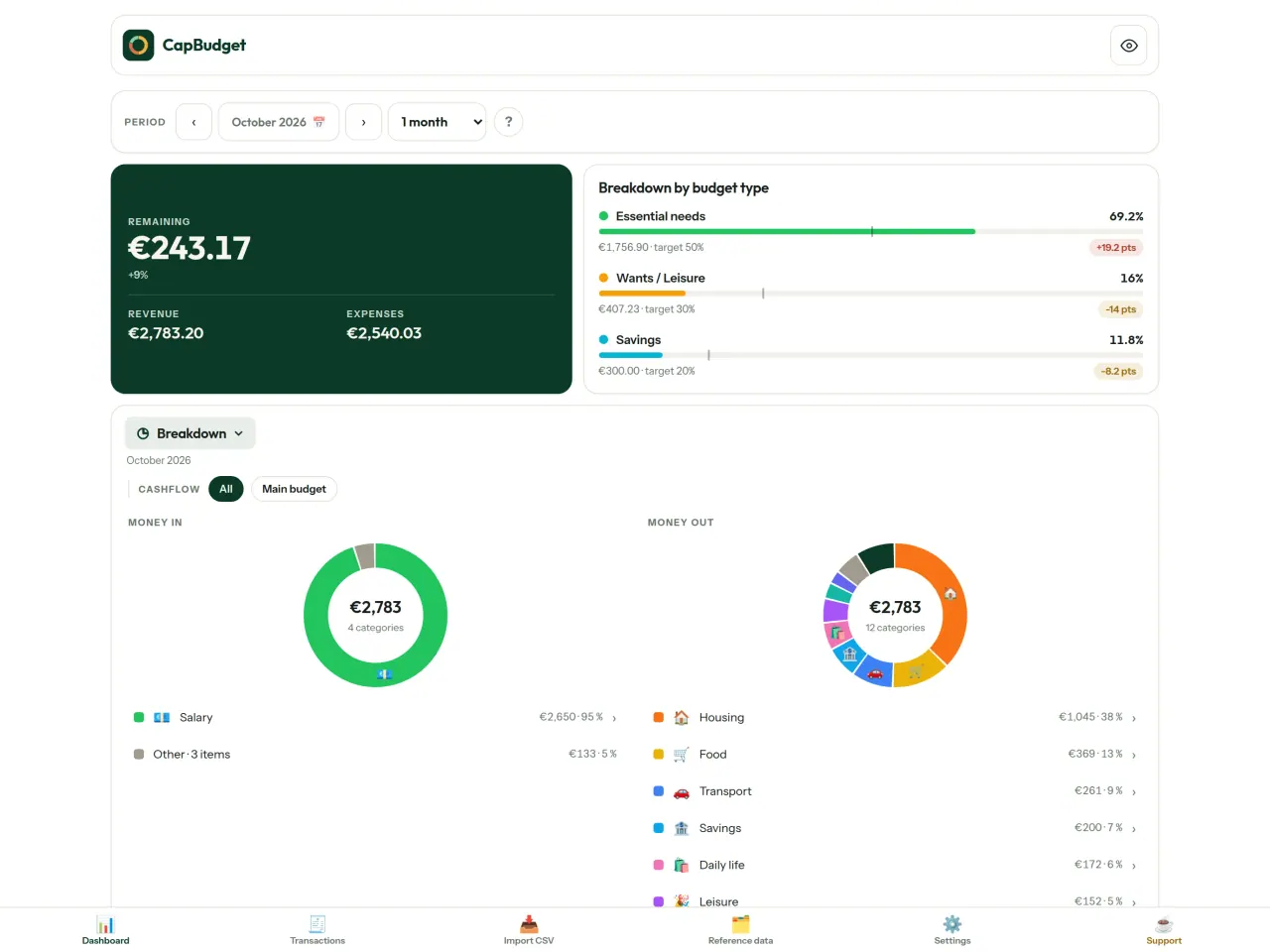
CapBudget ලබාගන්න.
iPhone සහ Android හි නොමිලේ.
Privacy policy
පහත පෙළ ඉංග්රීසියෙන් ඇත. ඉංග්රීසි අනුවාදය බලපවත්වයි.
Last updated: 2026-11-03
CapBudget is a local-first budgeting app. The short version: nothing leaves your device unless you turn on sync between your own phones, and even then it is end-to-end encrypted. We collect nothing.
What data the app handles
Everything you put into CapBudget (bank transactions, account references,
categories, categorization rules, budget targets, and app settings) is
stored only in a single SQLite database on your device
(household.sqlite), in the app's own private storage. There is
no account and no login.
What we collect
Nothing. No analytics or usage tracking, no advertising or advertising identifiers, no crash or diagnostics reporting, no third-party SDKs that phone home. Without sync the app makes no network calls to any Pixeon service and functions fully offline.
Sync between your phones (optional)
Sync is off by default. If you link two or more phones in Settings > Sync, changes travel through a relay server run by Pixeon on Cloudflare. Everything is encrypted on your phone with a key that only your linked phones hold (it is exchanged by QR code, phone to phone, and never sent to the server). The relay stores only encrypted messages and an encrypted copy of the budget for a phone that joins; it cannot read them. It necessarily sees technical metadata: random channel and device identifiers, message sizes and times, and IP addresses (used for rate limiting, not logged). Removing a phone changes the key; stopping sync on every phone deletes the channel, and inactive channels are purged. No account, name, e-mail or phone number is involved.
CSV imports
When you import a bank CSV export, the file is parsed on your device. It is not uploaded anywhere and is not retained by the app unless you choose “keep” during import.
Backups
You can export a backup from Settings. The backup is a file you control. CapBudget does not upload it and has no access to wherever you save it.
Permissions
The app requests no location, contacts, microphone, or other sensitive permissions. The camera is used only if you scan a sync QR code; the image is processed on the phone and never stored or sent.
Optional tips
CapBudget is free. If you wish, you can leave the developer an optional tip; a tip never unlocks anything. In the iOS and Android apps this uses the store’s in-app purchase (Apple or Google Play): the payment is processed entirely by the store under its own terms and privacy policy, and CapBudget never sees your payment details, your account or your purchase history, and receives no personal information. The Android app declares the Google Play billing permission for this. In a web browser a button opens an external donation page in your browser; that page is operated by a third party under its own privacy policy, and nothing from the app is sent to it.
Bank-account references
An account number/IBAN from your CSV is stored to group transactions by account, kept only on your device. In the UI only the last 4 characters are shown.
Contact form on this website
If you write to us through this site, we use your message and the email address you optionally give only to reply. Bot protection is provided by Cloudflare and email delivery by Resend.
Language choice on this website
When you choose a language, or when this site opens a page in your browser's language, it stores
one small functional cookie (pxl, a language code, one year) so that your choice is
remembered. If this site suggests a page in your browser's language and you close that suggestion,
your browser also keeps a local note (pxl-banner-off, in local storage, 30 days) so the
suggestion does not come back. Neither identifies anyone, neither is used for tracking or advertising,
and neither is shared. You can delete them in your browser at any time.
Website statistics
This website uses Cloudflare Web Analytics to count visits (pages viewed, country, browser type, loading speed). It sets no cookie, does not use local storage, does not fingerprint your device, does not follow you across sites and does not build a profile of you. Search engines (for example Google Search Console) give us aggregated search statistics, without any data about individual visitors. Our own web server also counts the pages it serves: for each page it keeps the page address, the site or social network that sent you (only its name, or the campaign tag written in the link), the country, the type of device and whether the request came from a robot. It keeps no IP address, no identifier and no cookie, and these counts are anonymous. We use no advertising or other analytics service. None of this concerns the app itself, which collects nothing.
Delete your data
CapBudget keeps your data on your phone only. To delete it, open Settings and use Delete all my data (it erases the database and every preference, and the app starts again as on first launch), or uninstall the app. If you used sync, open Settings > Sync and choose Stop syncing on this phone on every linked phone: when the last linked phone stops, the encrypted channel and the encrypted copy of the budget are deleted from the relay. Delete all my data also leaves sync first. If a phone was offline, or the app was uninstalled without stopping sync, the channel is deleted automatically after 90 days without activity. For any request, write to the support e-mail below.
Children
CapBudget is a general-purpose finance tool and is not directed at children.
Changes
An updated policy will be published at this URL with a new date above.
Contact
Questions about privacy: capbudget-contact@pixeon.net
සහාය
අවසන් වරට යාවත්කාලීන කළේ: 2026-10-08
CapBudget යනු ඔබේ අයවැය ඔබේ උපාංගයේ පමණක් තබා ගන්නා කුඩා ස්වාධීන යෙදුමකි: ගිණුමක්, ලියාපදිංචි වීමක් හෝ සේවාදායකයක් නැත. වඩාත්ම සාමාන්ය ප්රශ්නවලට පිළිතුරු පහතින් ඇත.
දින කිහිපයක් ඇතුළත පිළිතුරු දීමට අපි උපරිම උත්සාහය දරමු. අපට උපකාර කිරීමට, ඔබේ උපාංගයේ ආකෘතිය, එහි පද්ධති අනුවාදය සහ ඔබ කරමින් සිටි දේ සඳහන් කරන්න. සැබෑ බැංකු දත්ත හෝ ගිණුම් අංක එවන්න එපා.
මගේ දත්ත ගබඩා කර ඇත්තේ කොහේද?
ඔබේ උපාංගයේ පමණක්, යෙදුමේම පෞද්ගලික ගබඩාවේ. CapBudget ගිණුමක් හෝ CapBudget සේවාදායකයක් නැති නිසා, අප ඇතුළුව කිසිවෙකුට ඔබේ දත්ත බැලීමට හෝ නැවත ලබා ගැනීමට නොහැක. විස්තර පෞද්ගලිකත්ව ප්රතිපත්තියේ ඇත.
මගේ දත්ත උපස්ථ කරන්නේ හෝ නව දුරකථනයකට ගෙන යන්නේ කෙසේද?
- Settings → Backup & restore → Download a backup විවෘත කරන්න. ඔබට
.sqliteගොනුවක් ලැබේ: එය ඔබට කැමති ඕනෑම තැනක තබා ගන්න (Files, වලාකුළු ධාවකයක් හෝ ඔබේ පරිගණකය). - නව උපාංගයේ CapBudget ස්ථාපනය කර, Settings → Backup & restore විවෘත කර, ගොනුව තෝරා Restore from a backup තට්ටු කරන්න.
ප්රතිසාධනයක් මඟින් යෙදුමේ දැනට ඇති සියල්ල ප්රතිස්ථාපනය කරයි.
මට CapBudget දුරකථන දෙකක භාවිත කළ හැකිද (සමමුහුර්ත කිරීම)?
ඔව්, එය විකල්පයකි. පළමු දුරකථනයේ සැකසුම් → සමමුහුර්ත කිරීම විවෘත කර දුරකථනයකට ආරාධනා කරන්න තට්ටු කරන්න. දෙවන දුරකථනයේ අයවැයකට එක්වන්න තට්ටු කර QR කේතය ස්කෑන් කරන්න. දුරකථන දෙකෙහිම ඉලක්කම් 4ක කේතයක් පෙන්වයි: ඒවා ගැළපේ නම්, නව දුරකථනයට අවසර දෙන්න. ඉන්පසු ඔබේ වෙනස්කම් දුරකථන අතර සමමුහුර්ත වේ (දුරකථන 5ක් දක්වා). සියල්ල දුරකථන තුළම සංකේතනය කර ඇත: අතරමැදි සේවාදායකය කියවිය නොහැකි දත්ත පමණක් රැගෙන යයි. QR කේතය මිනිත්තු 5කින් කල් ඉකුත් වේ. දුරකථනයක් ඉවත් කිරීමට, සැකසුම් → සමමුහුර්ත කිරීම විවෘත කර එය අසල ඇති ඉවත් කරන්න තට්ටු කරන්න; එවිට සංකේතන යතුර වෙනස් වේ. විස්තර පෞද්ගලිකත්ව ප්රතිපත්තියේ ඇත.
මම යෙදුම මකා දැමුවහොත් හෝ මගේ දුරකථනය නැති වුවහොත්, මගේ දත්ත නැවත ලබා ගත හැකිද?
ඔබ උපස්ථයක් නිර්යාත කර නොමැති නම් නොහැක: දත්ත තිබෙන්නේ උපාංගයේ පමණි. නිතිපතා උපස්ථයක් බාගත කර ගන්න.
මගේ බැංකුවේ ගනුදෙනු ආනයනය කරන්නේ කෙසේද?
ඔබේ බැංකුවේ වෙබ් අඩවියෙන් CSV ගොනුවක් නිර්යාත කර, Import CSV ටැබය විවෘත කර, ගොනුව තෝරා, එහි තීරු එක් වරක් සිතියම්ගත කර, පෙරදසුන පරීක්ෂා කර (අනුපිටපත් සහ වලංගු නොවන දින සලකුණු කර ඇත) තහවුරු කරන්න. ඔබ තහවුරු කරන තුරු කිසිවක් ආනයනය නොවේ.
ගනුදෙනු ස්වයංක්රීයව වර්ගීකරණය කළ හැකිද?
ඔව්. Reference data → Rules තුළ, "label contains RENT → Housing / Rent" වැනි නීති සාදන්න. ඔබට ඕනෑම වේලාවක ඒවා අතීත ගනුදෙනුවලට නැවත යෙදිය හැක; ඔබ අතින් සංස්කරණය කළ ගනුදෙනු ඔබ ඒවා උඩින් ලිවීමට පැහැදිලිව තෝරා නොගන්නා තුරු ආරක්ෂිත වේ.
භාෂාව, තේමාව හෝ මගේ අයවැය මාසය ආරම්භ වන දිනය වෙනස් කරන්නේ කෙසේද?
භාෂා බොත්තම ඉහළ තීරුවේ ඇත. තේමාව සහ ඔබේ අයවැය මාසය ආරම්භ වන දිනය Settings තුළ ඇත. CapBudget ඉංග්රීසි, ප්රංශ, ජර්මන්, ස්පාඤ්ඤ, පෘතුගීසි සහ ඉතාලි භාෂාවලින් ලබා ගත හැක.
නියැදි දත්ත ඉවත් කරන්නේ කෙසේද?
Settings → Sample data → Remove sample data. ඉවත් කරන්නේ නියැදි ගනුදෙනු පමණි, ඔබේම ගනුදෙනු කිසිවිටෙක නොවේ.
ව්යාපෘතියට සහාය වන්න
CapBudget නොමිලේ සහ දැන්වීම් රහිතව පවතී. එය ඔබට ප්රයෝජනවත් නම්, එහි සංවර්ධනයට සහාය විය හැක (අත්යවශ්ය නොවේ):
Buy Me a CoffeeEXIF නරඹන්නා, මෙටාඩේටා පිරිසිදු කිරීම: ස්ථානය, දිනය. ඔබේ දුරකථනයේ.
Pixeon වෙතින් තවත්VaultMarkEncrypted document vault. Watermark documents, remove metadata before sharing.
Pixeon වෙතින් තවත්Little RelayBreastfeeding, sleep and starting solids tracker. No account, works offline.
Pixeon වෙතින් තවත්MenuloopPlan the week's meals, build your grocery list and keep recipes with photos.