CapBudget: બજેટ
ખર્ચ ટ્રેકર અને ફેમિલી બજેટ પ્લાનર, ફોનમાં, ઑફલાઇન.


CapBudget એ તમારા ઘર અને પરિવાર માટેનું બજેટ પ્લાનર અને ખર્ચ ટ્રેકર છે, જે ફેમિલી બજેટ ગોઠવવામાં મદદ કરે છે. બધું તમારા ઉપકરણમાં જ રહે છે: કોઈ એકાઉન્ટ, સાઇન-અપ, ક્લાઉડ એકાઉન્ટ, જાહેરાતો કે ટ્રેકિંગ નહીં, અને તે સંપૂર્ણ ઑફલાઇન કાર્ય કરે છે.
બજેટ, ખર્ચ ટ્રેકર, ફેમિલી બજેટ અને બજેટ પ્લાનર સાથે તમારા માસિક પૈસા સરળતાથી સમજો. આ એપ ખર્ચ અને આવકને સ્પષ્ટ રીતે ગોઠવે છે, જેથી તમારો પરિવાર પોતાના પૈસાનું આયોજન કરી શકે.
CapBudget શું કરે છે
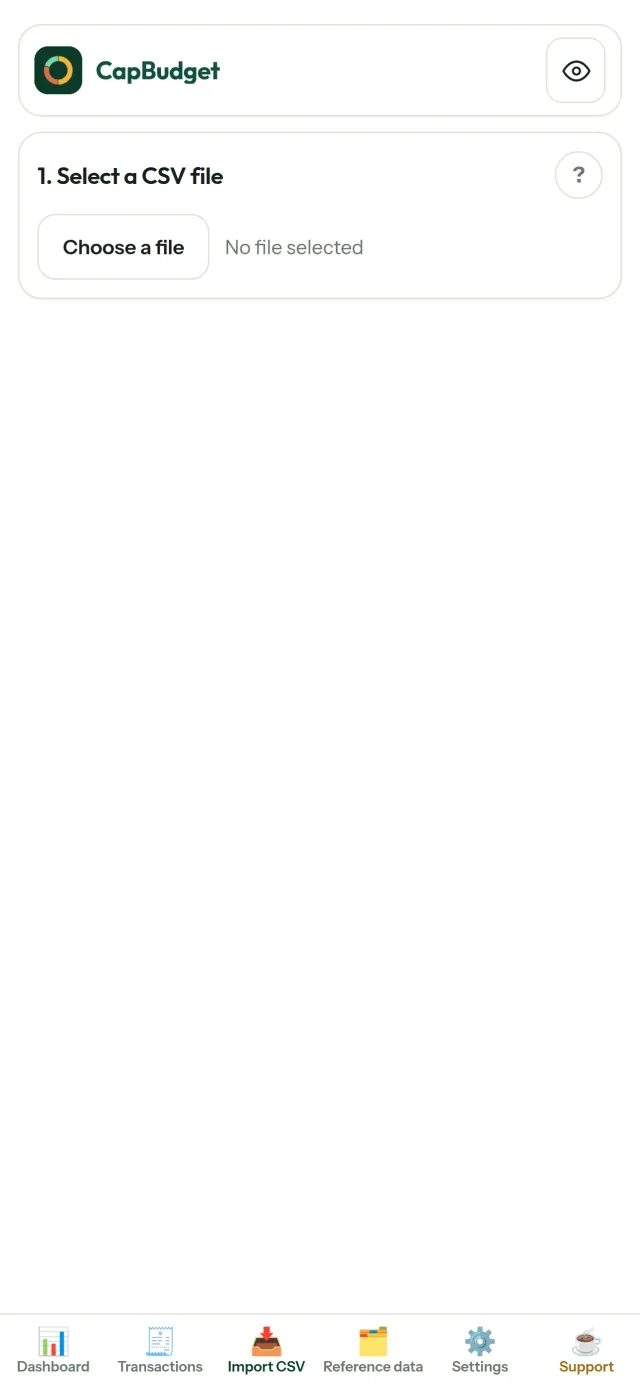
બેંકના નિકાસ આયાત કરો
કોઈપણ બેંકની CSV ફાઇલ લાવો. તેના કૉલમ એક વાર ગોઠવો, આયાત થનાર માહિતીનું પૂર્વદર્શન જુઓ, ડુપ્લિકેટ શોધ અને કડક તારીખ ચકાસણી સાથે, પછી ખાતરી કરો. કંઈ પણ ચૂપચાપ અનુમાનથી ભરાતું નથી.
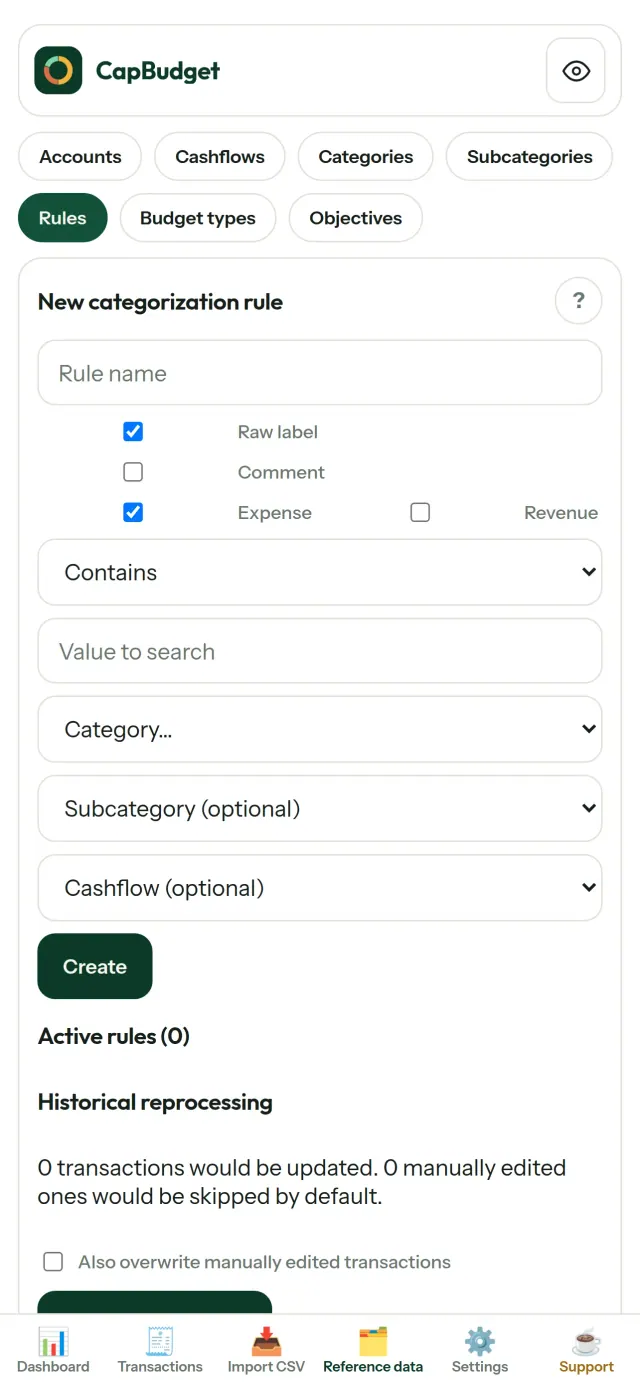
નિયમોને ગોઠવણી કરવા દો
સરળ નિયમો બનાવો ("RENT હોય → ઘર / ભાડું") અને CapBudget તમારા વ્યવહારોને આપમેળે કેટેગરીમાં ગોઠવે છે. જ્યારે ઇચ્છો ત્યારે જૂના વ્યવહારો પર નિયમો ફરી ચલાવો, તમારા હાથથી કરેલા સુધારા ક્યારેય બદલાતા નથી.
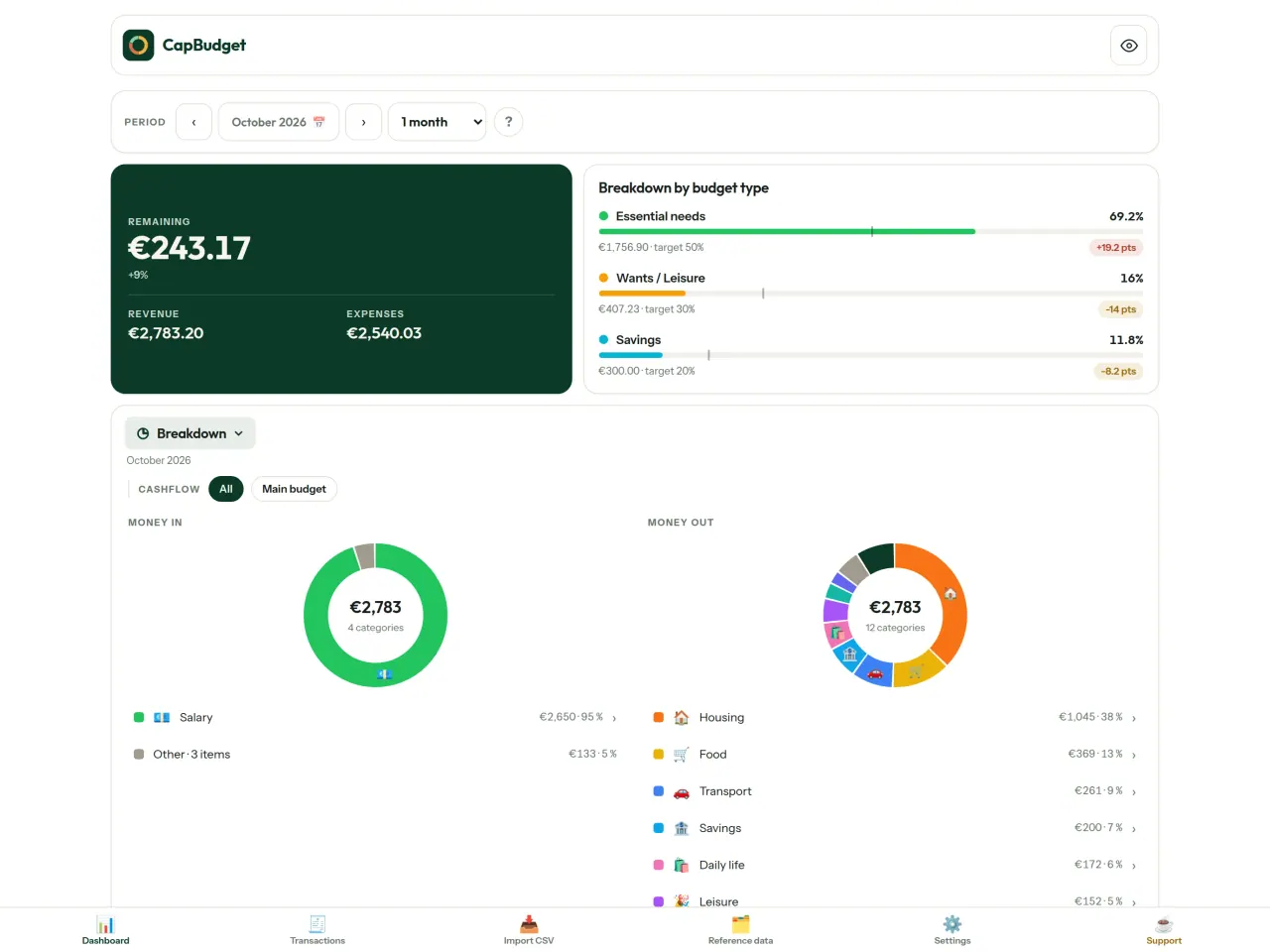
તમારા પૈસા ક્યાં જાય છે તે જુઓ
મહિનાની શ્રેણી, કૅશફ્લો અથવા કેટેગરી પ્રમાણે ફિલ્ટર કરો અને કોઈપણ ચાર્ટને છબી તરીકે નિકાસ કરો.
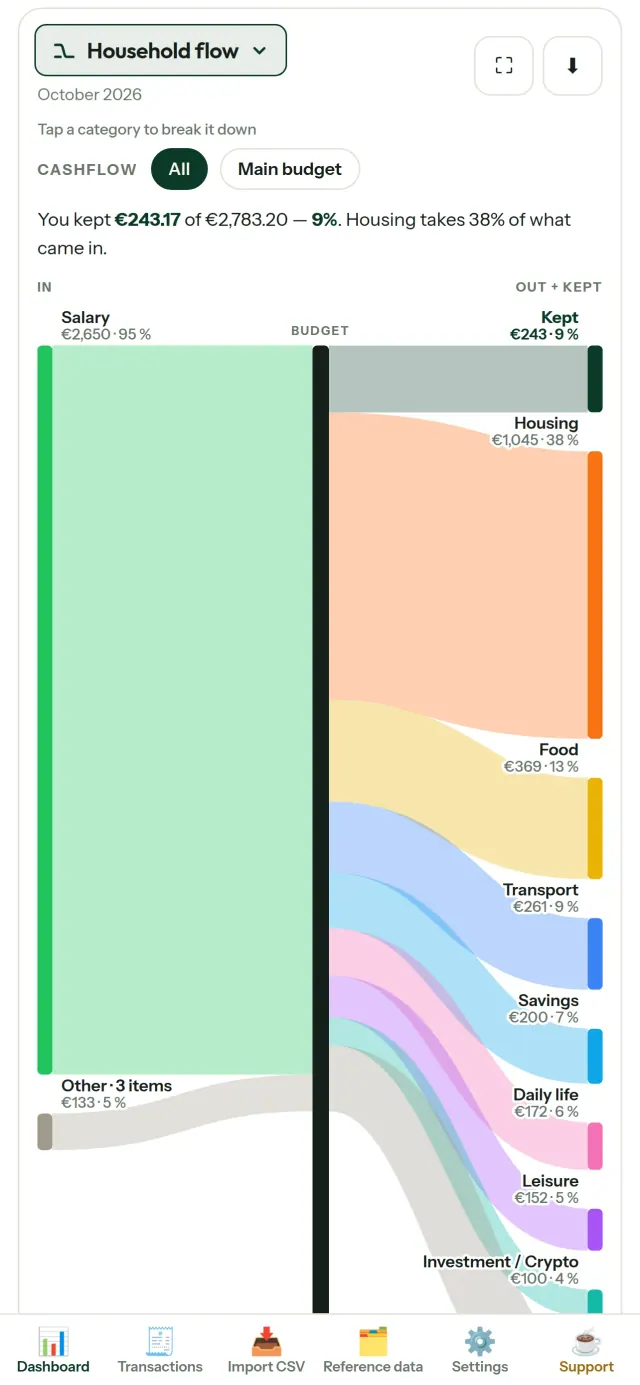
- ઘરનો પ્રવાહ: આવકથી કેટેગરી અને પછી બાકી રકમ સુધીનો Sankey આલેખ
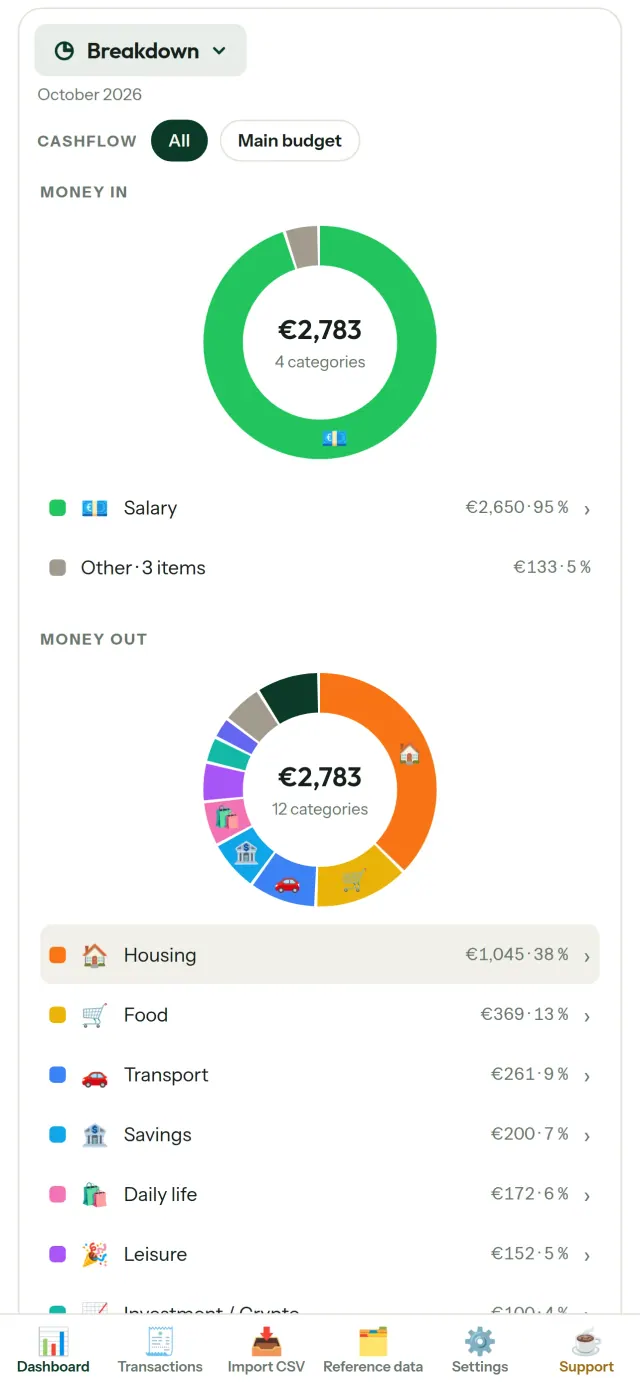
- વિભાજન: કેટેગરી પ્રમાણે આવક અને ખર્ચ, વધુ વિગતો માટે ટૅપ કરો
- પૈસા ક્યાં જાય છે: સૌથી મોટા ખર્ચથી શરૂ થતો ખર્ચ પ્રવાહ
- ખાલી થતો મહિનો: દરરોજ કેટલી રકમ બાકી રહે છે
- તમારી ગતિ: દરેક મહિનાની સરખામણી સ્થિર ખર્ચ ગતિ સાથે
બજેટ લક્ષ્યો
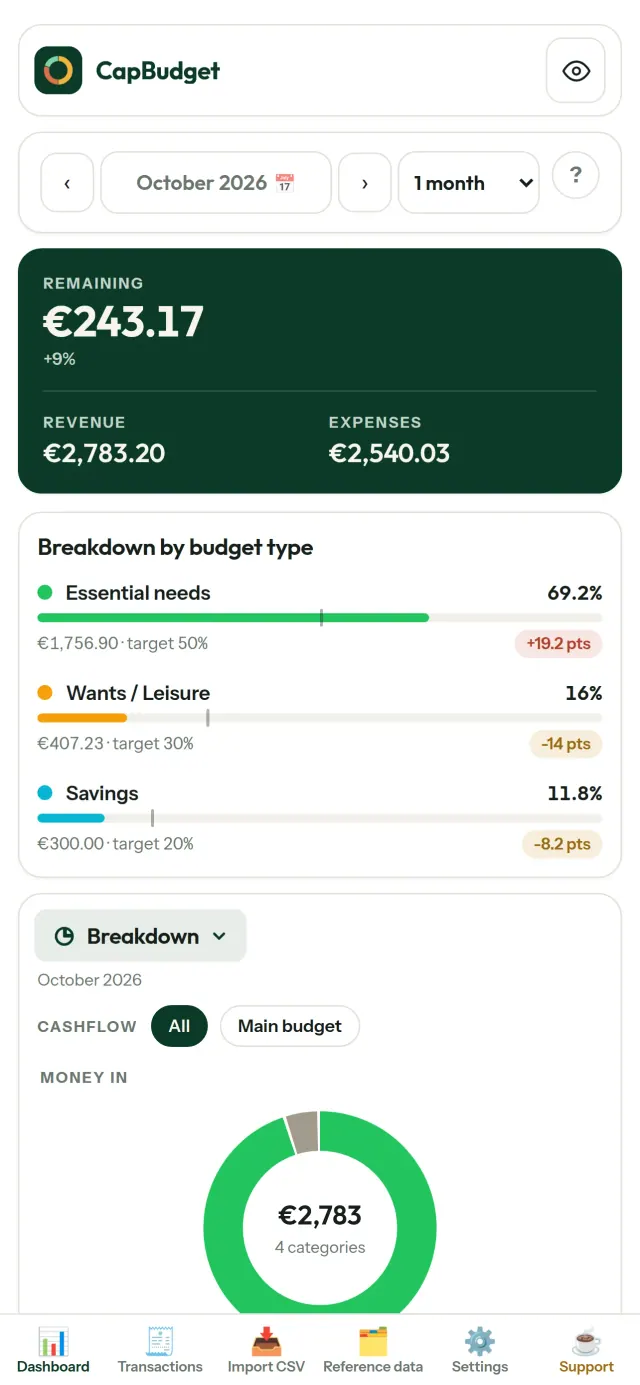
50/30/20 નિયમ, જરૂરિયાતો, ઇચ્છાઓ અને બચત, સાથે તમારા માસિક ખર્ચની સરખામણી કરો અથવા તમારા પોતાના ટકા નક્કી કરો અને લક્ષ્ય તથા વાસ્તવિકતા જુઓ.
તમારો મહિનો, તમારી રીત
તમારો બજેટ મહિનો કોઈપણ દિવસે શરૂ થઈ શકે છે, જેથી તે તમારો પગાર ખરેખર આવે ત્યારે સાથે મેળ ખાય. કેટેગરી, ઉપકેટેગરી અને કૅશફ્લો તમારી રીતે ગોઠવો.
વૈકલ્પિક સિંક તમારા ફોન વચ્ચે
સિંક ડિફૉલ્ટ રૂપે બંધ હોય છે: જો તમે તેને ક્યારેય ચાલુ ન કરો, તો કંઈ બદલાતું નથી અને CapBudget 100% લોકલ રહે છે. જો તમે તેને ચાલુ કરો, તો તમારા ફોન Pixeon દ્વારા ચલાવવામાં આવતા રિલે સર્વર મારફતે તેમના ફેરફારોની આપલે કરે છે. મોકલતા પહેલાં તમારા ફોન પર બધું એન્ક્રિપ્ટ થાય છે અને ફક્ત તમારા જોડાયેલા ફોન પાસે જ કીઓ હોય છે, તેથી રિલે તમારો ડેટા વાંચી શકતું નથી. તે ફક્ત સંદેશાના કદ અને સમય જેવી તકનીકી માહિતી જ જુએ છે. ફોનને QR સ્કેન કરીને જોડવામાં આવે છે.
તમારો ડેટા તમારો જ રહે
બધું તમારા ઉપકરણની એક જ ફાઇલમાં રહે છે. જ્યારે ઇચ્છો ત્યારે બેકઅપ નિકાસ કરો અને જ્યાં ગમે ત્યાં રાખો. તમે સિંક ચાલુ ન કરો ત્યાં સુધી કંઈપણ અપલોડ થતું નથી.
લાઇટ અને ડાર્ક થીમ સાથે.
તે કોના માટે છે
- પરિવારો અને ઘરો જે પોતાની બેંકના CSV એક્સપોર્ટથી બજેટ પર નજર રાખવા માગે છે.
- જે લોકો ખર્ચ પર નજર રાખવા માટે બેંકના લૉગિન વિગતો આપવા અથવા ખાતું બનાવવા માગતા નથી.
- ડેટા લીકથી થાકેલા લોકો જે પોતાના નાણાકીય ડેટા પર નિયંત્રણ પાછું મેળવવા માગે છે: અહીં તે ક્યારેય ફોન છોડતો નથી, તેથી સર્વરમાંથી લીક થવા જેવું કંઈ નથી.
- જે લોકો 50/30/20 નિયમ અનુસરે છે અથવા જેમનો બજેટ મહિનો પગાર આવે તે દિવસથી શરૂ થાય છે.
CapBudget શા માટે પસંદ કરવી
- પહેલા સ્થાનિક: કોઈ ખાતું નહીં, ક્લાઉડ નહીં, જાહેરાત નહીં, ટ્રેકિંગ નહીં. તમારા વ્યવહારો તમારા ઉપકરણ પરની એક ફાઇલમાં રહે છે.
- સંપૂર્ણપણે ઑફલાઇન કામ કરે છે અને મફત છે.
- કોઈપણ બેંકની CSV આયાત કરે છે, ડુપ્લિકેટ શોધ અને તારીખોની કડક ચકાસણી સાથે. વર્ગીકરણના નિયમો તમારા હાથે કરેલા સુધારાઓ ક્યારેય ફરીથી લખતા નથી.
એપ હજી શું કરતી નથી
- બેંક સાથે આપમેળે સિંક હજી નથી. તમે તમારી બેંકનું CSV એક્સપોર્ટ આયાત કરો છો.
- તમારા પોતાના ફોન વચ્ચેનું સિંક વૈકલ્પિક છે (એન્ડ-ટુ-એન્ડ એન્ક્રિપ્ટેડ, વધુમાં વધુ 5 ફોન); ક્લાઉડ એકાઉન્ટ કે વેબ વર્ઝન નથી.
Pixeon નો સિદ્ધાંત. Pixeon ની એપ્સ પહેલા સ્થાનિક હોય છે: કોઈ ખાતું નહીં, કોઈ ટ્રેકિંગ નહીં, અને તમારો ડેટા તમારા ફોનમાં જ રહે છે. જો કોઈ એપ ક્યારેય નેટવર્ક સાથે જોડાય, તો તે ફક્ત ત્યારે જ જ્યારે તમે પોતે જરૂરી સુવિધા ચાલુ કરવાનું પસંદ કરો, અને ગોપનીયતા નીતિ રિલીઝ પહેલાં અપડેટ કરવામાં આવે છે.
CapBudget ને કાર્યમાં જુઓ.
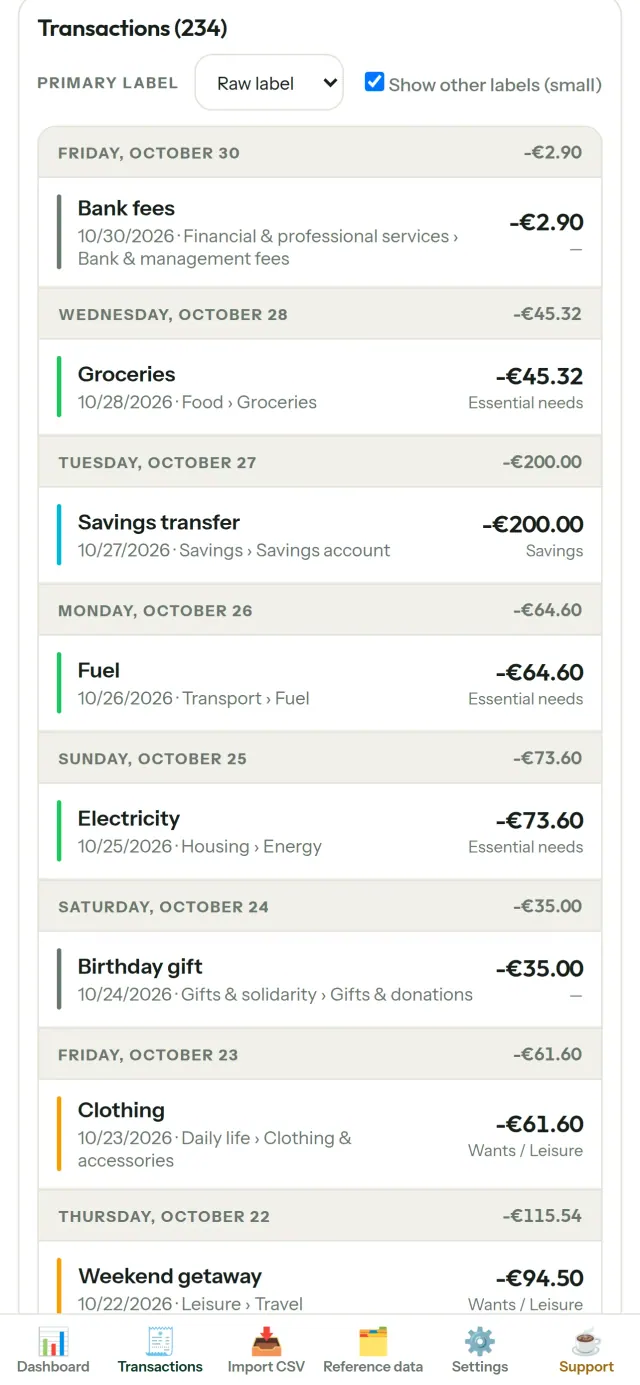
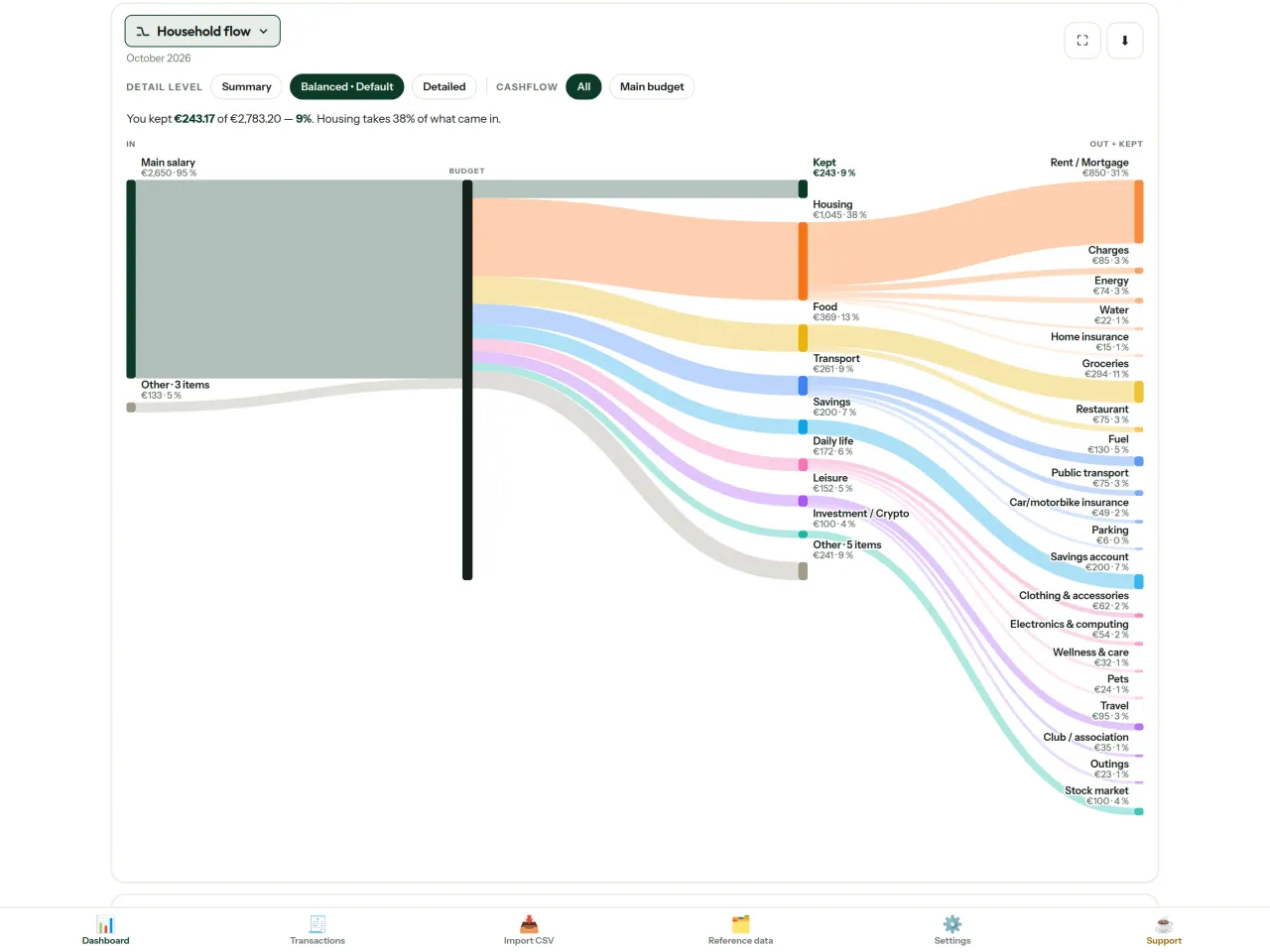
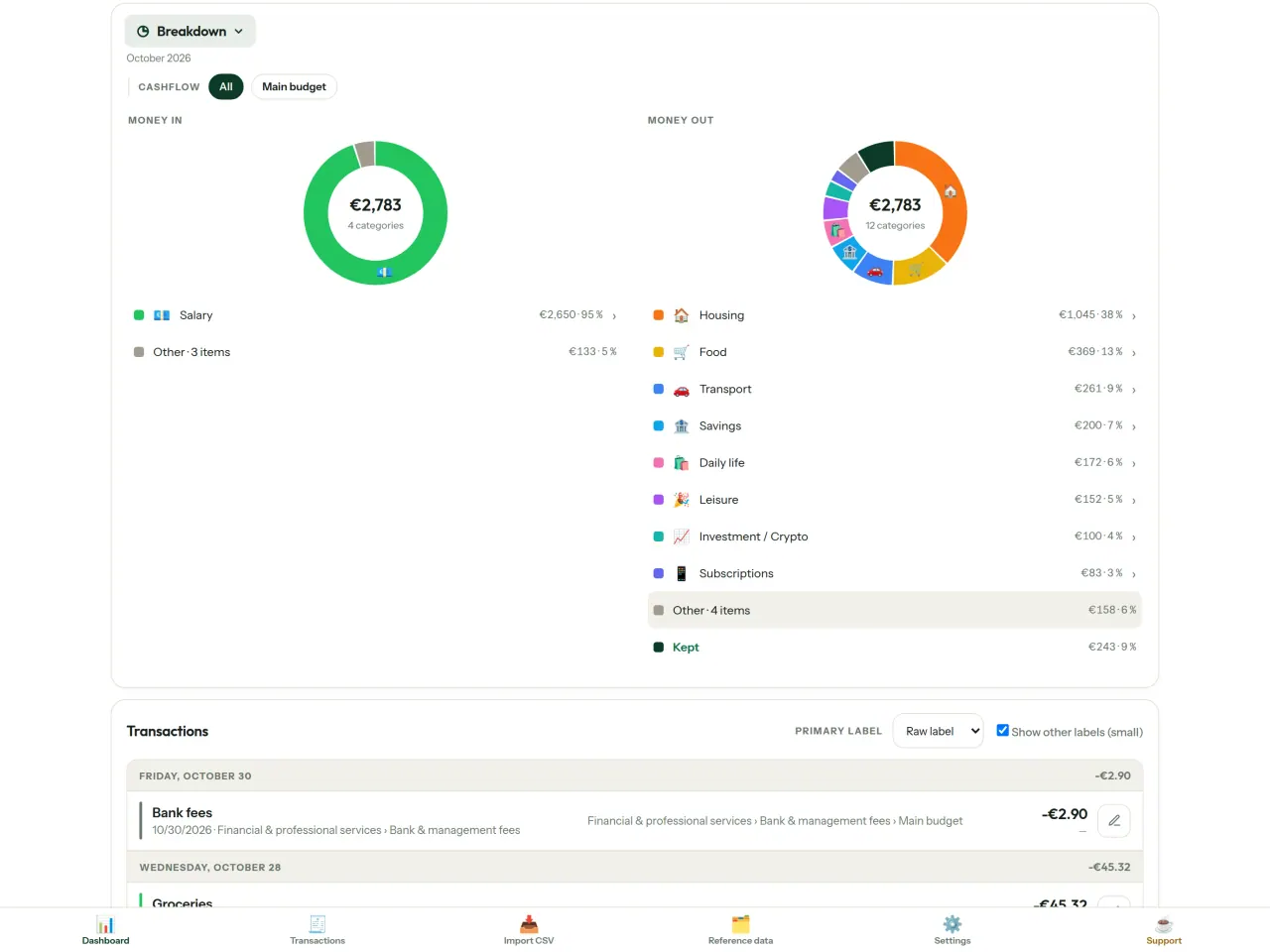
CapBudget મેળવો.
iPhone અને Android પર મફત.
Privacy policy
નીચેનું લખાણ અંગ્રેજીમાં છે. અંગ્રેજી સંસ્કરણ માન્ય ગણાય છે.
Last updated: 2026-11-03
CapBudget is a local-first budgeting app. The short version: nothing leaves your device unless you turn on sync between your own phones, and even then it is end-to-end encrypted. We collect nothing.
What data the app handles
Everything you put into CapBudget (bank transactions, account references,
categories, categorization rules, budget targets, and app settings) is
stored only in a single SQLite database on your device
(household.sqlite), in the app's own private storage. There is
no account and no login.
What we collect
Nothing. No analytics or usage tracking, no advertising or advertising identifiers, no crash or diagnostics reporting, no third-party SDKs that phone home. Without sync the app makes no network calls to any Pixeon service and functions fully offline.
Sync between your phones (optional)
Sync is off by default. If you link two or more phones in Settings > Sync, changes travel through a relay server run by Pixeon on Cloudflare. Everything is encrypted on your phone with a key that only your linked phones hold (it is exchanged by QR code, phone to phone, and never sent to the server). The relay stores only encrypted messages and an encrypted copy of the budget for a phone that joins; it cannot read them. It necessarily sees technical metadata: random channel and device identifiers, message sizes and times, and IP addresses (used for rate limiting, not logged). Removing a phone changes the key; stopping sync on every phone deletes the channel, and inactive channels are purged. No account, name, e-mail or phone number is involved.
CSV imports
When you import a bank CSV export, the file is parsed on your device. It is not uploaded anywhere and is not retained by the app unless you choose “keep” during import.
Backups
You can export a backup from Settings. The backup is a file you control. CapBudget does not upload it and has no access to wherever you save it.
Permissions
The app requests no location, contacts, microphone, or other sensitive permissions. The camera is used only if you scan a sync QR code; the image is processed on the phone and never stored or sent.
Optional tips
CapBudget is free. If you wish, you can leave the developer an optional tip; a tip never unlocks anything. In the iOS and Android apps this uses the store’s in-app purchase (Apple or Google Play): the payment is processed entirely by the store under its own terms and privacy policy, and CapBudget never sees your payment details, your account or your purchase history, and receives no personal information. The Android app declares the Google Play billing permission for this. In a web browser a button opens an external donation page in your browser; that page is operated by a third party under its own privacy policy, and nothing from the app is sent to it.
Bank-account references
An account number/IBAN from your CSV is stored to group transactions by account, kept only on your device. In the UI only the last 4 characters are shown.
Contact form on this website
If you write to us through this site, we use your message and the email address you optionally give only to reply. Bot protection is provided by Cloudflare and email delivery by Resend.
Language choice on this website
When you choose a language, or when this site opens a page in your browser's language, it stores
one small functional cookie (pxl, a language code, one year) so that your choice is
remembered. If this site suggests a page in your browser's language and you close that suggestion,
your browser also keeps a local note (pxl-banner-off, in local storage, 30 days) so the
suggestion does not come back. Neither identifies anyone, neither is used for tracking or advertising,
and neither is shared. You can delete them in your browser at any time.
Website statistics
This website uses Cloudflare Web Analytics to count visits (pages viewed, country, browser type, loading speed). It sets no cookie, does not use local storage, does not fingerprint your device, does not follow you across sites and does not build a profile of you. Search engines (for example Google Search Console) give us aggregated search statistics, without any data about individual visitors. Our own web server also counts the pages it serves: for each page it keeps the page address, the site or social network that sent you (only its name, or the campaign tag written in the link), the country, the type of device and whether the request came from a robot. It keeps no IP address, no identifier and no cookie, and these counts are anonymous. We use no advertising or other analytics service. None of this concerns the app itself, which collects nothing.
Delete your data
CapBudget keeps your data on your phone only. To delete it, open Settings and use Delete all my data (it erases the database and every preference, and the app starts again as on first launch), or uninstall the app. If you used sync, open Settings > Sync and choose Stop syncing on this phone on every linked phone: when the last linked phone stops, the encrypted channel and the encrypted copy of the budget are deleted from the relay. Delete all my data also leaves sync first. If a phone was offline, or the app was uninstalled without stopping sync, the channel is deleted automatically after 90 days without activity. For any request, write to the support e-mail below.
Children
CapBudget is a general-purpose finance tool and is not directed at children.
Changes
An updated policy will be published at this URL with a new date above.
Contact
Questions about privacy: capbudget-contact@pixeon.net
સહાય
છેલ્લે અપડેટ: 2026-10-08
CapBudget એક નાની સ્વતંત્ર એપ છે, જે તમારું બજેટ ફક્ત તમારા ડિવાઇસ પર રાખે છે: કોઈ અકાઉન્ટ નહીં, સાઇન-અપ નહીં, સર્વર નહીં. સૌથી સામાન્ય પ્રશ્નોના જવાબ નીચે આપેલા છે.
અમે થોડા દિવસોમાં જવાબ આપવાનો શ્રેષ્ઠ પ્રયાસ કરીએ છીએ. અમને મદદ કરવા માટે, તમારા ડિવાઇસનું મોડેલ, તેની સિસ્ટમ આવૃત્તિ અને તમે શું કરી રહ્યા હતા તે જણાવો. કૃપા કરીને વાસ્તવિક બેંક માહિતી અથવા અકાઉન્ટ નંબર મોકલશો નહીં.
મારો ડેટા ક્યાં સંગ્રહિત થાય છે?
ફક્ત તમારા ડિવાઇસ પર, એપના પોતાના ખાનગી સ્ટોરેજમાં. કોઈ CapBudget અકાઉન્ટ કે CapBudget સર્વર નથી, તેથી અમને સહિત કોઈ પણ તમારો ડેટા જોઈ કે પુનઃપ્રાપ્ત કરી શકતું નથી. વિગતો ગોપનીયતા નીતિમાં છે.
હું મારા ડેટાનો બેકઅપ કેવી રીતે લઈ શકું અથવા તેને નવા ફોનમાં કેવી રીતે ખસેડી શકું?
- સેટિંગ્સ → બેકઅપ અને પુનઃસ્થાપન → બેકઅપ ડાઉનલોડ કરો ખોલો. તમને એક
.sqliteફાઇલ મળશે: તેને તમને ગમે ત્યાં સાચવો (Files, ક્લાઉડ ડ્રાઇવ, તમારું કમ્પ્યુટર). - નવા ડિવાઇસ પર CapBudget ઇન્સ્ટોલ કરો, સેટિંગ્સ → બેકઅપ અને પુનઃસ્થાપન ખોલો, ફાઇલ પસંદ કરો અને બેકઅપમાંથી પુનઃસ્થાપિત કરો પર ટૅપ કરો.
પુનઃસ્થાપન એપમાં હાલમાં રહેલી દરેક વસ્તુને બદલી નાખે છે.
શું હું CapBudget બે ફોન પર વાપરી શકું (સિંક)?
હા, તે વૈકલ્પિક છે. પહેલા ફોન પર સેટિંગ્સ ખોલો, સિંક → ફોનને આમંત્રિત કરો પર ટૅપ કરો. બીજા ફોન પર બજેટમાં જોડાઓ પર ટૅપ કરીને QR કોડ સ્કૅન કરો. બંને ફોન પર 4 અંકનો કોડ દેખાશે: કોડ સરખા હોય, તો નવા ફોનને મંજૂરી આપો. ત્યાર પછી તમારા ફોન વચ્ચે ફેરફારો સિંક થતા રહેશે (વધુમાં વધુ 5). બધું ફોનમાં એન્ક્રિપ્ટ થાય છે: રિલે સર્વર માત્ર એવો ડેટા મોકલે છે જેને તે વાંચી શકતું નથી. QR કોડ 5 મિનિટ પછી સમાપ્ત થઈ જાય છે. ફોન દૂર કરવા માટે સેટિંગ્સ → સિંક ખોલો અને તેની બાજુમાં દૂર કરો પર ટૅપ કરો; ત્યાર પછી એન્ક્રિપ્શન કી બદલાઈ જાય છે. વધુ વિગતો માટે ગોપનીયતા નીતિ જુઓ.
મેં એપ ડિલીટ કરી અથવા મારો ફોન ખોવાઈ ગયો, તો શું મારો ડેટા પુનઃપ્રાપ્ત થઈ શકે?
તમે બેકઅપ નિકાસ કર્યો હોય તો જ: ડેટા ફક્ત ડિવાઇસ પર રહે છે. નિયમિત રીતે બેકઅપ ડાઉનલોડ કરો.
હું મારી બેંકના વ્યવહારો કેવી રીતે આયાત કરી શકું?
તમારી બેંકની વેબસાઇટ પરથી CSV ફાઇલ નિકાસ કરો, પછી Import CSV ટૅબ ખોલો, ફાઇલ પસંદ કરો, તેના કૉલમ એક વખત મેપ કરો, પ્રીવ્યૂ તપાસો (ડુપ્લિકેટ અને અમાન્ય તારીખો દર્શાવવામાં આવે છે) અને પુષ્ટિ કરો. તમે પુષ્ટિ કરો ત્યાં સુધી કંઈ પણ આયાત થતું નથી.
શું વ્યવહારોનું આપમેળે વર્ગીકરણ થઈ શકે?
હા. સંદર્ભ ડેટા → નિયમોમાં "લેબલમાં RENT હોય → Housing / Rent" જેવા નિયમો બનાવો. તમે તેને કોઈપણ સમયે જૂના વ્યવહારો પર ફરી લાગુ કરી શકો છો; તમે હાથથી સંપાદિત કરેલા વ્યવહારો સુરક્ષિત રહે છે, જ્યાં સુધી તમે સ્પષ્ટપણે તેને ઓવરરાઇટ કરવાનું પસંદ ન કરો.
હું ભાષા, થીમ અથવા મારા બજેટ મહિનાનો પ્રારંભિક દિવસ કેવી રીતે બદલી શકું?
ભાષાનું બટન ઉપરની પટ્ટીમાં છે. થીમ અને તમારો બજેટ મહિનો શરૂ થવાનો દિવસ સેટિંગ્સમાં છે. CapBudget અંગ્રેજી, ફ્રેન્ચ, જર્મન, સ્પેનિશ, પોર્ટુગીઝ અને ઇટાલિયન ભાષામાં ઉપલબ્ધ છે.
હું નમૂના ડેટા કેવી રીતે દૂર કરી શકું?
સેટિંગ્સ → નમૂના ડેટા → નમૂના ડેટા દૂર કરો. ફક્ત નમૂનાના વ્યવહારો દૂર થાય છે, તમારા પોતાના ક્યારેય નહીં.
પ્રોજેક્ટને સહાય કરો
CapBudget મફત અને જાહેરાત વિનાની રહેશે. જો તે તમને ઉપયોગી લાગે, તો તમે તેના વિકાસને ટેકો આપી શકો છો (વૈકલ્પિક):
Buy Me a CoffeeEXIF વ્યૂઅર અને ફોટો મેટાડેટા સાફ કરવો: સ્થાન, તારીખ, કેમેરા. તમારા ફોન પર.
Pixeon તરફથી વધુVaultMarkEncrypted document vault. Watermark documents, remove metadata before sharing.
Pixeon તરફથી વધુLittle RelayBreastfeeding, sleep and starting solids tracker. No account, works offline.
Pixeon તરફથી વધુMenuloopPlan the week's meals, build your grocery list and keep recipes with photos.