CapBudget: ງົບປະມານ
ບັນທຶກລາຍຈ່າຍ ແລະ ງົບປະມານຄອບຄົວ, ໃຊ້ອອບລາຍ.


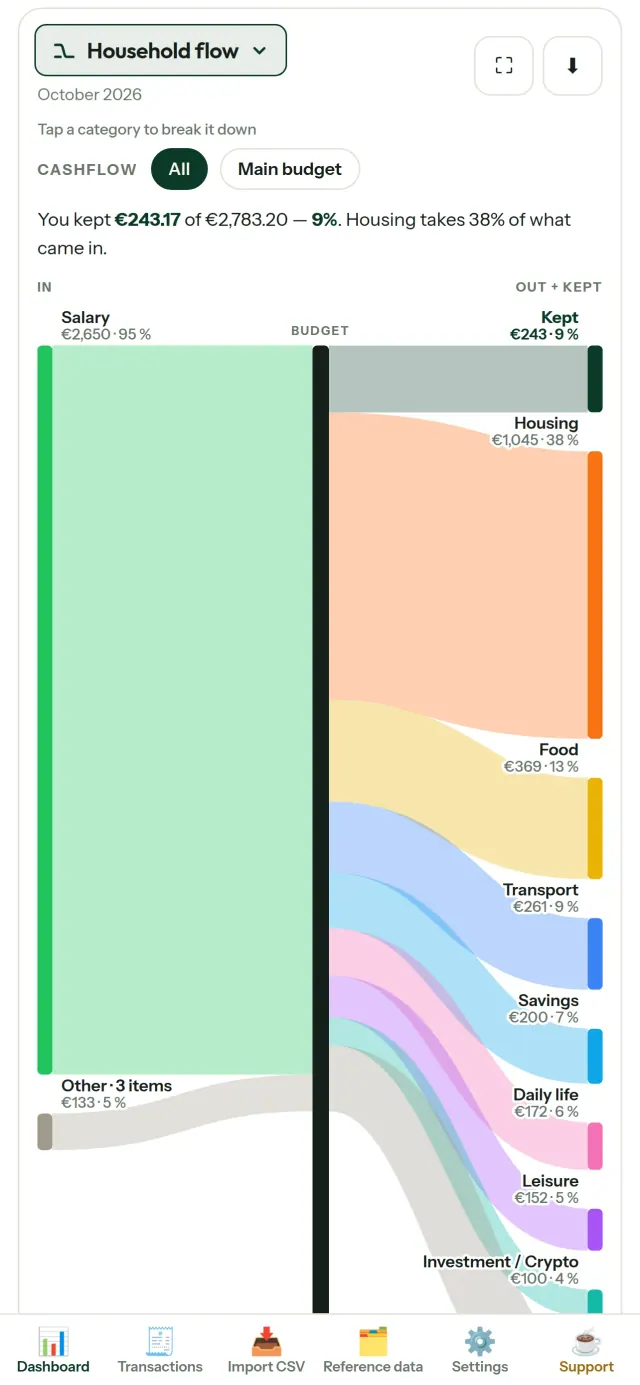
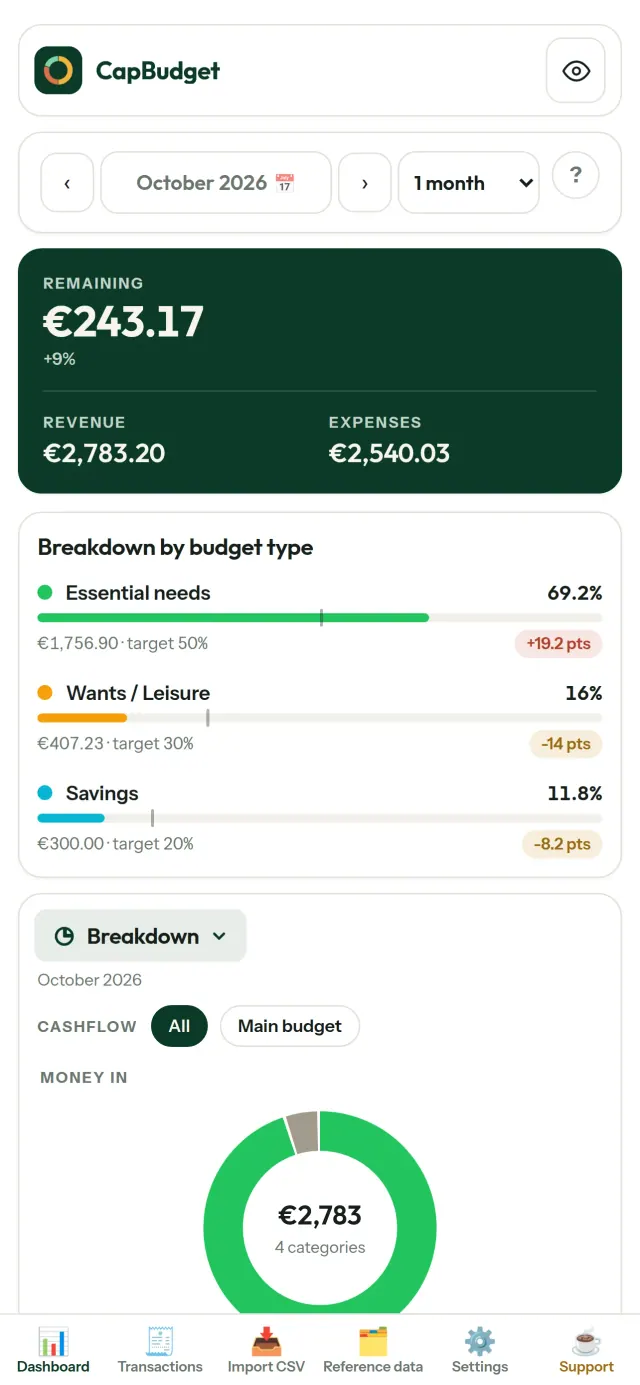
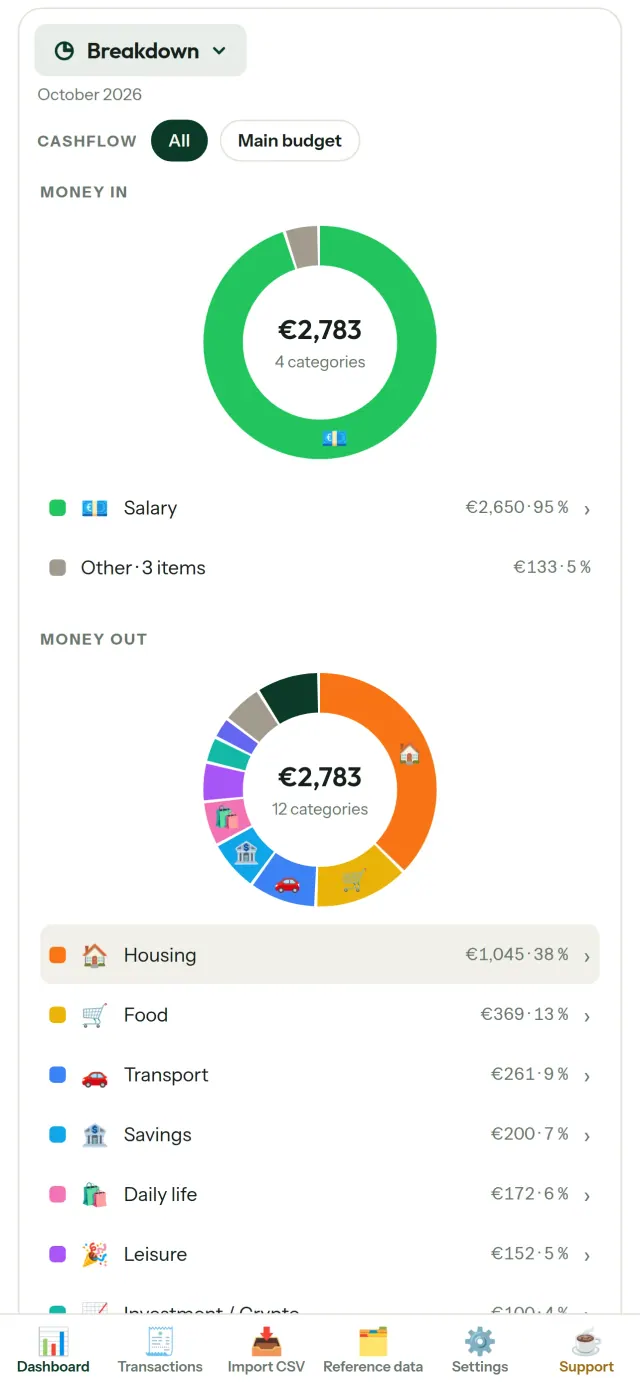
CapBudget ແມ່ນແອັບວາງແຜນງົບປະມານ ແລະ ບັນທຶກລາຍຈ່າຍ ສຳລັບຄອບຄົວ. ງົບປະມານຄອບຄົວທຸກຢ່າງຢູ່ໃນອຸປະກອນ: ບໍ່ມີບັນຊີ, ບໍ່ມີບັນຊີຄລາວ, ໂຄສະນາ ຫຼື ການຕິດຕາມ, ແລະ ໃຊ້ງານອອບລາຍໄດ້. ງົບປະມານ ແລະ ລາຍຈ່າຍຈັດການໄດ້ງ່າຍ.
ງົບປະມານ ແລະ ບັນທຶກລາຍຈ່າຍ ງ່າຍໆ ສຳລັບ ງົບປະມານຄອບຄົວ. ບັນທຶກ ລາຍຈ່າຍ ຂອງ ຄອບຄົວ ຢູ່ໃນອຸປະກອນຂອງທ່ານ.
CapBudget ເຮັດຫຍັງໄດ້
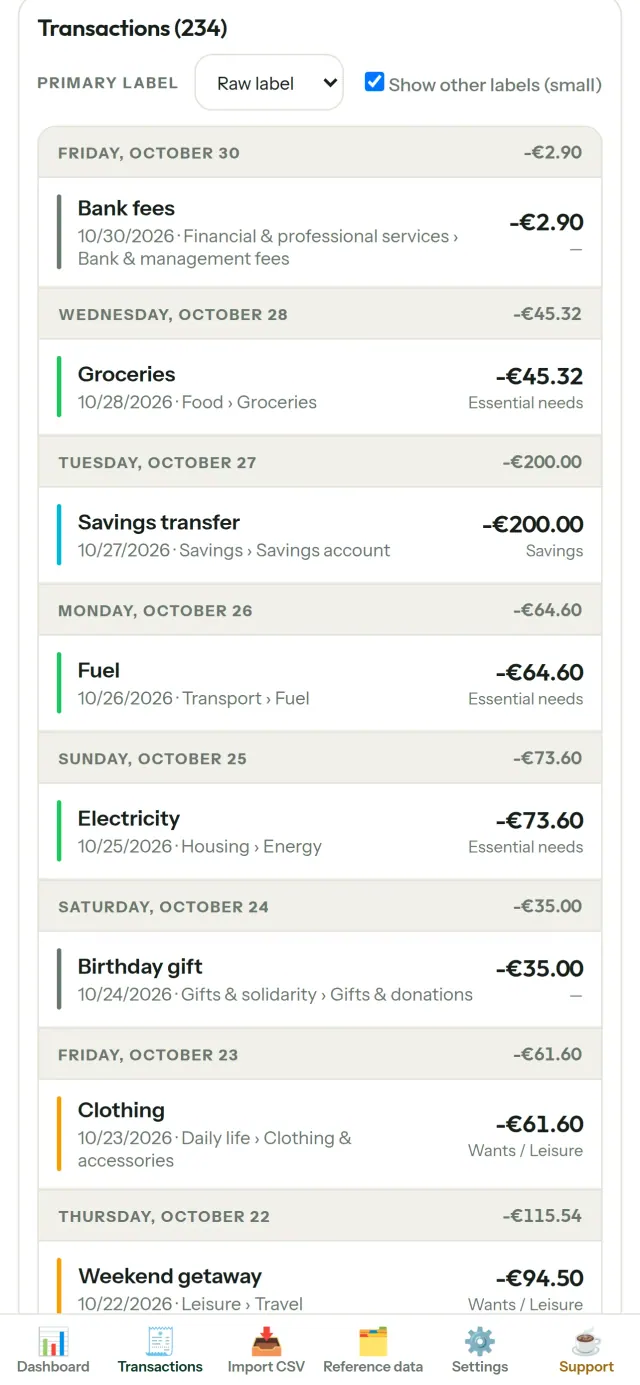
ນຳເຂົ້າລາຍການຈາກທະນາຄານ
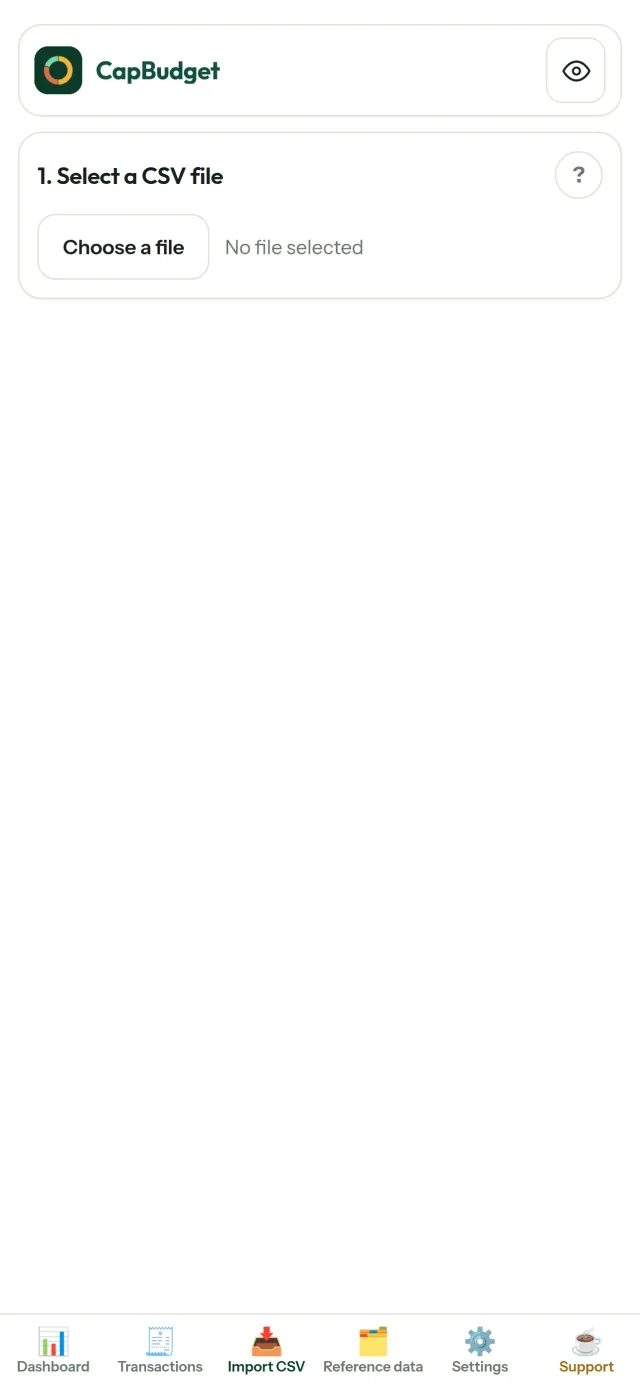
ນຳເຂົ້າໄຟລ໌ CSV, ຈັບຄູ່ຖັນຄັ້ງດຽວ, ເບິ່ງຕົວຢ່າງ, ກວດຫາລາຍການຊ້ຳ ແລະ ວັນທີບໍ່ຖືກຕ້ອງ ກ່ອນຢືນຢັນ.
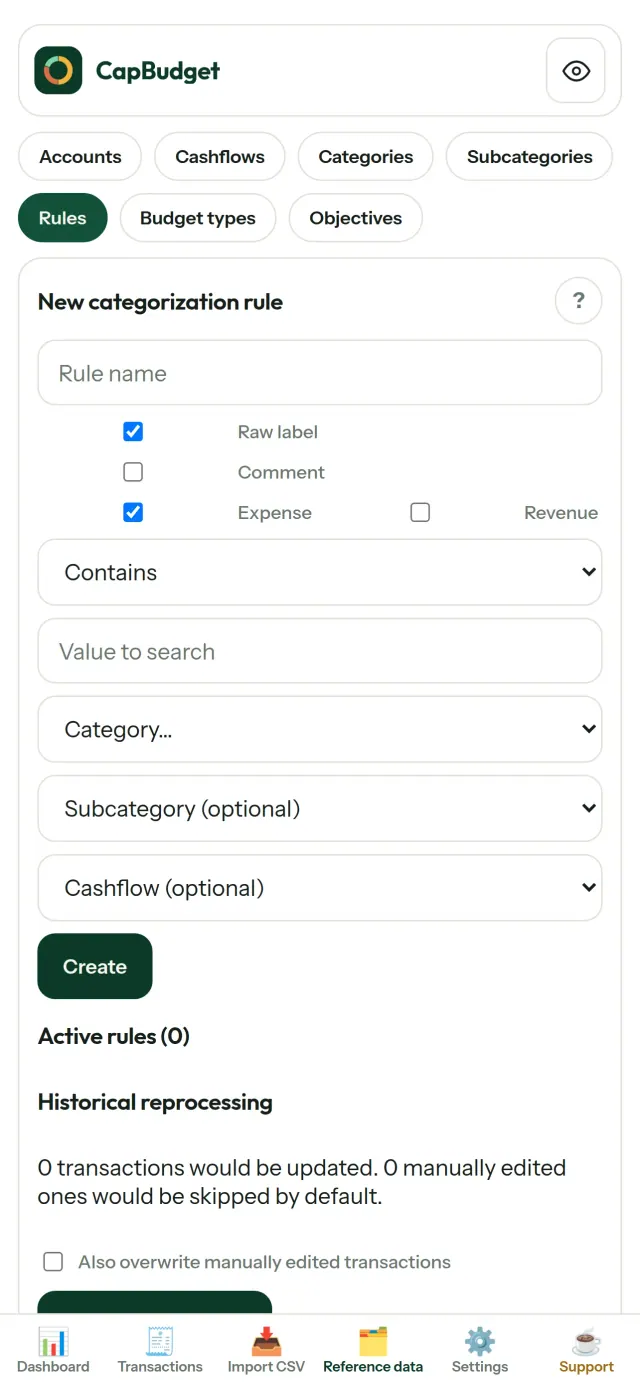
ໃຫ້ກົດເກນຈັດລຽງ
ສ້າງກົດເກນງ່າຍໆ ແລະ CapBudget ຈະຈັດລາຍການເຂົ້າໝວດ. ແກ້ໄຂດ້ວຍຕົນເອງໄດ້ ໂດຍບໍ່ຖືກຂຽນທັບ.
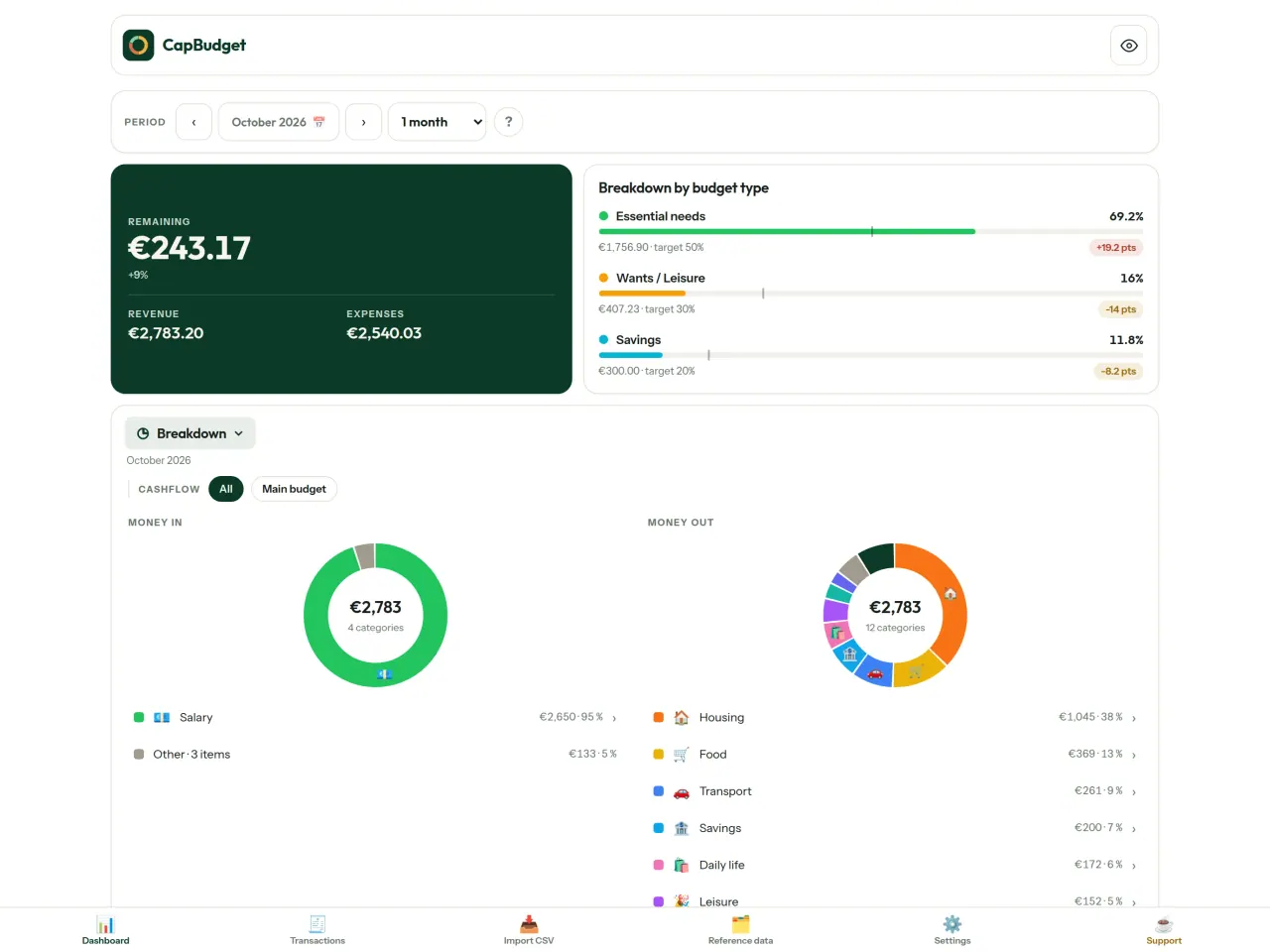
ເບິ່ງເງິນຂອງທ່ານໄປໃສ
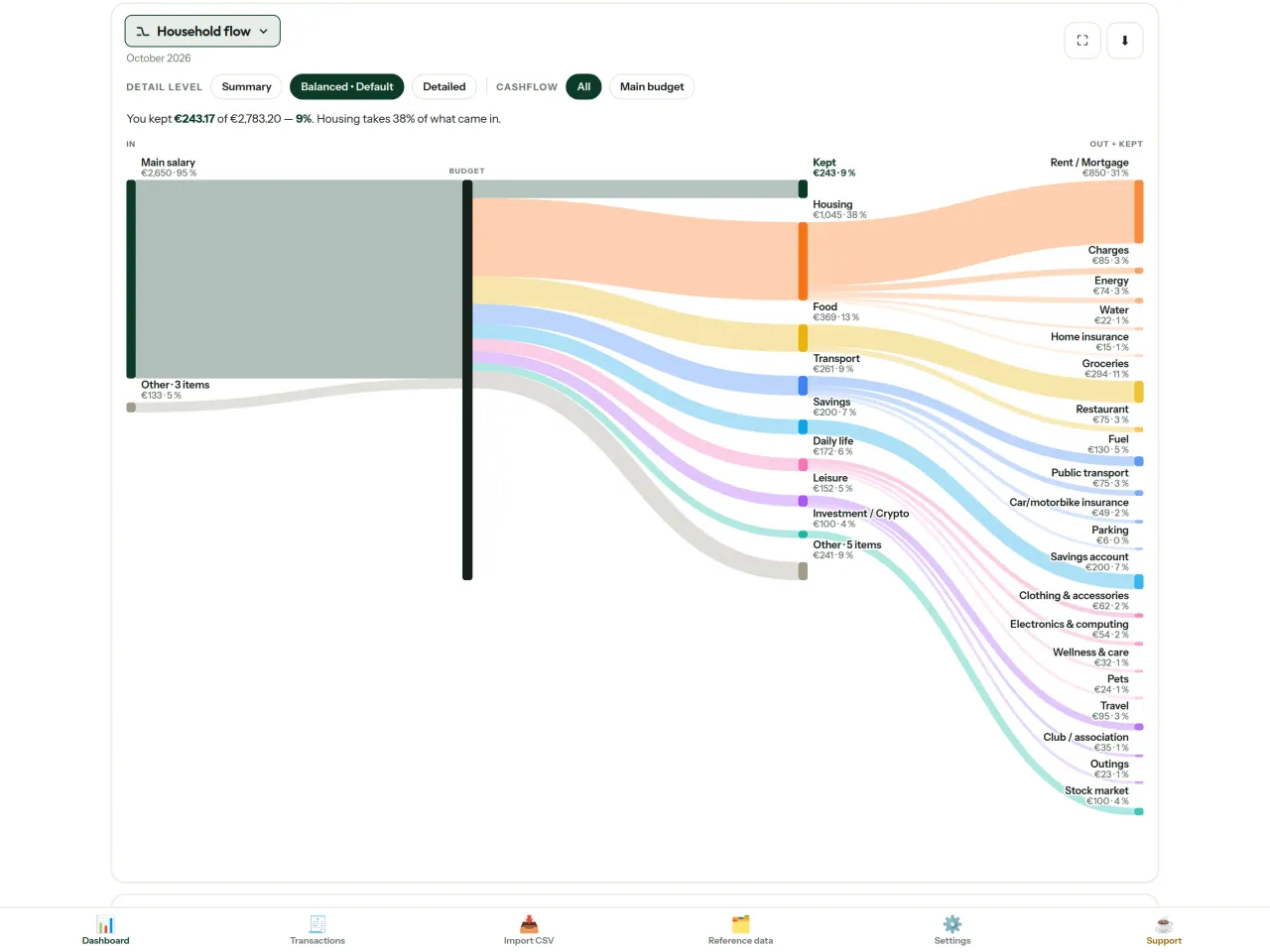
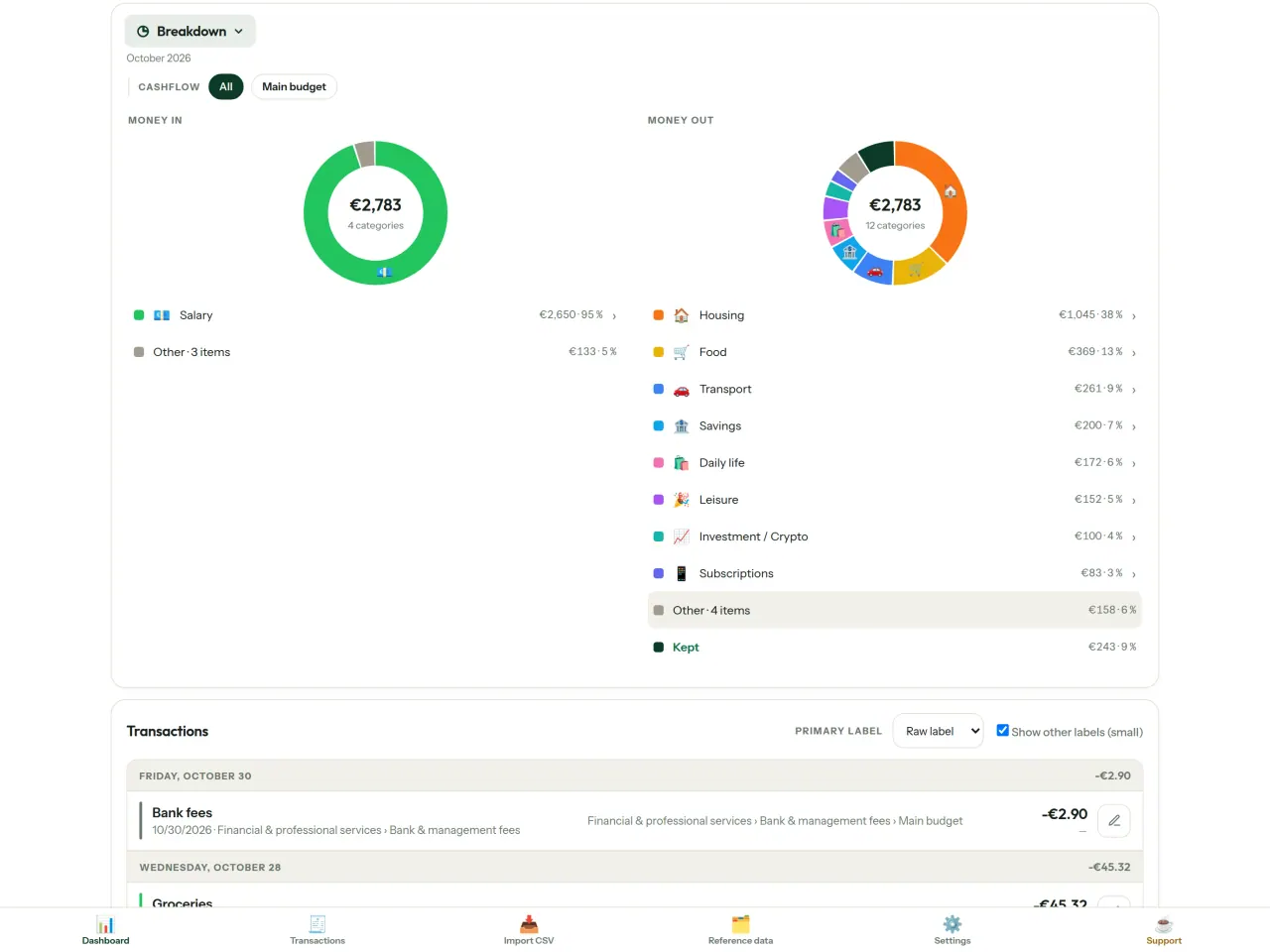
ກັ່ນຕອງຕາມເດືອນ, ກະແສເງິນ ຫຼື ໝວດ ແລະ ສົ່ງອອກແຜນພູມເປັນຮູບພາບ.
- ກະແສເງິນຄອບຄົວຈາກລາຍຮັບເຖິງໝວດ ແລະ ເງິນຄົງເຫຼືອ
- ເບິ່ງລາຍຮັບ ແລະ ລາຍຈ່າຍຕາມໝວດ
- ເບິ່ງລາຍຈ່າຍຈາກລາຍການໃຫຍ່ສຸດ
- ຕິດຕາມເງິນຄົງເຫຼືອແຕ່ລະມື້
ເປົ້າໝາຍງົບປະມານ
ປຽບທຽບລາຍຈ່າຍກັບກົດ 50/30/20: ສິ່ງຈຳເປັນ, ຄວາມຕ້ອງການ ແລະ ເງິນອອມ. ຫຼື ກຳນົດເປີເຊັນຂອງຕົນເອງ.
ເດືອນຂອງທ່ານ, ວິທີຂອງທ່ານ
ເດືອນງົບປະມານເລີ່ມມື້ໃດກໍໄດ້. ປັບແຕ່ງໝວດ, ໝວດຍ່ອຍ ແລະ ກະແສເງິນ.
【ຊິງຄ໌ລະຫວ່າງໂທລະສັບເປັນທາງເລືອກ】
ຊິງຄ໌ຖືກປິດເປັນຄ່າເລີ່ມຕົ້ນ: ຖ້າບໍ່ເປີດຈະບໍ່ມີຫຍັງປ່ຽນແປງແລະ CapBudget ຈະຢູ່ເທິງອຸປະກອນ 100%. ຖ້າເປີດ ແອັບຈະໃຊ້ເຄື່ອງສົ່ງຂໍ້ມູນ relay ຂອງ Pixeon ແຕ່ຂໍ້ມູນທັງໝົດຖືກເຂົ້າລະຫັດກ່ອນສົ່ງ: ຄີຢູ່ໃນເທິງມືຖືທີ່ຈັບຄູ່ເທົ່ານັ້ນ, relay ອ່ານບໍ່ໄດ້ (ເຫັນພຽງຂໍ້ມູນທາງເທັກນິກຢ່າງຂະໜາດ ແລະ ເວລາ). ຈັບຄູ່ຜ່ານ QR.
ຂໍ້ມູນຂອງທ່ານເປັນຂອງທ່ານ
ທຸກຢ່າງຢູ່ໃນໄຟລ໌ດຽວໃນອຸປະກອນ. ສົ່ງອອກສຳຮອງໄດ້ທຸກເວລາ ແລະ ເກັບໄວ້ບ່ອນໃດກໍໄດ້. ບໍ່ມີການອັບໂຫຼດຂໍ້ມູນ ນອກຈາກທ່ານເປີດການຊິງຄ໌.
ມີຮູບແບບສະຫວ່າງ ແລະ ມືດ.
ສຳລັບໃຜ
- ຄອບຄົວທີ່ຢາກຕິດຕາມງົບປະມານຈາກການສົ່ງອອກ CSV ຂອງທະນາຄານ.
- ຄົນທີ່ບໍ່ຢາກໃຫ້ຂໍ້ມູນເຂົ້າລະບົບທະນາຄານ ຫຼື ສ້າງບັນຊີເພື່ອຕິດຕາມລາຍຈ່າຍ.
- ຄົນທີ່ເບື່ອກັບການຮົ່ວໄຫຼຂອງຂໍ້ມູນ ແລະ ຢາກເອົາການຄວບຄຸມຂໍ້ມູນການເງິນຄືນ: ທີ່ນີ້ມັນບໍ່ເຄີຍອອກຈາກໂທລະສັບ, ສະນັ້ນບໍ່ມີຫຍັງຈະຮົ່ວຈາກເຊີບເວີ.
- ຄົນທີ່ໃຊ້ກົດ 50/30/20 ຫຼື ຄົນທີ່ເດືອນງົບປະມານເລີ່ມໃນມື້ເງິນເດືອນເຂົ້າ.
ເປັນຫຍັງຈຶ່ງເລືອກ CapBudget
- ຢູ່ໃນອຸປະກອນກ່ອນ: ບໍ່ມີບັນຊີ, ບໍ່ມີຄລາວ, ບໍ່ມີໂຄສະນາ, ບໍ່ມີການຕິດຕາມ. ທຸລະກຳຂອງທ່ານຢູ່ໃນໄຟລ໌ດຽວໃນອຸປະກອນຂອງທ່ານ.
- ເຮັດວຽກແບບອອບລາຍໄດ້ເຕັມທີ່, ແລະ ຟຣີ.
- ນຳເຂົ້າ CSV ຂອງທະນາຄານໃດກໍໄດ້ ພ້ອມການກວດພົບລາຍການຊ້ຳ ແລະ ການກວດວັນທີທີ່ເຂັ້ມງວດ. ກົດການຈັດໝວດໝູ່ບໍ່ເຄີຍຂຽນທັບການແກ້ໄຂດ້ວຍມືຂອງທ່ານ.
ສິ່ງທີ່ແອັບຍັງບໍ່ເຮັດ
- ການຊິງຄ໌ອັດຕະໂນມັດກັບທະນາຄານຍັງບໍ່ມີ. ທ່ານນຳເຂົ້າການສົ່ງອອກ CSV ຈາກທະນາຄານຂອງທ່ານ.
- ການຊິງຄ໌ລະຫວ່າງໂທລະສັບຂອງທ່ານເອງເປັນທາງເລືອກ (ເຂົ້າລະຫັດແບບຕົ້ນທາງເຖິງປາຍທາງ, ສູງສຸດ 5 ໂທລະສັບ); ບໍ່ມີບັນຊີຄລາວ ແລະບໍ່ມີເວີຊັນເວັບ.
ຫຼັກການຂອງ Pixeon. ແອັບຂອງ Pixeon ເນັ້ນຢູ່ໃນອຸປະກອນກ່ອນ: ບໍ່ມີບັນຊີ, ບໍ່ມີການຕິດຕາມ, ແລະ ຂໍ້ມູນຂອງທ່ານຢູ່ໃນໂທລະສັບຂອງທ່ານ. ຖ້າແອັບໃດເຊື່ອມຕໍ່ເຄືອຂ່າຍ, ມັນຈະເກີດຂຶ້ນກໍຕໍ່ເມື່ອທ່ານເລືອກເປີດຄຸນສົມບັດທີ່ຕ້ອງການເອງເທົ່ານັ້ນ, ແລະ ນະໂຍບາຍຄວາມເປັນສ່ວນຕົວຈະຖືກອັບເດດກ່ອນການປ່ອຍ.
ເບິ່ງ CapBudget ເຮັດວຽກ.
ຮັບ CapBudget.
ຟຣີໃນ iPhone ແລະ Android.
Privacy policy
ຂໍ້ຄວາມຂ້າງລຸ່ມເປັນພາສາອັງກິດ. ສະບັບພາສາອັງກິດມີຜົນບັງຄັບໃຊ້.
Last updated: 2026-11-03
CapBudget is a local-first budgeting app. The short version: nothing leaves your device unless you turn on sync between your own phones, and even then it is end-to-end encrypted. We collect nothing.
What data the app handles
Everything you put into CapBudget (bank transactions, account references,
categories, categorization rules, budget targets, and app settings) is
stored only in a single SQLite database on your device
(household.sqlite), in the app's own private storage. There is
no account and no login.
What we collect
Nothing. No analytics or usage tracking, no advertising or advertising identifiers, no crash or diagnostics reporting, no third-party SDKs that phone home. Without sync the app makes no network calls to any Pixeon service and functions fully offline.
Sync between your phones (optional)
Sync is off by default. If you link two or more phones in Settings > Sync, changes travel through a relay server run by Pixeon on Cloudflare. Everything is encrypted on your phone with a key that only your linked phones hold (it is exchanged by QR code, phone to phone, and never sent to the server). The relay stores only encrypted messages and an encrypted copy of the budget for a phone that joins; it cannot read them. It necessarily sees technical metadata: random channel and device identifiers, message sizes and times, and IP addresses (used for rate limiting, not logged). Removing a phone changes the key; stopping sync on every phone deletes the channel, and inactive channels are purged. No account, name, e-mail or phone number is involved.
CSV imports
When you import a bank CSV export, the file is parsed on your device. It is not uploaded anywhere and is not retained by the app unless you choose “keep” during import.
Backups
You can export a backup from Settings. The backup is a file you control. CapBudget does not upload it and has no access to wherever you save it.
Permissions
The app requests no location, contacts, microphone, or other sensitive permissions. The camera is used only if you scan a sync QR code; the image is processed on the phone and never stored or sent.
Optional tips
CapBudget is free. If you wish, you can leave the developer an optional tip; a tip never unlocks anything. In the iOS and Android apps this uses the store’s in-app purchase (Apple or Google Play): the payment is processed entirely by the store under its own terms and privacy policy, and CapBudget never sees your payment details, your account or your purchase history, and receives no personal information. The Android app declares the Google Play billing permission for this. In a web browser a button opens an external donation page in your browser; that page is operated by a third party under its own privacy policy, and nothing from the app is sent to it.
Bank-account references
An account number/IBAN from your CSV is stored to group transactions by account, kept only on your device. In the UI only the last 4 characters are shown.
Contact form on this website
If you write to us through this site, we use your message and the email address you optionally give only to reply. Bot protection is provided by Cloudflare and email delivery by Resend.
Language choice on this website
When you choose a language, or when this site opens a page in your browser's language, it stores
one small functional cookie (pxl, a language code, one year) so that your choice is
remembered. If this site suggests a page in your browser's language and you close that suggestion,
your browser also keeps a local note (pxl-banner-off, in local storage, 30 days) so the
suggestion does not come back. Neither identifies anyone, neither is used for tracking or advertising,
and neither is shared. You can delete them in your browser at any time.
Website statistics
This website uses Cloudflare Web Analytics to count visits (pages viewed, country, browser type, loading speed). It sets no cookie, does not use local storage, does not fingerprint your device, does not follow you across sites and does not build a profile of you. Search engines (for example Google Search Console) give us aggregated search statistics, without any data about individual visitors. Our own web server also counts the pages it serves: for each page it keeps the page address, the site or social network that sent you (only its name, or the campaign tag written in the link), the country, the type of device and whether the request came from a robot. It keeps no IP address, no identifier and no cookie, and these counts are anonymous. We use no advertising or other analytics service. None of this concerns the app itself, which collects nothing.
Delete your data
CapBudget keeps your data on your phone only. To delete it, open Settings and use Delete all my data (it erases the database and every preference, and the app starts again as on first launch), or uninstall the app. If you used sync, open Settings > Sync and choose Stop syncing on this phone on every linked phone: when the last linked phone stops, the encrypted channel and the encrypted copy of the budget are deleted from the relay. Delete all my data also leaves sync first. If a phone was offline, or the app was uninstalled without stopping sync, the channel is deleted automatically after 90 days without activity. For any request, write to the support e-mail below.
Children
CapBudget is a general-purpose finance tool and is not directed at children.
Changes
An updated policy will be published at this URL with a new date above.
Contact
Questions about privacy: capbudget-contact@pixeon.net
ການຊ່ວຍເຫຼືອ
ອັບເດດຫຼ້າສຸດ: 2026-10-08
CapBudget ແມ່ນແອັບອິດສະຫຼະຂະໜາດນ້ອຍທີ່ເກັບງົບປະມານຂອງທ່ານ ໄວ້ພຽງແຕ່ໃນອຸປະກອນຂອງທ່ານ: ບໍ່ມີບັນຊີ, ບໍ່ຕ້ອງລົງທະບຽນ, ບໍ່ມີເຊີບເວີ. ຄຳຕອບຕໍ່ຄຳຖາມທີ່ພົບເລື້ອຍຢູ່ດ້ານລຸ່ມ.
ພວກເຮົາຈະພະຍາຍາມຕອບກັບພາຍໃນສອງສາມມື້. ເພື່ອຊ່ວຍພວກເຮົາ, ບອກຮຸ່ນອຸປະກອນ, ລຸ້ນລະບົບ ແລະ ສິ່ງທີ່ທ່ານກຳລັງເຮັດ. ກະລຸນາຢ່າສົ່ງຂໍ້ມູນທະນາຄານຈິງ ຫຼື ເລກບັນຊີ.
ຂໍ້ມູນຂອງຂ້ອຍເກັບຢູ່ໃສ?
ເກັບຢູ່ພຽງແຕ່ໃນອຸປະກອນຂອງທ່ານ, ໃນບ່ອນເກັບຂໍ້ມູນສ່ວນຕົວຂອງແອັບ. ບໍ່ມີບັນຊີ CapBudget ແລະ ບໍ່ມີເຊີບເວີ CapBudget, ດັ່ງນັ້ນບໍ່ມີໃຜ, ລວມທັງພວກເຮົາ, ສາມາດເຫັນ ຫຼື ກູ້ຄືນຂໍ້ມູນຂອງທ່ານໄດ້. ລາຍລະອຽດຢູ່ໃນ ນະໂຍບາຍຄວາມເປັນສ່ວນຕົວ.
ຂ້ອຍຈະສຳຮອງຂໍ້ມູນ ຫຼື ຍ້າຍໄປໂທລະສັບເຄື່ອງໃໝ່ໄດ້ແນວໃດ?
- ເປີດ ການຕັ້ງຄ່າ → ສຳຮອງຂໍ້ມູນ & ກູ້ຄືນ → ດາວໂຫຼດຂໍ້ມູນສຳຮອງ. ທ່ານຈະໄດ້ໄຟລ໌
.sqlite: ເກັບໄວ້ບ່ອນໃດກໍໄດ້ (Files, ໄດຣຟ໌ຄລາວ, ຫຼື ຄອມພິວເຕີ). - ໃນອຸປະກອນໃໝ່, ຕິດຕັ້ງ CapBudget, ເປີດ ການຕັ້ງຄ່າ → ສຳຮອງຂໍ້ມູນ & ກູ້ຄືນ, ເລືອກໄຟລ໌ ແລະ ແຕະ ກູ້ຄືນຈາກຂໍ້ມູນສຳຮອງ.
ການກູ້ຄືນຈະ ແທນທີ່ ທຸກຢ່າງທີ່ຢູ່ໃນແອັບປັດຈຸບັນ.
ຂ້ອຍສາມາດໃຊ້ CapBudget ໃນໂທລະສັບສອງເຄື່ອງໄດ້ບໍ (ຊິງຄ໌)?
ໄດ້, ຟັງຊັນນີ້ເປັນທາງເລືອກ. ໃນໂທລະສັບເຄື່ອງທຳອິດ ໃຫ້ເປີດ ການຕັ້ງຄ່າ → ຊິງຄ໌ ແລະແຕະ ເຊີນໂທລະສັບ. ໃນໂທລະສັບເຄື່ອງທີສອງ ໃຫ້ແຕະ ເຂົ້າຮ່ວມງົບປະມານ ແລະສະແກນລະຫັດ QR. ໂທລະສັບທັງສອງເຄື່ອງຈະສະແດງລະຫັດ 4 ຕົວເລກ: ຖ້າລະຫັດກົງກັນ, ໃຫ້ອະນຸຍາດໂທລະສັບເຄື່ອງໃໝ່. ຈາກນັ້ນ ການປ່ຽນແປງຈະຖືກຊິງຄ໌ລະຫວ່າງໂທລະສັບຂອງທ່ານ (ສູງສຸດ 5 ເຄື່ອງ). ທຸກຢ່າງຈະຖືກເຂົ້າລະຫັດຢູ່ໃນໂທລະສັບ: ເຊີບເວີຕົວກາງພຽງແຕ່ສົ່ງຕໍ່ຂໍ້ມູນທີ່ມັນອ່ານບໍ່ໄດ້. ລະຫັດ QR ຈະໝົດອາຍຸຫຼັງຈາກ 5 ນາທີ. ເພື່ອເອົາໂທລະສັບອອກ, ໃຫ້ເປີດ ການຕັ້ງຄ່າ → ຊິງຄ໌ ແລະແຕະ ລຶບອອກ ຖັດຈາກໂທລະສັບນັ້ນ; ຈາກນັ້ນກະແຈເຂົ້າລະຫັດຈະປ່ຽນ. ອ່ານລາຍລະອຽດໄດ້ໃນ ນະໂຍບາຍຄວາມເປັນສ່ວນຕົວ.
ຂ້ອຍລຶບແອັບ ຫຼື ເຮັດໂທລະສັບເສຍ, ສາມາດກູ້ຄືນຂໍ້ມູນໄດ້ບໍ?
ບໍ່ໄດ້, ນອກຈາກວ່າທ່ານໄດ້ສົ່ງອອກຂໍ້ມູນສຳຮອງ: ຂໍ້ມູນຢູ່ໃນອຸປະກອນເທົ່ານັ້ນ. ດາວໂຫຼດຂໍ້ມູນສຳຮອງເປັນປະຈຳ.
ຂ້ອຍຈະນຳເຂົ້າລາຍການເຄື່ອນໄຫວຈາກທະນາຄານໄດ້ແນວໃດ?
ສົ່ງອອກໄຟລ໌ CSV ຈາກເວັບໄຊຂອງທະນາຄານ, ແລ້ວເປີດແຖບ ນຳເຂົ້າ CSV, ເລືອກໄຟລ໌, ຈັດຄູ່ຖັນຂອງມັນຄັ້ງດຽວ, ກວດເບິ່ງຕົວຢ່າງ (ລາຍການຊ້ຳ ແລະ ວັນທີບໍ່ຖືກຕ້ອງຈະຖືກໝາຍໄວ້) ແລະ ຢືນຢັນ. ຈະບໍ່ມີການນຳເຂົ້າຈົນກວ່າທ່ານຈະຢືນຢັນ.
ສາມາດຈັດໝວດໝູ່ລາຍການເຄື່ອນໄຫວໂດຍອັດຕະໂນມັດໄດ້ບໍ?
ໄດ້. ໃນ ຂໍ້ມູນອ້າງອີງ → ກົດລະບຽບ, ສ້າງກົດລະບຽບເຊັ່ນ "ປ້າຍກຳກັບມີຄຳວ່າ ຄ່າເຊົ່າ → ທີ່ຢູ່ອາໄສ / ຄ່າເຊົ່າ". ທ່ານສາມາດນຳໄປໃຊ້ກັບລາຍການເກົ່າໄດ້ທຸກເວລາ; ລາຍການທີ່ທ່ານແກ້ໄຂດ້ວຍມືຈະຖືກປົກປ້ອງ, ນອກຈາກທ່ານຈະເລືອກຂຽນທັບໂດຍສະເພາະ.
ຂ້ອຍຈະປ່ຽນພາສາ, ຮູບແບບ ຫຼື ມື້ເລີ່ມຕົ້ນຂອງເດືອນງົບປະມານໄດ້ແນວໃດ?
ປຸ່ມພາສາຢູ່ແຖບດ້ານເທິງ. ຮູບແບບ ແລະ ມື້ທີ່ເດືອນງົບປະມານເລີ່ມຕົ້ນຢູ່ໃນ ການຕັ້ງຄ່າ. CapBudget ມີໃຫ້ໃຊ້ໃນພາສາອັງກິດ, ຝຣັ່ງ, ເຢຍລະມັນ, ແອສປາໂຍນ, ໂປຣຕຸເກດ ແລະ ອິຕາລີ.
ຂ້ອຍຈະລຶບຂໍ້ມູນຕົວຢ່າງໄດ້ແນວໃດ?
ການຕັ້ງຄ່າ → ຂໍ້ມູນຕົວຢ່າງ → ລຶບຂໍ້ມູນຕົວຢ່າງ. ຈະລຶບສະເພາະລາຍການຕົວຢ່າງ, ບໍ່ລຶບຂອງທ່ານ.
ສະໜັບສະໜູນໂຄງການ
CapBudget ຍັງຄົງຟຣີ ແລະ ບໍ່ມີໂຄສະນາ. ຖ້າມີປະໂຫຍດຕໍ່ທ່ານ ທ່ານສາມາດສະໜັບສະໜູນການພັດທະນາໄດ້ (ບໍ່ບັງຄັບ):
Buy Me a Coffeeຕົວເບິ່ງ EXIF ແລະລຶບເມຕາເດຕ້າຮູບ: ສະຖານທີ່, ວັນທີ, ກ້ອງ. ໃນໂທລະສັບຂອງເຈົ້າ.
ຈາກ Pixeon ເຊັ່ນກັນVaultMarkEncrypted document vault. Watermark documents, remove metadata before sharing.
ຈາກ Pixeon ເຊັ່ນກັນLittle RelayBreastfeeding, sleep and starting solids tracker. No account, works offline.
ຈາກ Pixeon ເຊັ່ນກັນMenuloopPlan the week's meals, build your grocery list and keep recipes with photos.